Requires:
- Charitable Pro 1.8.16+
- Charitable Ambassadors 3.0.0+
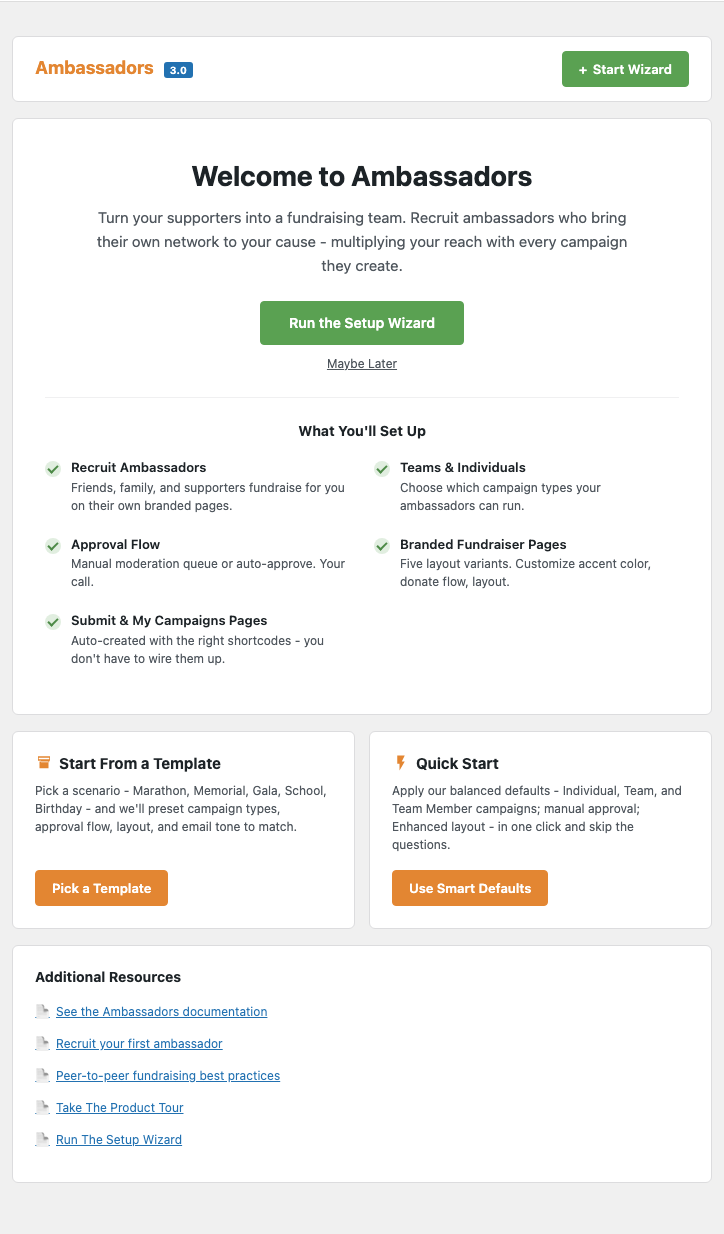
The first time you activate Charitable Ambassadors, you’ll see a Welcome screen that asks how you want to get started. There are three paths – all of them get you to the same place (a running peer-to-peer program), but each fits a different style of user. Pick the one that matches how you like to set things up and you’ll be running submissions in a few minutes.
When You’d Use It
- First-time setup – you’ve just activated the plugin and want a guided way through the settings that matter.
- Setting up a second site – you know what you want; pick a template to apply your usual configuration in one click.
- Switching scenarios – you ran a marathon last year, this year it’s a gala. Re-running the wizard with the Gala template re-applies the right settings.
- Helping a colleague onboard – point them at the wizard so they don’t have to learn the settings tree.
Finding The Ambassadors Setup Wizard
The Setup screen appears automatically the first time you visit any Ambassadors admin page after activation. After that:
In your WordPress Admin, go to Charitable » Ambassadors » General » Setup actions » Open Setup
The Setup screen is always available – you can re-run any of the three paths whenever you want, and re-running won’t blow away settings you’ve already customized.
Three Paths of the Wizard
Path 1 – Wizard
The Wizard walks you through every meaningful Ambassadors setting in a guided, step-by-step flow. Best for people who want to see and understand each choice before clicking Save.
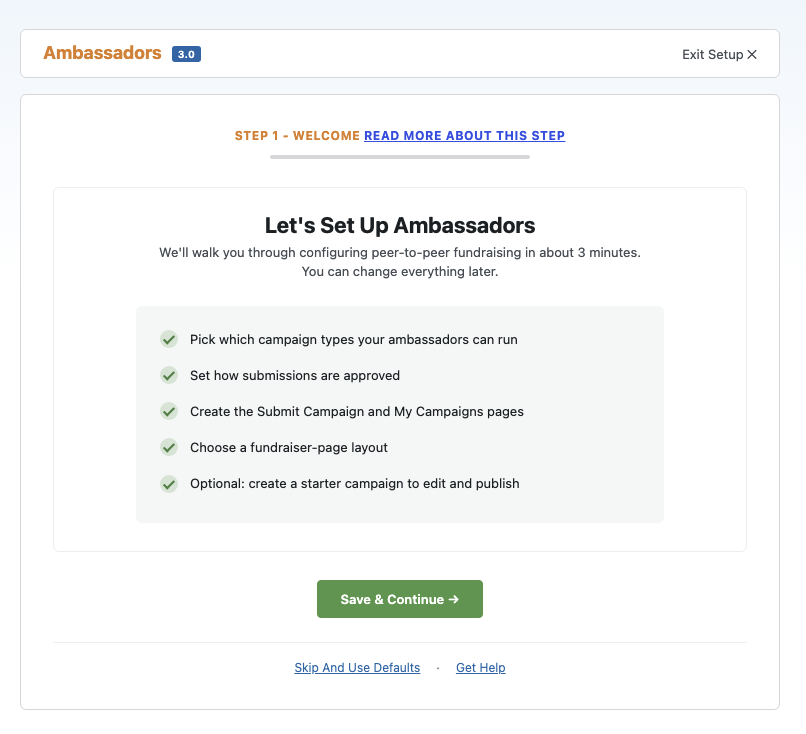
The steps:
| # | Step | What you decide |
|---|---|---|
| 1 | Welcome | Introduction + path choice. |
| 2 | Campaign types | What kinds of fundraisers you’ll accept – individual, team, team member. |
| 3 | Approval & requirements | Manual or auto-approval. Whether ambassadors need to register an account. Whether they need to verify their email. |
| 4 | Login flow | Where ambassadors land when they need to sign in. (Conditional – skipped if your site already has a login flow configured.) |
| 5 | Pages | Scaffold a /submit-campaign/ page and a /my-campaigns/ page if you don’t already have them. |
| 6 | Sharing | Pick which social networks the share grid shows on fundraiser pages. |
| 7 | Template style | Pick legacy / enhanced / visual rendering for fundraiser pages. |
| 8 | Brand color | Set your primary accent color (used by enhanced + visual templates). (Conditional – skipped if you’re staying on legacy templates.) |
| 9 | Starter campaign | Optionally create a draft peer-to-peer-enabled campaign so you have something to test the ambassador flow against immediately. |
| 10 | Complete | Summary of what was set, next steps, exit. |
Each step has a “Read more about this step” link in the header that opens this docs page anchored to the step name. Every step also has a “Skip” button so you can move past anything you’d rather configure later from the Settings.
Path 2 – Templates
If you know what kind of program you’re running – a marathon, a gala, a school fundraiser – the Templates path is the fastest way to apply a sensible default bundle of settings. Pick a template and the wizard applies a curated set of settings, then drops you straight into a slim version of the wizard for the choices that template can’t safely default (like your brand color and starter campaign).
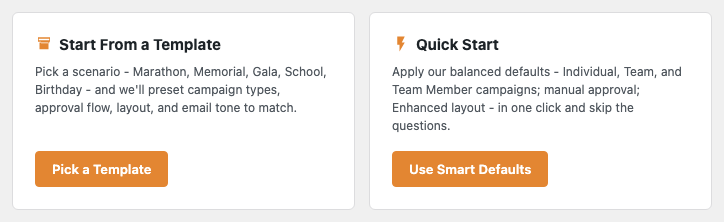
The six scenarios:
| Template | When to pick it | What it sets |
|---|---|---|
| Marathon / Walk-a-thon | Race-day fundraisers with teams. | Individual + Team + Team Member submissions, manual approval, email verification on, “stats-forward” layout. Starter goal $50K, 90-day length. |
| Memorial / Tribute | Solo fundraisers honoring a person. | Individual submissions only, manual approval, “story-forward” layout. Starter goal $10K, 60-day length. |
| Annual Gala / Event | Trusted internal teams running an annual event. | Team + Team Member submissions, auto-approval (low friction), “classic” layout. Starter goal $100K, 30-day length. |
| School / Education | K-12 schools, PTAs, classroom fundraising. | Team + Team Member submissions, manual approval, “donate-first” layout. Starter goal $25K, 45-day length. |
| Birthday / Personal | Short-burst personal fundraisers. | Individual submissions only, auto-approval, “magazine” layout. Starter goal $1K, 14-day length. |
| Custom – Build my own | None of the above fits. | Applies no preset; drops you into the regular wizard. |
After you pick a template, the wizard skips ahead – the campaign types, approval, sharing, template style, and layout-variant steps are already set, so you only see Pages, Brand color, Starter campaign, and Complete.
Path 3 – Quick Start
The fastest path: one click. Quick Start applies a generic-but-sensible default bundle (essentially the same as picking Custom and accepting every default), creates your Submit Campaign + My Campaigns pages, and drops you on the Overview ready to share an ambassador link.
Use Quick Start when:
- You’re just exploring the plugin and want to see what running ambassadors looks like.
- You’re a developer iterating on a customization and need a reset-able baseline.
- You’ve already designed your own settings via filters and don’t want the wizard’s defaults to fight you.
You can re-run the regular Wizard at any point afterward to refine the choices Quick Start auto-applied.
What the Wizard Actually Does
Across all three paths, the wizard makes the same kinds of changes:
| Surface | What gets touched |
|---|---|
| Settings | wp_options.charitable_settings > ambassadors > * keys for every step you complete. |
| Pages | The Pages step creates /submit-campaign/ (with [charitable_submit_campaign]) and /my-campaigns/ (with [charitable_my_campaigns]) as drafts if they don’t already exist. You publish them when you’re ready. |
| Starter campaign | The Starter step creates a peer-to-peer-enabled draft campaign with optional placeholder header image and starter copy. |
| Onboarding state | The wizard’s progress is stored in wp_options.charitable_ambassadors_onboarding so you can resume after closing the page. |
Nothing is destructive. Re-running the wizard doesn’t wipe existing settings – it shows you the existing value and lets you keep or change it.
Resetting Setup Data
If you want to start clean (for example, testing the onboarding flow before a release), use the destructive Reset setup data button on WordPress Admin > Charitable > Ambassadors > General > Setup actions. It removes only the artifacts the wizard creates (the onboarding state option, the auto-created pages if they’re still empty drafts, the starter campaign if it’s still a draft). It does not touch settings.
The reset is double-confirmed and logged.
The “Setup needs attention” Panel
Until you finish at least one completion path, an orange panel appears on the Overview prompting you to open Setup:
You can dismiss the panel per-user – the dismissal is stored in user-meta and doesn’t affect other admins.
Tips
- Pick a template if one fits. It’s faster than the full wizard and gets you 80% of the way to a well-configured site.
- The Starter step is optional but recommended. Having one peer-to-peer-enabled campaign on day one means you can test the ambassador flow yourself before sharing anything publicly.
- The wizard isn’t “done forever.” Re-run it any time you want to change scenarios (e.g. switching from a gala to a marathon program).
- Use Quick Start in dev environments. It’s the fastest way to reset and start over while iterating.
Developer Reference
The rest of this page is for developers customizing the onboarding flow.
Storage
wp_option:  charitable_ambassadors_onboarding
shape:      {
              'completed_via'       => null | 'wizard' | 'template' | 'quick_start',
              'completed_at'        => null | int (epoch),
              'template_slug'       => null | string,
              'current_step'        => string (key),
              'completed_steps'     => string[],
              'panel_dismissed_by'  => int[] (user IDs),
            }
State is read/written via Charitable_Ambassadors_Onboarding_State::get_instance().
Step registry
The 10 master steps are defined in Charitable_Ambassadors_Onboarding_Steps::get_master_steps(). Each has a can_render callable used for conditional branching. Two steps are conditional out of the box:
login_setup– skipped if the site already has a non-default login flow configured.brand_color– skipped if the site stays on legacy templates (no accent color is used).
Add, remove, or reorder steps via the charitable_ambassadors_onboarding_wizard_steps filter.
Per-step can_render
Each step’s render eligibility can also be overridden via a per-step filter:
add_filter( 'charitable_ambassadors_onboarding_step_brand_color_can_render', '__return_false' );
Use this to hide individual steps without modifying the master list.
Templates registry
The 6 templates are defined in Charitable_Ambassadors_Onboarding_Templates::get_all(). Each template has:
label,description(display only)settings– the bundle ofambassadorssettings to applystarter– defaults for the starter campaign (title, description, goal, length, suggested donations)
Add or modify templates via the charitable_ambassadors_onboarding_templates filter.
Filters
| Filter | Default | Purpose |
|---|---|---|
charitable_ambassadors_onboarding_wizard_steps | array of 10 | Add, remove, or reorder wizard steps. |
charitable_ambassadors_onboarding_step_<key>_can_render | true | Per-step conditional gate. |
charitable_ambassadors_onboarding_templates | array of 6 | Register additional scenario templates. |
charitable_ambassadors_onboarding_visual_template_candidates | computed | Filter the list of campaigns offered as a Visual mode template campaign on the Template style step. |
charitable_ambassadors_onboarding_starter_campaign_args | computed | Modify the wp_insert_post args used to create the starter campaign. Receives $args, $template_slug, $data. |
charitable_ambassadors_onboarding_starter_campaign_defaults | computed | Modify the starter defaults (title, description, goal, etc.). Receives $defaults, $slug. |
charitable_ambassadors_onboarding_starter_suggested_donations | template default | Override the suggested donation amounts for the starter. Receives $amounts, $template_slug. |
charitable_ambassadors_onboarding_should_show_panel | computed | Force the “Setup needs attention” panel on or off. |
charitable_ambassadors_onboarding_panel_accent | #E38632 | Accent color of the prompt panel. |
charitable_ambassadors_onboarding_show_features / _show_resources | true | Toggle the Features and Resources sections on the wizard sidebar. |
charitable_ambassadors_onboarding_features / _resources / _sidebar_features | computed | Replace those sections’ content. |
charitable_ambassadors_onboarding_sidebar_illustration | SVG | Replace the sidebar illustration. |
charitable_ambassadors_onboarding_sidebar_docs_url / _docs_label | wpcharitable.com URL | Override the sidebar docs link. |
charitable_ambassadors_onboarding_docs_url | this page | Override the base docs URL the per-step “Read more” links resolve to. |
charitable_ambassadors_onboarding_docs_url_for_step | computed | Per-step docs URL override. Receives $url, $step_key. |
charitable_ambassadors_onboarding_capability | manage_charitable_settings | Capability check for all onboarding AJAX endpoints. |
charitable_ambassadors_quick_start_defaults | computed | Override the bundle of settings Quick Start applies. |
charitable_ambassadors_onboarding_placeholder_image_meta | array | Metadata for the placeholder header image used by the starter campaign. |
charitable_ambassadors_onboarding_path_icon | SVG per path | Replace the per-path icon on the path-picker. Receives $svg, $slug. |
Actions
| Action | Args | Fires when |
|---|---|---|
charitable_ambassadors_onboarding_artifact_created | $type, $post_id | A wizard step created a page or starter campaign. $type is 'page' or 'campaign'. |
charitable_ambassadors_onboarding_complete | $via, $template_slug | Any of the three paths completes. $via is 'wizard', 'template', or 'quick_start'. |
charitable_ambassadors_onboarding_quick_start_applied | – | Quick Start completed (in addition to _complete). |
charitable_ambassadors_onboarding_panel_dismissed | $user_id | A user dismissed the Overview prompt panel. |
AJAX endpoints
All on wp_ajax_ only, nonce action charitable_ambassadors_onboarding, capability manage_charitable_settings (filterable via charitable_ambassadors_onboarding_capability):
| Action | Purpose |
|---|---|
charitable_ambassadors_onboarding_apply_quick_start | Apply the Quick Start defaults bundle. |
charitable_ambassadors_onboarding_dismiss_panel | Dismiss the “Setup needs attention” panel for the current user. |
(Step-by-step navigation uses standard form-POST against the wizard’s own URL with sub-action params; it’s not AJAX.)
Customization Examples
Add a custom “Crowdfunding” template:
add_filter( 'charitable_ambassadors_onboarding_templates', function ( $templates ) {
    $templates['crowdfunding'] = [
        'label'       => 'Crowdfunding launch',
        'description' => 'High-volume short-burst campaign with auto-approve.',
        'settings'    => [
            'campaign_recipients'    => [ 'individual' ],
            'auto_approve_campaigns' => 1,
            'ui_version'             => 'enhanced',
            'enhanced_layout_variant'=> 'magazine',
        ],
        'starter' => [
            'title'       => 'Help us launch',
            'description' => 'A short, intense campaign...',
            'goal'        => 20000,
            'length_days' => 30,
            'suggested_donations' => [ 10, 25, 50, 100 ],
            'terms'       => [],
        ],
    ];
    return $templates;
} );
Skip the Login Flow step on every install:
add_filter( 'charitable_ambassadors_onboarding_step_login_setup_can_render', '__return_false' );
Replace the Setup panel’s accent color to match your brand:
add_filter( 'charitable_ambassadors_onboarding_panel_accent', function () {
    return '#1e7e34';
} );
Related
- Overview Dashboard – the prompt panel lives at the top of Overview until onboarding completes.
- Display Features – the Template style step’s choices.
- My Campaigns – one of the two pages the Pages step creates.
- Submit Campaign – the other page the Pages step creates.
- Hooks & filters in Ambassadors – full reference.
Helpful Links
🤝 Get help when you need it
Connect with Customer Support →
📑 Find the guide you need
Browse the Documentation Hub →
⬇️ Download proven strategies, campaign ideas, and expert tools
🔗 Let your AI Assistant do the fundraising work for you.
Connect Charitable to your AI assistant →
💸 Get Free Fundraising Resources
Head to the Charitable Fundraising Hub →
🤔 Got questions about Charitable?
Charitable FAQs →
Need help understanding non-profit terms and jargon?
See our Non-Profit Glossary →