Requires: Charitable Pro 1.8.16+ Charitable Ambassadors 3.6.0+
This page is about Charitable Ambassadors, the addon that turns a Charitable campaign into a peer-to-peer one, where your supporters make their own fundraiser pages and raise money on your behalf. The owner dashboard is new in Ambassadors 3.6.0 and exists in no earlier version, so if you cannot find the screens below, update the addon first.
The owner dashboard is a read-only page on the front of your site. Somebody signs in and sees one campaign and everything fundraising beneath it: how much has come in, how many people have signed up, how many have actually raised something, and the newest gifts.
It is for the people running a piece of your program who are not WordPress administrators and should not have to become one.
To give somebody access to it, see Organizers.
The words on this page
Ambassadors nests campaigns inside each other, and this dashboard is a report on one slice of that nest. Four words do most of the work here, and all of them are covered at length on Peer-to-Peer Concepts.
- Campaign. The appeal everybody is raising for, and the subject of one dashboard. Somebody with access to several switches between them.
- Participant. One person’s own fundraiser page, nested beneath the campaign. This is what a supporter creates when they sign up to raise money, and what Top Participants ranks.
- Group. An optional middle tier between the two, either a campaign nested under the parent or a team whose members each have their own page. A school running campaign > class > pupil has groups. A marathon running campaign > runner does not, and Top Groups stays hidden rather than appearing empty.
- Owner. Whoever is allowed to see a campaign’s dashboard. This is a named list per campaign, not a WordPress role and not authorship, so even the person who created the campaign sees nothing until they are added to it. You manage that list on Organizers.
When you’d use it
- A teacher wants their own class’s numbers without the whole school’s.
- A team captain wants to see which of their runners have not started yet.
- A chapter lead reports a weekly figure upward and currently asks you for it.
- A board member wants to watch one appeal without an admin account.
Setting it up
Create a page, give it any title you like, and put this on it:
[charitable_owner_dashboard]
One page serves everybody. You do not make a page per campaign or per person. Each visitor sees only the campaigns they have been given, on the same page.
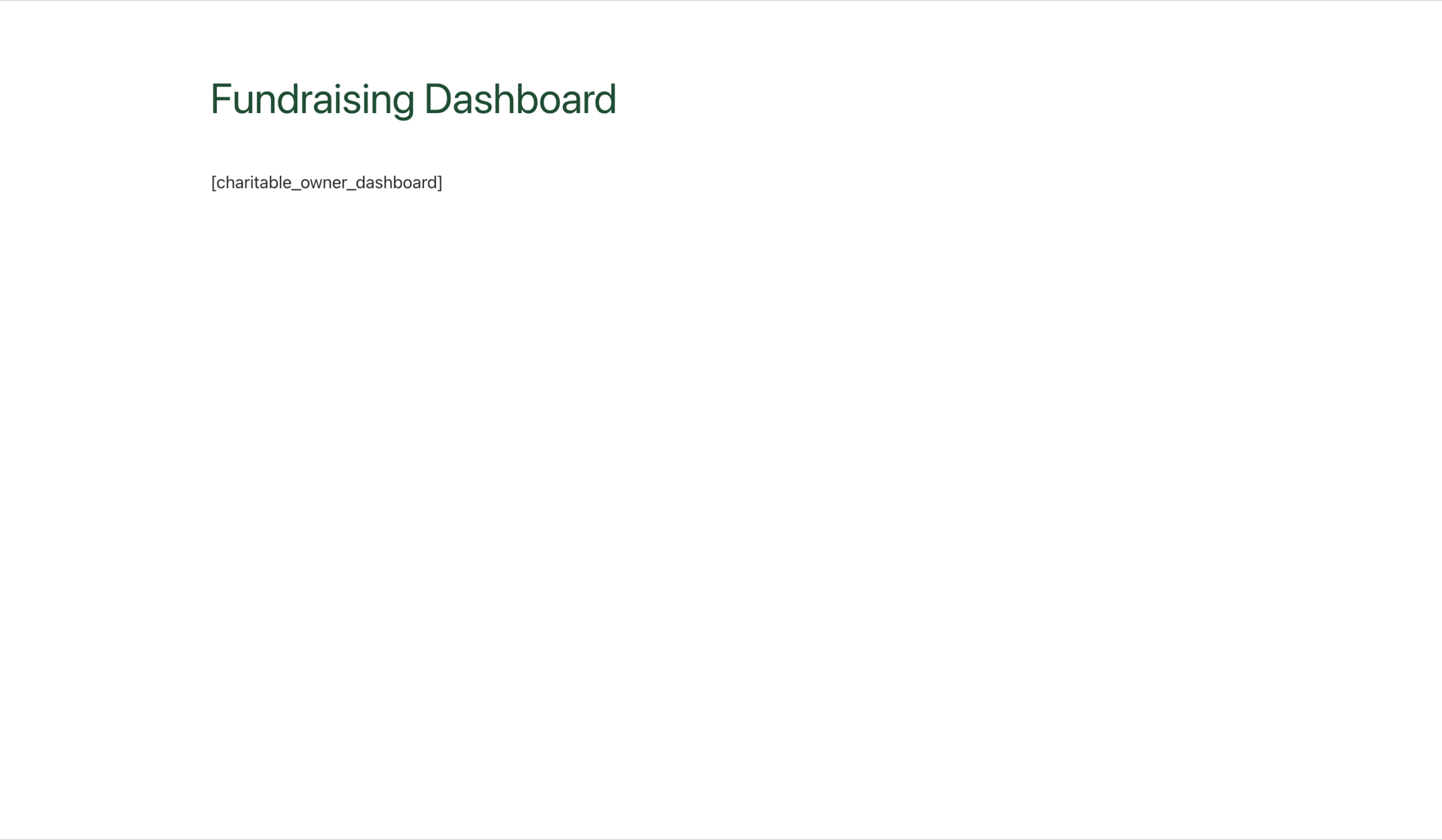
Publish it, then give somebody access from Organizers.
The page is excluded from page caching automatically, because what it shows differs per visitor. If you run a caching plugin you do not need to add an exclusion by hand.
What somebody sees who is not signed in
A short message asking them to sign in, and nothing else. No campaign names, no figures.
What somebody sees who has no access
A message saying this account is not set up to manage a campaign, and to contact their program administrator. Again, no figures.
This is deliberately a plain message rather than a 404 or a login form. Both of those read as a broken site and generate support tickets.
Switching between campaigns
Somebody with access to more than one campaign gets a selector at the top. The page reloads showing the campaign they chose.
Somebody with access to exactly one campaign does not see a selector, because there is nothing to choose.
The four numbers

Each tile has a help icon next to its label with the same explanation.
| Tile | What it counts |
|---|---|
| Raised | Every completed donation to this campaign and the pages beneath it, including gifts made directly on this page, not only on participants’ pages |
| Registered | Fundraiser pages that exist beneath this campaign. A page counts whether or not it has raised anything yet |
| Active | Participants with at least one completed donation. The gap between this and Registered is pages that exist but have not raised yet |
| Donors | Distinct people, counted once each. Someone who gave to three participants counts once here, so this is lower than the participants’ donor counts added together |
A fifth tile, Days Left, appears when the campaign has an end date.
Only completed donations count. Pending and failed payments are excluded, and so are test-mode donations when your site is set to exclude them.
The two empty states
- Nobody has registered yet means no fundraiser pages exist beneath this campaign at all. That is a different problem from people signing up and not raising, so the dashboard says which one it is.
- Nothing raised yet means pages exist but no completed donation has arrived.
Top Participants
Individual fundraiser pages beneath this campaign, ranked by money raised.
Top Groups
The tier between this campaign and its participants, ranked by money raised.
This only appears when your campaign is organized that way. It needs three levels: the campaign, a middle tier, then the participants. A school with campaign > class > pupil gets Top Groups. A marathon with campaign > runner does not, because there is no middle tier to rank, and the section is hidden rather than shown empty.
The middle tier can be either kind of grouping Ambassadors supports: a campaign nested under the parent, or a team whose members each have their own fundraiser page. Both rank the same way. A team’s row totals every gift to its members, plus any gift made to the team page itself.
Looking into a row
Hover over a name in Top Groups or Top Participants, tab to it with the keyboard, or tap it on a phone. A panel opens showing:
- the amount raised
- the date of the last gift
- a seven-day trend
- participation, for a group, or donor count, for a participant
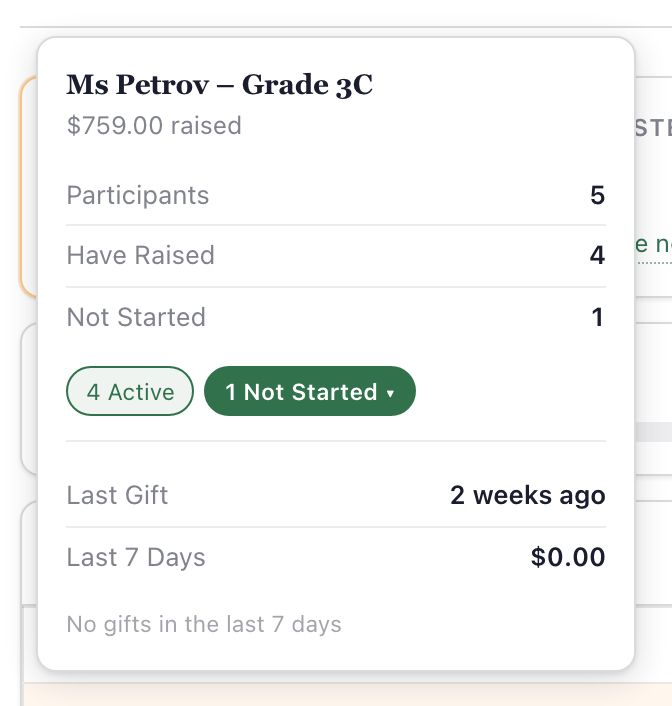
Everything in the panel is read-only. There is nothing to click inside it.
Finding who has not started
The gap between Registered and Active is the people who signed up and have not raised anything. That number can be clicked or tapped, and it expands into a list naming them, each linking to their fundraiser page.
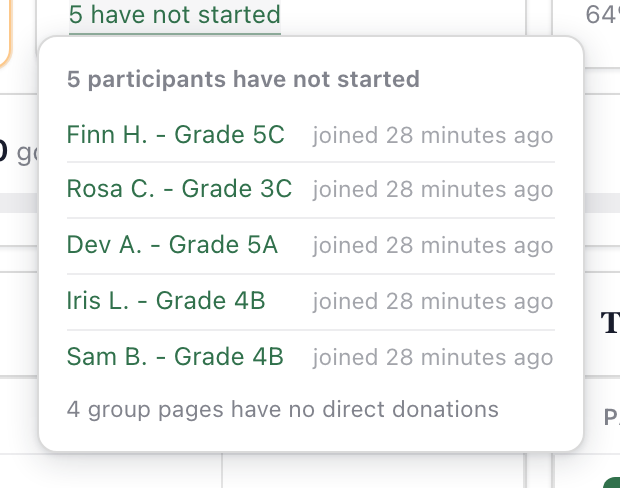
The first 50 names show. Long lists scroll inside the panel.
This is usually the most useful thing on the page: it turns a number into a list of people somebody can actually contact.
Recent Donations
The newest completed donations anywhere in this campaign, including gifts made directly to this page.
Whether donor names appear here is set per campaign. See Dashboard Settings below. With names switched off the dashboard shows amounts only.
Beyond Your Campaign
An optional table listing every participating campaign on the site and what it has raised. Names and totals, nothing else: no groups, no participants, no donors.
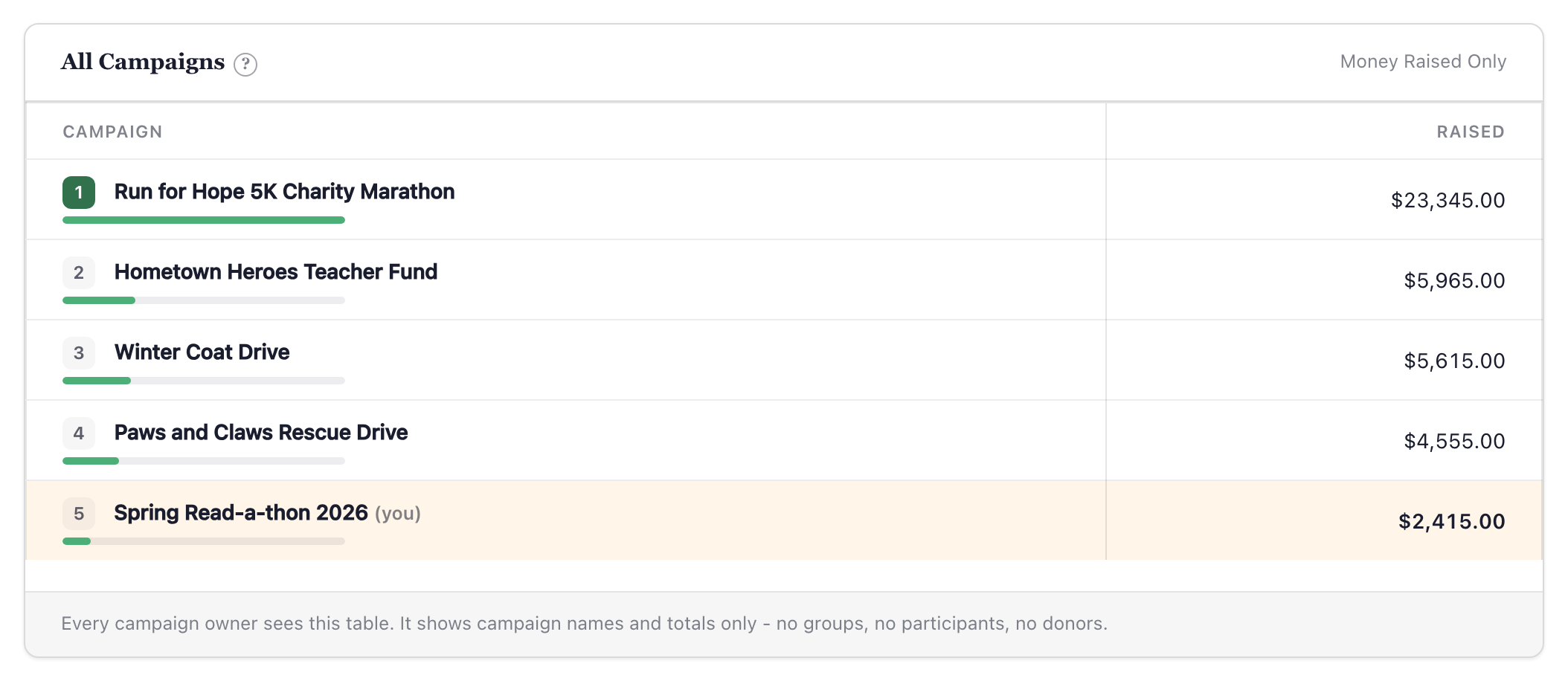
It is off until you switch it on, per campaign. A campaign joins only when you tick the box in Dashboard Settings on that campaign. Until at least one campaign has opted in, the section does not appear at all.
Think about this one before switching it on. Everyone who can see any dashboard on your site can see every campaign that has opted in. If you run unrelated clients or chapters on one site and they should not see each other’s totals, leave it off.
Dashboard Settings on a campaign
Each campaign has a Dashboard Settings box in the sidebar of its edit screen.
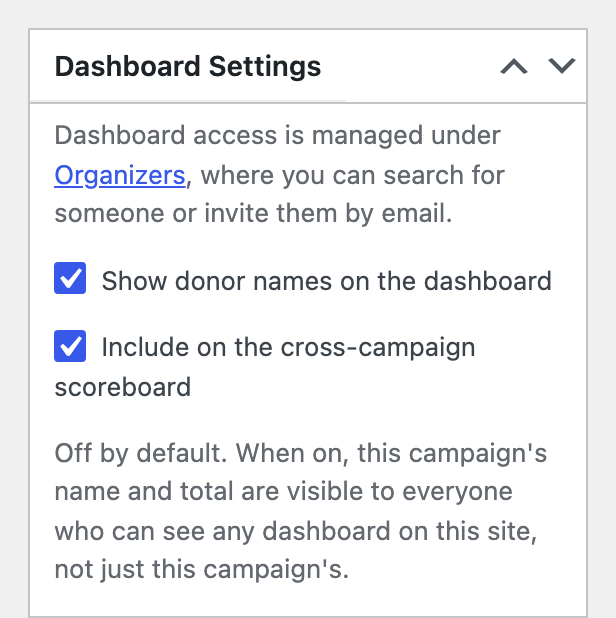
| Setting | Effect |
|---|---|
| Show donor names on the dashboard | Off shows amounts only in Recent Donations |
| Include on the cross-campaign scoreboard | Off by default. On puts this campaign’s name and total in front of everyone who can see any dashboard on this site |
The box also tells you if no page carries the dashboard shortcode yet, and links to the Organizers tab for granting access. Access is not granted from here.
The card on My Campaigns
Somebody who has dashboard access and visits My Campaigns sees a card linking to their dashboard, so they do not have to be sent the URL every time.
It finds the page by looking for the shortcode. If you have more than one candidate page, or want it to point somewhere specific, a filter sets the URL directly. See the developer reference.
Tips
- Look at the dashboard yourself before you hand it out. Add yourself as an organizer on one campaign and open the page.
- Check whether your campaign has a middle tier before promising anyone Top Groups.
- Decide about the cross-campaign table before inviting people, not after.
- If the numbers look wrong, check whether your site is set to exclude test-mode donations. The dashboard follows that setting.
Developer reference
Shortcode
[charitable_owner_dashboard]
Accepts one optional attribute, campaign, pinning the page to one campaign
id. A visitor without access to that campaign still sees only their own, so
the attribute narrows rather than grants.
Templates
| Template | Renders |
|---|---|
templates/dashboard/owner-dashboard.php |
The shell |
templates/dashboard/partials/tiles.php |
The number tiles |
templates/dashboard/partials/leaderboards.php |
Top Groups and Top Participants |
templates/dashboard/partials/scoreboard.php |
Beyond Your Campaign |
templates/dashboard/partials/state-notice.php |
The two empty states |
Override any of them from your theme at:
your-theme/charitable/charitable-ambassadors/dashboard/owner-dashboard.php
The base path is filterable with charitable_ambassadors_theme_template_path.
Post meta
| Key | Holds |
|---|---|
_charitable_ambassadors_dashboard_owners |
Array of user ids with access |
_charitable_ambassadors_dashboard_show_donor_names |
1 or 0 |
_charitable_ambassadors_dashboard_on_scoreboard |
1 to appear on the cross-campaign table |
_charitable_ambassadors_dashboard_generation |
Cache generation counter, bumped when donations or activity change |
Filters
| Filter | Purpose |
|---|---|
charitable_ambassadors_owner_dashboard_url |
Return a URL to override where the My Campaigns card points |
charitable_ambassadors_force_owner_dashboard_page |
Treat a specific page as the dashboard page |
charitable_ambassadors_dashboard_owner_ids |
The resolved owner ids. Receives ( $ids, $campaign_id ) |
charitable_ambassadors_dashboard_label |
Any one of the dashboard’s nouns. Receives ( $default, $key ) |
charitable_ambassadors_dashboard_label_<key> |
One specific noun. Keys: board, group, groups, participant, participants, section |
charitable_ambassadors_dashboard_activity_key |
Which Activity value to surface as a tile |
charitable_ambassadors_dashboard_activity_tile_label |
That tile’s label |
charitable_ambassadors_dashboard_generation_campaign_id |
The campaign whose generation counter is bumped |
Caching
Payloads are cached per scope in a cap_dash_ transient keyed to the
campaign’s generation counter, so a donation or activity entry invalidates the
payload rather than waiting for a timeout. The cross-campaign table is cached
separately for five minutes.
The page registers as dynamic through Charitable Pro’s
charitable_is_dynamic_page framework, which is what keeps it out of page
caches.
Authorization
Charitable_Ambassadors_Scope is the gate. Its constructor is private and it
is built through Scope::for_owner( $user_id, $campaign_id ), which returns
null when that user does not own that campaign. Every query the dashboard
runs is bounded by the campaign ids that scope resolved, so there is no path
that reads outside it.
The row-detail drill-down re-authorizes on every request rather than trusting the page that rendered the link.
AJAX endpoint
charitable_ambassadors_dashboard_not_started returns the expanded list of
participants who have not raised. Logged-in only, nonce
charitable_ambassadors_dashboard_row_detail, and it re-resolves the viewer’s
scope from the session rather than from the request.
Customization examples
Call the middle tier “Classes” instead of “Groups”
add_filter( 'charitable_ambassadors_dashboard_label_groups', function () {
    return 'Classes';
} );

add_filter( 'charitable_ambassadors_dashboard_label_group', function () {
    return 'Class';
} );
Point the My Campaigns card at a specific page
add_filter( 'charitable_ambassadors_owner_dashboard_url', function () {
    return home_url( '/program-dashboard/' );
} );
Surface an Activity value as a fifth tile
add_filter( 'charitable_ambassadors_dashboard_activity_key', function () {
    return 'miles_run';
} );

add_filter( 'charitable_ambassadors_dashboard_activity_tile_label', function () {
    return 'Miles Run';
} );
Related
- Organizers – granting and removing access
- My Campaigns – where the pointer card appears
- Activity – the module behind the optional fifth tile
- Overview – the admin-side view across every campaign