AMBASSADORS
Turn your supporters into passionate ambassadors for your cause
Harness the power of peer-to-peer fundraising to grow your organization’s reach and raise more money.






Run a real peer-to-peer fundraising program from inside the WordPress site you already own. Real-time dashboards, fundraiser moderation, supporter recruitment with attribution, a guided setup wizard, and eight beautiful fundraiser page layouts – all without paying a hosted SaaS platform or giving up a cut of every donation.
Built For The Way Nonprofits Actually Fundraise
Peer-to-peer fundraising used to mean a hard choice: pay thousands of dollars a year for a hosted platform that takes a per-transaction cut, or assemble a fragile P2P workflow on top of WordPress and hope it holds.
Charitable Ambassadors ends that tradeoff. Your supporters create their own fundraising pages, recruit friends, and raise money on your behalf – and every dollar stays in the donation gateway you already use.
Everything You Need, In One Addon
Seven dedicated admin areas, each focused on the work you actually do.
📊 Overview Dashboard
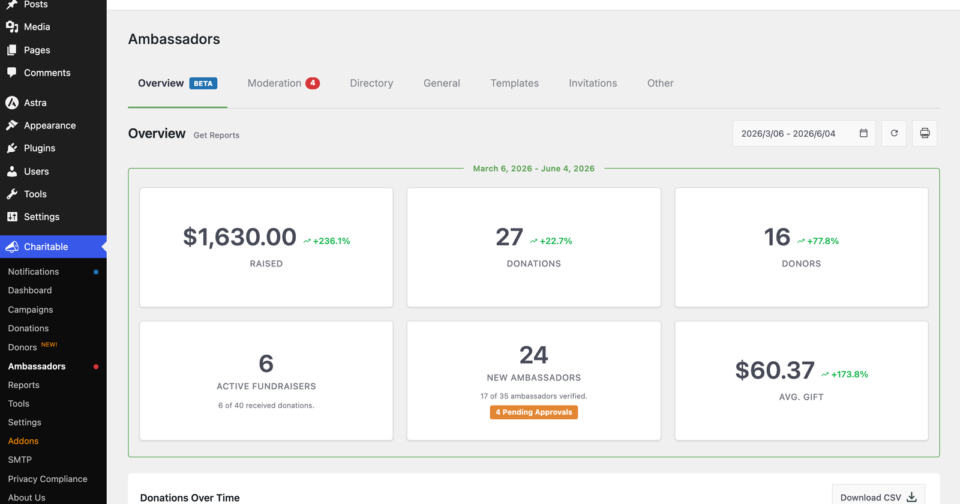
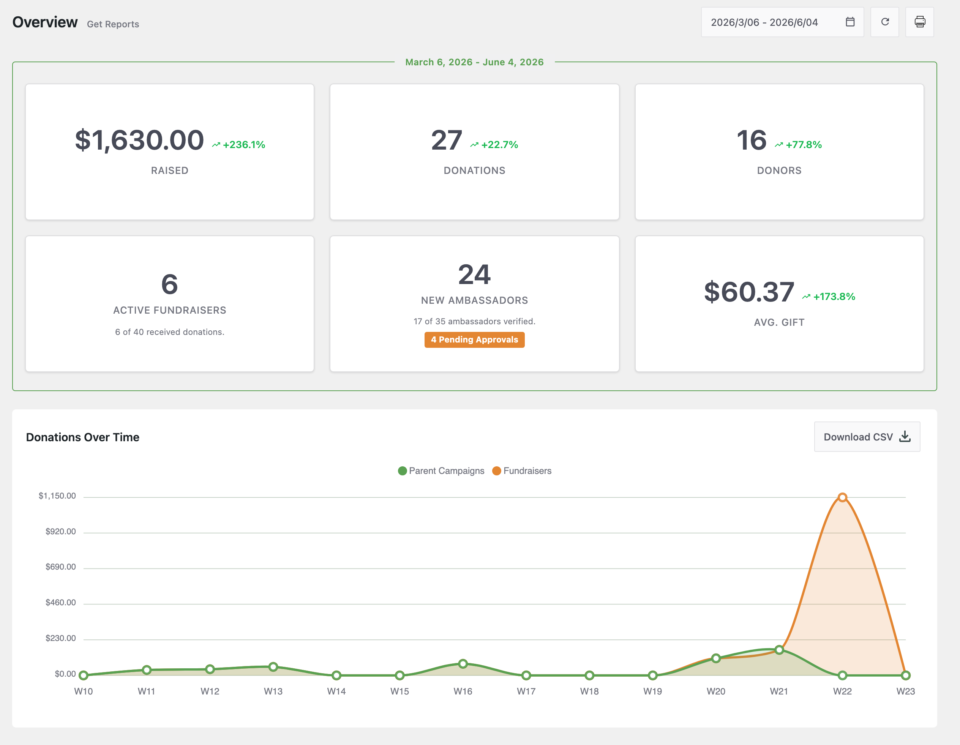
A live command center for your peer-to-peer program. KPI tiles for total raised, donations, active fundraisers, and goal progress. A trend chart of donations over time. Leaderboards for top parent campaigns, top fundraisers, and top ambassadors. CSV export and Print on every section.
⚖️ Moderation Queue
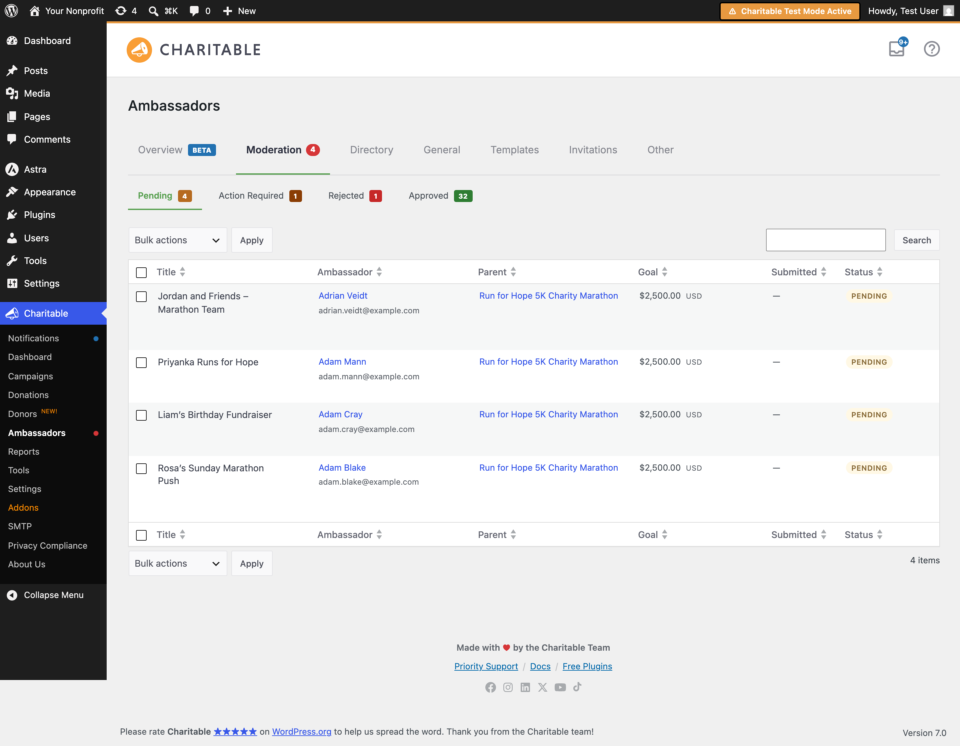
Every fundraiser carries your nonprofit’s name. Review each one before it goes public. Three-state queue (Pending, Approved, Rejected) with bulk actions and a 30-second undo. An append-only audit log records every decision. Two transactional emails keep ambassadors in the loop on rejections and change requests.
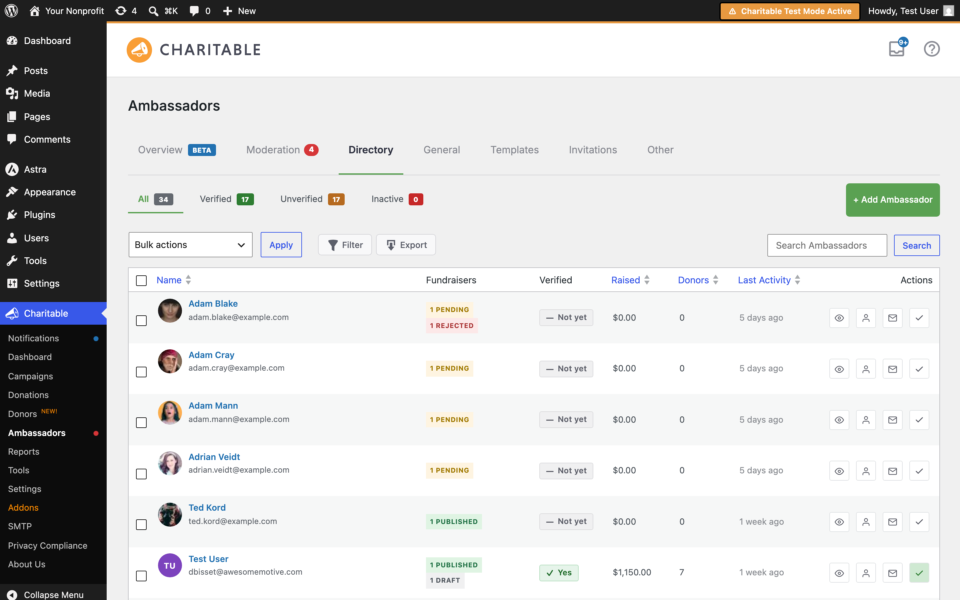
👥 Ambassador Directory
A searchable roster of every ambassador on your site. Profile drill-downs show every fundraiser they own and every donation that has come in through them. Bulk email reaches your full roster (or a filtered slice) without exporting to another tool. CSV export and manual add when you need them.
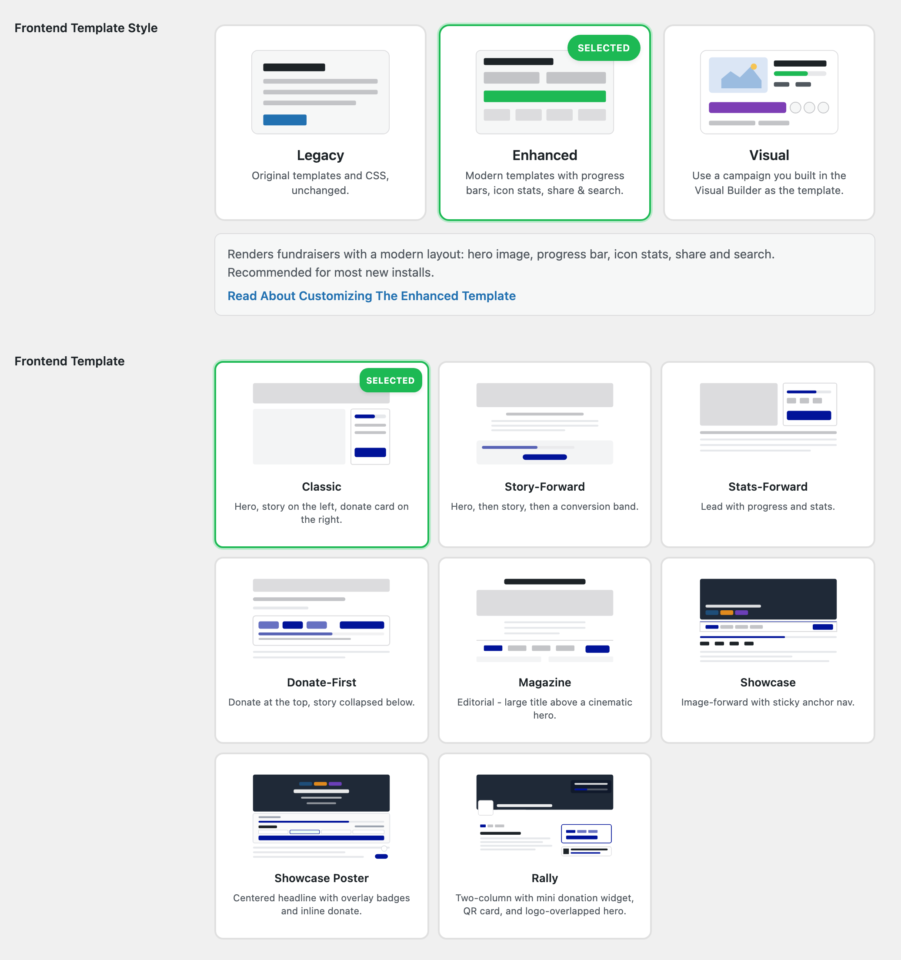
🎨 Eight Fundraiser Page Layouts
Pick from Classic, Story-Forward, Stats-Forward, Donate-First, Magazine, Showcase, Showcase Poster, or Rally. Each one is a fully designed, accent-color-aware layout that every fundraiser inherits in one click. Or design one template campaign in the Charitable Pro Visual Campaign Builder and have every ambassador’s fundraiser inherit that design automatically, with their name, photo, goal, and progress swapped in.
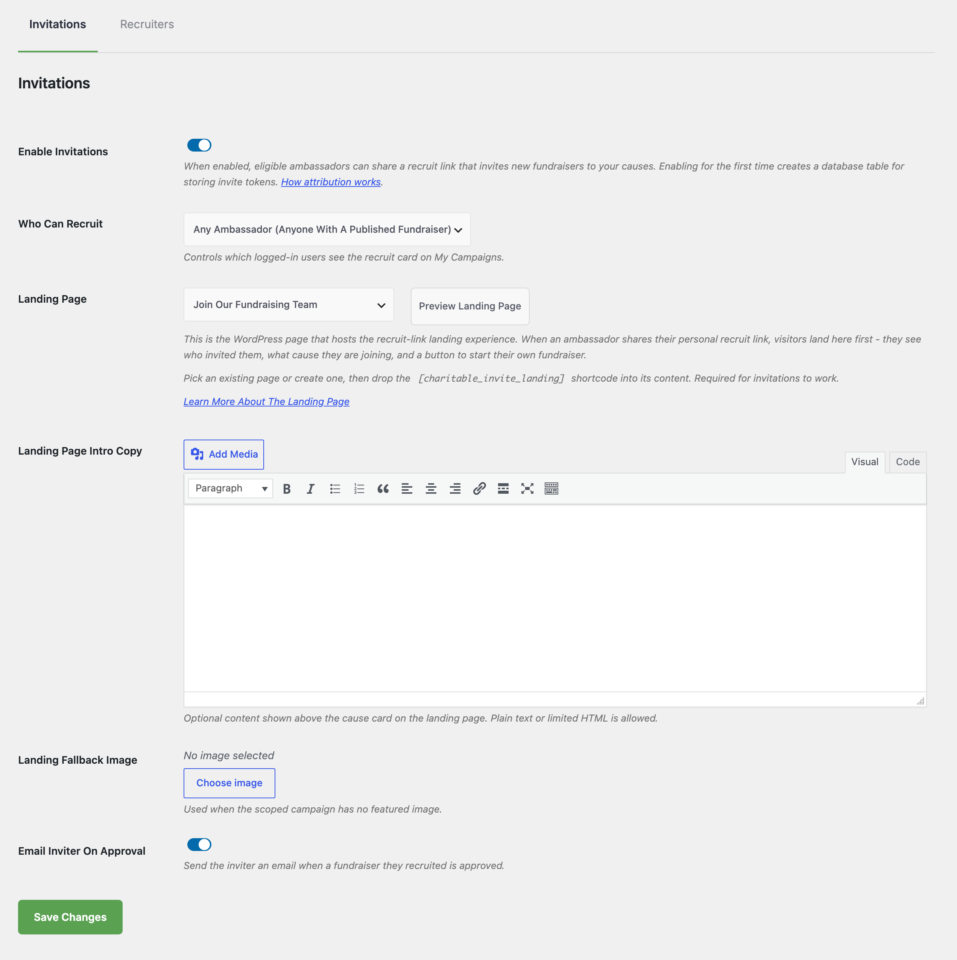
🤝 Recruitment Invitations
The single biggest growth lever in peer-to-peer fundraising, and brand new in 3.0. Every ambassador gets a personal invite link. A 30-day cookie attributes who clicked, who signed up, and how much each recruit raised. Sharing is a one-click action from the ambassador’s own My Campaigns dashboard. Recruitment KPIs roll up to your Overview.
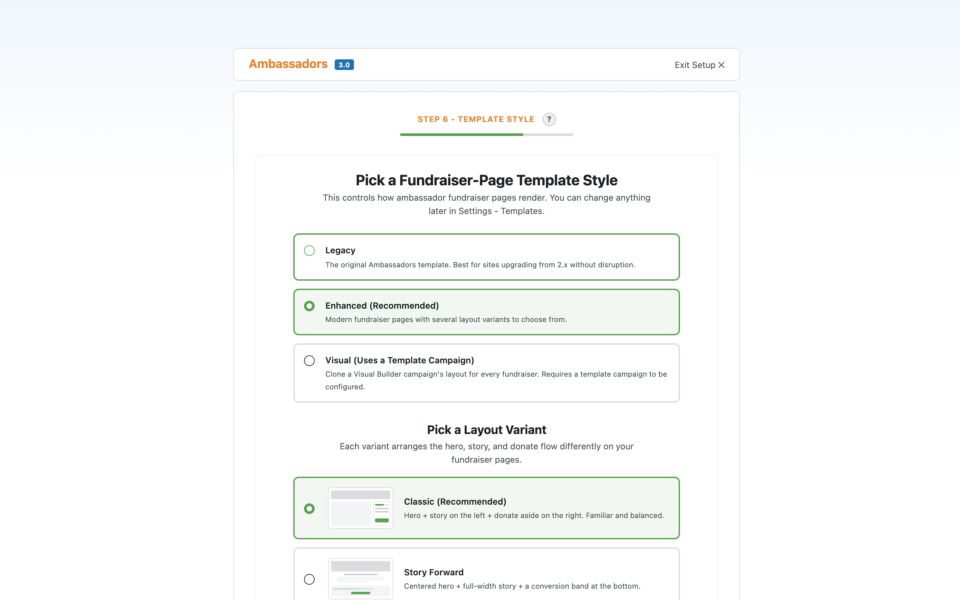
🪄 Onboarding Wizard
A brand-new admin used to need a tutorial and a support ticket. Now the plugin onboards them. Choose from a step-by-step Setup Wizard, six scenario templates (Marathon, Memorial, Gala, School, Birthday, Custom), or Quick Start. The wizard creates draft Submit Campaign and My Campaigns pages and a starter campaign, so the admin can review before going live.
🔔 In-Dashboard Notifications
The moments that matter surface inside WordPress, not in your inbox. Get notified when fundraisers are waiting on review, when a new ambassador’s first campaign goes live or lands its first donation, when any fundraiser hits 100% of goal, and when your organization crosses milestones from $1K all the way to $1M. Master switch and per-event toggles.
Who It’s For
🏛️ Nonprofits Running In-House
Replace your hosted P2P platform. Keep your existing donation gateway, your existing donor data, and the WordPress site you already pay for. Stop paying SaaS fees and per-transaction cuts on money your supporters are raising for you.
🏃 Year-End Match Campaigns
Design one fundraiser layout in the visual builder, let every ambassador fundraise against the same design, with their photo and story swapped in automatically. No template juggling.
🏫 School & Education Fundraising
Every classroom, team, or cohort gets its own sub-campaign. Teachers and parents become ambassadors. Invite links bring in families with attribution back to whoever recruited them.
🕊️ Memorial & Tribute Programs
Give grieving families a guided onboarding flow and a dignified fundraiser page without asking them to learn WordPress.
🌍 Multi-Chapter Organizations
Each chapter gets its own parent campaign and its own roster of fundraisers, all reporting up to a single dashboard for the home office.
🛠️ Agencies & Fundraising Consultants
Ship a complete peer-to-peer program for every client without forking the plugin, maintaining custom builds, or locking each client into a hosted platform you don’t control. Layout variants and template overrides give each client a distinct look.
How It Works
- Activate the addon. A guided wizard creates your Submit Campaign page, your My Campaigns page, and a starter peer-to-peer campaign – all in draft.
- Choose your fundraiser look. Pick one of eight built-in layouts, or design your own template campaign in the visual builder.
- Invite your supporters. Share invite links, and your supporters create their own fundraising pages.
- Moderate and monitor. Approve fundraisers as they come in. Watch the Overview dashboard refresh in real time as donations land.
- Grow with attribution. Recruitment links surface which ambassadors are driving real revenue, so you know where to double down.
What’s Included
- Overview dashboard with KPIs, charts, leaderboards, CSV export, and Print
- Moderation queue with bulk actions, 30-second undo, and audit log
- Ambassador Directory with profile drill-down, search, and bulk email
- Eight modern fundraiser page layouts plus Visual Template mode
- Live admin previews for the My Campaigns list and Fundraiser Page
- Recruitment invitations with 30-day cookie attribution
- Onboarding wizard with six scenario templates and Quick Start
- In-dashboard notifications for moderation, milestones, and goal events
- Reports tab integration inside Charitable Pro Reports
- A modernized card-grid Submit Campaign flow
- Team campaigns, team-member fundraisers, and team captaincy
- Custom emails for ambassadors, team members, and admins
- Translation-ready, with WPML and Polylang compatibility
- Hooks, filters, and template override paths for developers
Requirements
- WordPress 5.5 or later
- PHP 7.4 or later
- Charitable Pro 1.8.16 or later
Running an older Charitable Pro? Existing fundraiser pages continue to accept donations, and the admin shows a clear update notice until Pro is upgraded. Learn more about the version requirement.
Pricing
Charitable Ambassadors is included with every Charitable Pro plan that bundles addons. There is no per-transaction fee, no monthly hosting fee, and no cap on the number of fundraisers, ambassadors, or campaigns you can run.
Frequently Asked Questions
Do I need Charitable Pro to use Ambassadors? Yes. Ambassadors 3.0 is a Charitable Pro addon and requires Charitable Pro 1.8.16 or later. The earlier 2.x line of Ambassadors will continue to operate on older Pro versions, but new features and ongoing support land in 3.0+.
Will my supporters need WordPress accounts? Your ambassadors do create accounts on your site so they can manage their own fundraiser pages. Donors do not – they donate exactly like they would on any other Charitable campaign.
Can supporters edit their fundraiser pages after submitting? Yes. Ambassadors have a My Campaigns dashboard where they can edit content, update images, and track their progress. Edits to approved fundraisers go live immediately.
Does Ambassadors take a cut of donations? No. Donations flow through your existing payment gateway exactly like a regular Charitable campaign. There are no per-transaction fees added by the addon.
Can I migrate from a hosted P2P platform like Classy, GiveSmart, or DonorBox? Yes – and customers regularly do. Charitable has importers and gateway support for most major sources. Talk to support about your specific platform.
Is Ambassadors translation-ready? Yes. All strings are translatable, and the addon is compatible with WPML and Polylang for fully multilingual fundraising sites.
Do you offer hooks, filters, and template overrides? Yes. Every layout variant, email, and admin screen has documented filters and theme override paths. See the Ambassadors documentation for the developer reference.
Ready To Run A Real Peer-To-Peer Program?
Already a customer? Update from your dashboard and visit Charitable → Ambassadors to meet the new Overview tab.
Learn more
Charitable Ambassadors is our most powerful plugin. You can get the most out of it with the detailed setup guide covering all aspects of the plugin.
Not sure if peer-to-peer fundraising is right for you? Here are a couple articles that can help you learn more about it:
- The Beginner’s Guide to Peer-to-Peer Fundraising
- How to Create a Peer-to-Peer Fundraising Event Website
Interested in building your own fundraising crowdfunding platform? Discover how to do that in this guide to creating your own crowdfunding platform with WordPress.