Requires: Charitable Pro plugin 1.8.16+
Pro plan and higher
Charitable Ambassadors 3.5.0+
Do you want supporters to start a fundraiser without having to create a password first?
Asking someone to choose a password is where a lot of would-be fundraisers give up. They came to raise $50 for a cause they care about, and the form asks them to make up and remember a password for a website they may never visit again.
Passwordless Fundraiser Accounts remove that step. The create-fundraiser form stops asking for a password. Your fundraiser gets one email, clicks the link in it, and lands on My Campaigns already signed in.
This guide covers turning the feature on, what your fundraisers see, setting it for each campaign, following up with people who haven’t clicked yet, the emails and delivery checks, and the developer hooks.
The whole sign-up depends on one email arriving. So it helps to set this up and test it before your campaign opens.

What’s in This Guide?
- What Passwordless Fundraiser Accounts Do and Don't Cover
- How to Turn On Passwordless Fundraiser Accounts
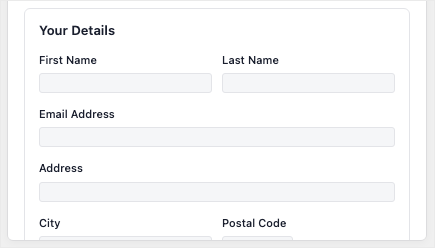
- What Fundraisers See When They Sign Up Without a Password
- How to Set Passwordless Sign-Up for Each Campaign
- How to See Which Fundraisers Haven't Signed In Yet
- The Passwordless Sign-In Emails and When They Send
- How Passwordless Accounts Check Your Email Delivery
- Tips Worth Keeping in Mind
- Troubleshooting Passwordless Fundraiser Accounts
- Developer Reference for Passwordless Fundraiser Accounts
What Passwordless Fundraiser Accounts Do and Don’t Cover
“Passwordless” means different things on different websites. Here’s exactly what it means in Charitable Ambassadors.
- A real WordPress account is still created. It just never has a password the person had to choose. That account is what lets them own and edit their fundraiser page afterwards.
- It covers fundraisers only. Donors never needed an account, and your own admin login doesn’t change.
- It relies on your site’s email. Every sign-up and sign-in starts with an email arriving. If your site can’t send email reliably, nobody gets in, so the feature includes its own delivery checks.
- You can mix it across campaigns. Any single campaign can switch it on or off, whatever the site setting is.
How to Turn On Passwordless Fundraiser Accounts
To turn it on, head over to Charitable » Ambassadors » Templates » Submit Form and switch on Passwordless Accounts.
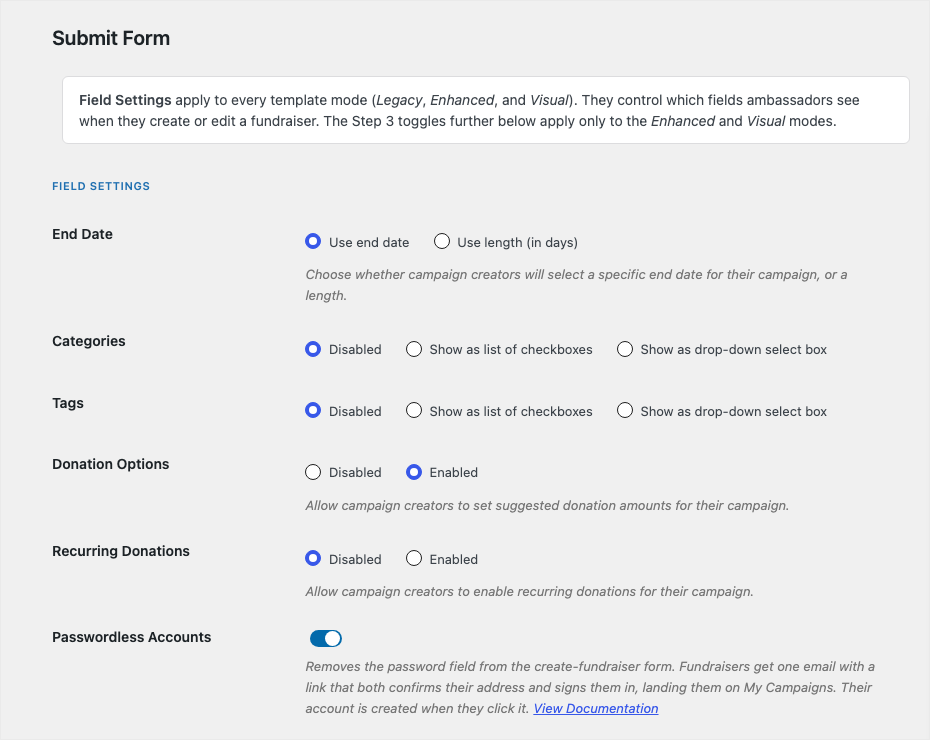
The first time you switch it on, Ambassadors creates one small database table to hold sign-in links. That’s the only change it makes to your site.
You can read exactly what that table holds in How Sign-In Link Data Is Stored.
What Fundraisers See When They Sign Up Without a Password
Here’s what a new fundraiser goes through, from the form to their page.
- They fill in the create-fundraiser form. There is no password field.
- They see a “check your email” screen that tells them what happens next.
- The email arrives with one link in it.
- They click the link and land on My Campaigns, signed in, with their fundraiser page ready.
What happens to the page at step 4 depends on your moderation setting. If the parent campaign needs approval, clicking the link moves the fundraiser into your moderation queue. If the campaign approves fundraisers automatically, the page goes live straight away.
This changes what you tell your supporters. With moderation on, the right message is “we’ll review your page shortly”, rather than “your page is live”.
How to Set Passwordless Sign-Up for Each Campaign
Most sites want one setting for the whole site, but not all of them do. A school might want passwordless sign-up for families and accounts with passwords for staff.
To change it for one campaign, edit any peer-to-peer parent campaign and open the Peer to Peer Fundraising panel. You’ll see 3 choices.
- Use the site default. The label tells you what the site setting is right now.
- On. The form has no password field.
- Off. Fundraisers create an account with a password.

How to See Which Fundraisers Haven’t Signed In Yet
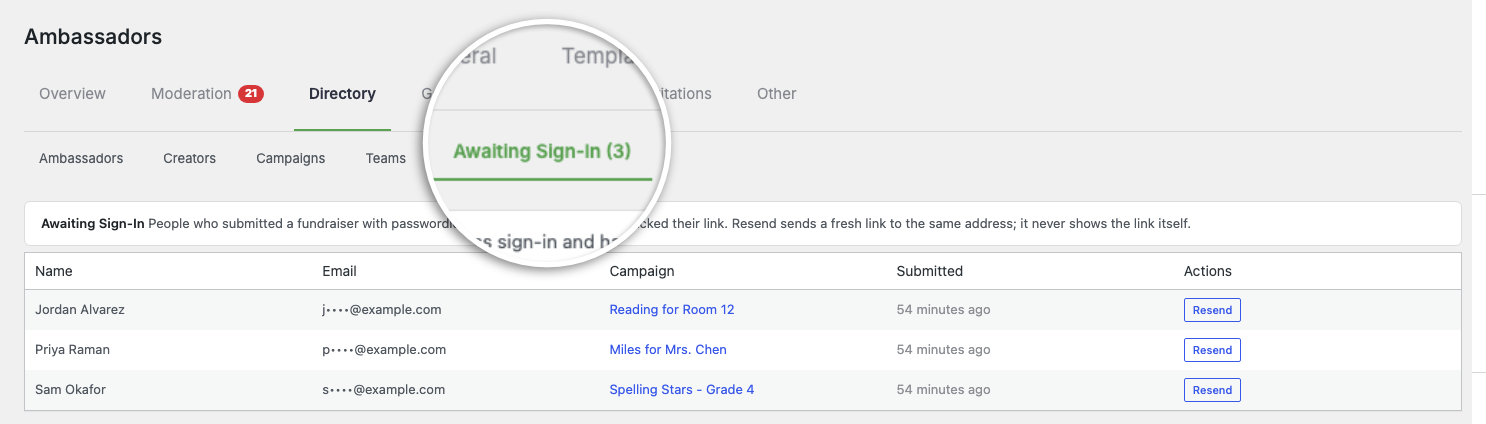
Most organizers want to know if their fundraisers actually got in. The Charitable » Ambassadors » Directory » Awaiting Sign-In tab answers that.
It lists everyone who submitted a fundraiser but hasn’t clicked their link yet. Each row shows the campaign they signed up for and has a Resend button.
There are 2 things to know about this screen.
- Email addresses are partly hidden by default. They show as
s****@example.com. The hidden part is always the same length, so it never hints at how long the address is. A developer can switch this off with the filter in the developer reference below. - Resending cancels the previous link. Each person only has one working link at a time. When someone asks for a new one, any earlier link stops working.
The Passwordless Sign-In Emails and When They Send
Passwordless Fundraiser Accounts add 2 emails. You’ll find both under Charitable » Settings » Emails.
| When it sends | |
|---|---|
| Creator: Finish Your Fundraiser | It sends when a new fundraiser submits their page for the first time. |
| Creator: Sign-In Link | It sends when a returning fundraiser asks to sign in again. |
You can edit both, like every other Charitable email. The first one carries the only link that can complete a sign-up, so it always sends, even if your saved email settings are older than this feature.
How Passwordless Accounts Check Your Email Delivery
The whole feature depends on email, so the Submit Form screen warns you when something would stop a fundraiser getting in. These are the notices you’re most likely to see.
| Warning | What it means |
|---|---|
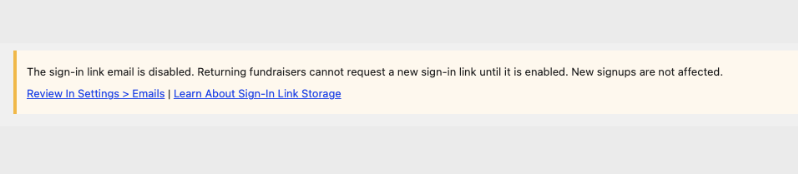
| The sign-in link email is disabled | Returning fundraisers can’t ask for a new link. New sign-ups still work. |
| Its database table is missing | Sign-ups and sign-ins both fail. The storage page explains how to fix this. |
| Links are outstanding | This counts links that were sent but haven’t been clicked yet. It’s for your information and doesn’t mean anything is wrong. |
| Cache compatibility is off | Sign-in links may not work behind some caches. |
Tips Worth Keeping in Mind
These habits help every fundraiser get in on the first try.
- Test with an email address you can read. The sign-up only works as well as your site’s email, and going through it yourself once is the quickest way to find a problem.
- Sign-in links expire. Each link works once and only for a limited time. Someone who leaves the email for 2 weeks will need a new one, and the Resend button sends it.
- Clicking through is what completes the sign-up. Opening the email isn’t enough, and neither is a link preview. The developer reference below explains why.
- Check Awaiting Sign-In in the first week of a campaign. When a group of people never clicked, it usually means there’s an email delivery problem.
Troubleshooting Passwordless Fundraiser Accounts
The Sign-In Email Never Arrived
Check the spam folder first, then check your site’s email sending in general. The notices on the Submit Form screen will tell you if the email itself is switched off.
If other Charitable emails are missing too, the problem is your site’s email setup rather than this feature.
The Sign-In Link Says It Has Already Been Used
Either the link really was used, or a newer link was sent and cancelled it. Press Resend on the Awaiting Sign-In tab and ask the fundraiser to use the newest email.
A New Fundraiser Isn’t in the Moderation Queue
Check the Awaiting Sign-In tab. If the fundraiser is listed there, they haven’t clicked their link yet, so the page is waiting on them rather than on you.
You Need to See the Full Email Address
Email addresses are partly hidden by default. A developer can show them in full with the charitable_ambassadors_awaiting_mask_email filter below.
Developer Reference for Passwordless Fundraiser Accounts
How the Passwordless Sign-In Flow Works
A submission issues a single-use token, which is emailed as a link. Opening the link renders a page, and submitting that page is what redeems the token, creates or resolves the account, claims the draft fundraiser, and signs the person in.
The page in between exists so an email scanner or link preview can’t use up the link before the person clicks it.
Tokens are 256 bits of CSPRNG output, stored as an HMAC-SHA256 hash keyed on wp_salt(), never in plain text. Redemption is a single conditional UPDATE, so a scanner prefetch and a human click can’t both succeed.
Capabilities of a Passwordless Fundraiser Account
An account created this way gets the campaign_creator role, which carries edit_campaigns and read and nothing else. There is deliberately no filter to change that.
Passwordless Filters
| Filter | Purpose |
|---|---|
charitable_ambassadors_awaiting_mask_email | Return false to show full addresses on the Awaiting Sign-In tab. Addresses are masked by default. |
charitable_ambassadors_passwordless_storage_docs_url | It sets the documentation URL linked from the settings help text and the self-check notices. |
// Show full addresses in Awaiting Sign-In to anyone who can open that screen.
add_filter( 'charitable_ambassadors_awaiting_mask_email', '__return_false' );
Passwordless Actions
| Action | Runs |
|---|---|
charitable_ambassadors_passwordless_redeemed | It runs after a token is redeemed and the account is resolved. It receives the user ID, purpose and campaign ID. |
Passwordless Template Overrides
You can override both public screens in your theme.
your-theme/charitable/charitable-ambassadors/passwordless/redeem.php
your-theme/charitable/charitable-ambassadors/passwordless/notice.php
Sign-In Link Rate Limiting
Link issuance is limited per email address, not per IP. That’s deliberate, because a whole school or office network often shares one IP address, and a limit per IP would lock out real families.
Brute force is handled by the token entropy rather than by throttling.
Wrapping Up
You now know how to turn on Passwordless Fundraiser Accounts, set them for each campaign, follow up with fundraisers who haven’t signed in, and read the email delivery checks. Your supporters can start a fundraiser with just their email address.
If you get stuck on any step, our support team is happy to help.
You May Also Want to Read
These guides cover the parts of Ambassadors that passwordless sign-up works with.
- How Sign-In Link Data Is Stored. See what the sign-in link table holds and how to fix it if it goes missing.
- Peer-to-Peer Concepts. Learn how parent campaigns, fundraisers and teams fit together.
- Moderation. Decide whether new fundraiser pages need your approval before they go live.
- Directory. Find every fundraiser, creator, campaign and team in one place, including the Awaiting Sign-In tab.
- Hooks and Filters in Ambassadors. Browse the full developer reference.
Helpful Links
🤝 Get help when you need it
Connect with Customer Support →
📑 Find the guide you need
Browse the Documentation Hub →
⬇️ Download proven strategies, campaign ideas, and expert tools
🔗 Let your AI Assistant do the fundraising work for you.
Connect Charitable to your AI assistant →
💸 Get Free Fundraising Resources
Head to the Charitable Fundraising Hub →
🤔 Got questions about Charitable?
Charitable FAQs →
Need help understanding non-profit terms and jargon?
See our Non-Profit Glossary →