Requires: Charitable Pro 1.8.16+
Charitable Ambassadors 3.0.0+
The Invitations feature uses a small custom database table to store the unique tokens that power your ambassadors’ invite URLs. This page explains where that table is, when it gets created, what’s inside it, and what happens if it ever goes missing.
If you’ve never thought about your site’s database before, the short version is: it’s a small, well-managed table that the plugin handles automatically. The rest of this page is for when something unusual happens (an upgrade went sideways, a backup didn’t restore cleanly, an admin asks “what data does this feature store?”) and you need to know the details.
The Short Version
| Question | Answer |
|---|---|
| What’s stored? | One row per invite token. Each row has the token string, the inviter’s user ID, an optional campaign ID, a created date, a revoked date (if revoked), a view count, and a claim count. |
| Where’s it stored? | In a custom table named <wp_prefix>charitable_ambassadors_invite_tokens (e.g. wp_charitable_ambassadors_invite_tokens). |
| When is the table created? | The first time you enable Invitations on the admin page. Until then, the table doesn’t exist. |
| Is any personal data stored? | No – just the inviter’s WordPress user ID. No names, no emails, no IPs. |
When the Table Is Created
Until you enable Invitations, the custom table doesn’t exist – the feature is fully opt-in. The first time you toggle Enable Invitations on at Charitable > Ambassadors > Invitations, you’ll see a one-time confirmation modal explaining what’s about to happen:
“Turning on Invitations will create a new database table to store invite tokens. The table is small and only used by the Invitations feature. Continue?”
Confirm, and the table is created via WordPress’s standard dbDelta() helper (the same mechanism every plugin uses to manage custom tables safely). The schema is rebuilt idempotently – if the table already exists, dbDelta() only emits the ALTER statements it actually needs.
A row is also written to wp_options:
charitable_ambassadors_invites_schema_version = '1.0'
This is how the plugin knows what version of the schema your table is on, so future upgrades can migrate cleanly.
What’s Inside the Table
The table has eight columns – no PII, no donation amounts, nothing the inviter doesn’t already see in their own My Campaigns page:
| Column | What it stores |
|---|---|
id | Auto-incrementing primary key. |
token | The unique string that appears in the URL. 16 characters, alphanumeric. |
user_id | The WordPress user ID of the inviter. |
campaign_id | (Optional) A parent campaign ID, when the token is scoped to a specific cause. |
created_at | When the token was first generated. |
revoked_at | When the token was revoked (null if active). |
view_count | How many times someone has clicked this token’s URL. |
claim_count | How many recruits have successfully signed up via this token. |
That’s it. No emails, no IPs, no browser fingerprints. The inviter and the recipient are both protected.
How the Table Is Used
Three things happen against this table during normal operation:
- Token creation – the first time an eligible ambassador visits My Campaigns with Invitations on, a token row is created for them (and an additional row for each parent campaign they own).
- Click resolution – when someone clicks an invite URL, the URL handler looks the token up to find the inviter.
- Counters –
view_countis bumped on every click;claim_countis bumped when a recruit successfully attributes.
That’s the whole lifecycle. There’s no background processing, no scheduled jobs, no syncing to external services.
The Four Self-Check States
The Invitations admin tab has a self-check banner that catches the rare moments when something’s off:

| You’ll see | What’s wrong | What to do |
|---|---|---|
| Red: “Enabled but database table missing” | A plugin update, manual DB cleanup, or backup restore wiped the table while the setting stayed on. | Click Recreate Table – the schema is rebuilt in place. No data loss for new clicks; old tokens are gone. |
| Yellow: “Schema out of date” | A future upgrade introduced a newer schema; your install hasn’t migrated yet. | Click Run Upgrade. The migration is safe and idempotent. |
| Blue: “Disabled but data exists” | You turned the feature off but the table is still there with token rows in it. | Either Re-enable (data resumes use), or Permanently delete and remove table (data is gone for good). |
| Blue: “Cache compatibility off” | A caching plugin may cache your invite landing page, which would break attribution. | Turn on Cache Compatibility under Charitable > Settings > Advanced > Misc. |
The self-check runs on every visit to the Invitations tab and on Charitable Tools > Site Info. It’s how you find out about table problems before they hit your customers.
Turning the Feature off (Soft Disable)
If you decide Invitations isn’t right for your program, Disable Invitations at the top of the admin tab:
- The toggle flips to off.
- The shortcode stops rendering on the landing page (or shows the admin preview when an admin views it).
- The recruit card stops appearing on My Campaigns.
- The URL handler stops fielding
?charitable-invite=...clicks. - The table stays. Token history is preserved so you can re-enable later without losing it.
This is reversible – re-enable any time and the existing tokens resume working.
Permanently Deleting the Data (Hard Uninstall)
If you want the data gone – say, for GDPR compliance or because you’ve decided you definitely won’t use Invitations again – use Permanently delete and remove table at the bottom of the Invitations tab:
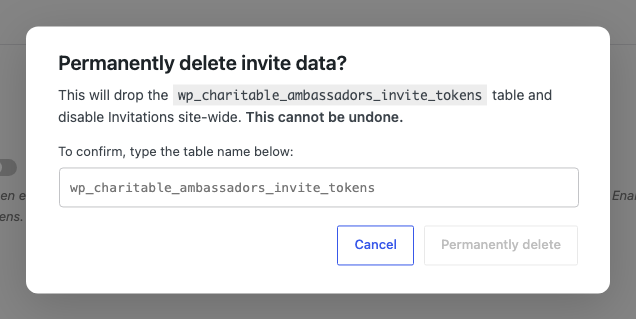
The destructive flow is intentionally a few steps:
- Click Permanently delete and remove table.
- A confirmation modal asks you to type the table name (e.g.
wp_charitable_ambassadors_invite_tokens) to confirm. - Submit. The table is dropped, the
_schema_versionoption is removed, theinvites_enabledsetting is set to off. - The action is logged to Charitable Tools > Log with the moderator’s user ID.
This is a one-way door. The next time you enable Invitations, a fresh table is created with zero rows.
What Happens During an Export / Backup
The table is a regular MySQL table inside your WordPress database. Any tool that backs up WordPress databases (UpdraftPlus, BackupBuddy, mysqldump, your host’s automated backups) includes it automatically. Restores work the same way – bring the database back, the table comes with it.
What Happens During an Export of Personal Data
The WordPress Personal Data Export tool exports the user’s WordPress account data. The Invitations table stores user_id references, so a user’s invite tokens are included in their personal data export (token strings + view/claim counts). No PII beyond the user ID is in the table.
Tips
- Don’t manually edit the table. The plugin’s admin UI exposes everything you’d need – revoke a token, regenerate a token, see counts. Hand-editing rows breaks
claim_countintegrity. - If you restore a backup that doesn’t include this table, the self-check will catch it on the next admin visit and offer Recreate Table.
- The schema is versioned. Future plugin updates may add columns; the upgrade is safe and idempotent.
- No SQL in this doc by design. Schemas drift; the docs shouldn’t carry them. Always read the plugin’s
Charitable_Ambassadors_Invites_Schemaclass for the canonical column list.
Developer Reference
The rest of this page is for developers and DBAs.
Schema class
Charitable_Ambassadors_Invites_Schema::table_name();        // string - prefixed name
Charitable_Ambassadors_Invites_Schema::exists();            // bool   - does the table exist
Charitable_Ambassadors_Invites_Schema::is_current();        // bool   - exists + columns match + version current
Charitable_Ambassadors_Invites_Schema::schema_version();    // string - stored version (empty if no record)
Charitable_Ambassadors_Invites_Schema::create();            // creates via dbDelta + stamps version
Charitable_Ambassadors_Invites_Schema::upgrade();           // idempotent migration to current schema
Charitable_Ambassadors_Invites_Schema::drop();              // drops table + deletes schema-version option
All methods are static and safe to call from any context (the file is loaded unconditionally so the self-check and Site Info can interrogate state even when Invitations is disabled).
Option keys
charitable_ambassadors_invites_schema_version       # current installed schema version
charitable_settings > ambassadors > invites_enabled # feature master switch
Tokens class
For working with rows in the table programmatically:
Charitable_Ambassadors_Invites_Tokens::get_or_create( $user_id, $campaign_id = 0 );
Charitable_Ambassadors_Invites_Tokens::lookup_by_token_string( $token_string );
Charitable_Ambassadors_Invites_Tokens::lookup_by_id( $token_id );
Charitable_Ambassadors_Invites_Tokens::increment_view( $token_id );
Charitable_Ambassadors_Invites_Tokens::increment_claim( $token_id );
Charitable_Ambassadors_Invites_Tokens::revoke( $token_id );
Charitable_Ambassadors_Invites_Tokens::build_invite_url( $token_string );
Filters
| Filter | Default | Purpose |
|---|---|---|
charitable_ambassadors_invites_table_name | wp_charitable_ambassadors_invite_tokens | Override the table name (e.g. multisite scoped tables). Not recommended in production. |
charitable_ambassadors_invitations_storage_docs_url | this page | Override the docs URL the self-check banners link to. |
Actions
| Action | Args | Fires when |
|---|---|---|
charitable_ambassadors_invites_schema_created | $table_name | Schema::create() actually created (not just updated) the table. |
charitable_ambassadors_invites_schema_upgraded | $from_version, $to_version | Schema::create() ran dbDelta and applied ALTERs. |
charitable_ambassadors_invites_schema_dropped | $table_name | Schema::drop() removed the table. |
Site Info integration
Charitable Tools » Site Info has an Ambassadors block that shows:
- Whether the table exists.
- The current schema version.
- The total row count.
- Whether the schema is current.
See Site Info for the full layout.
Multisite
Each subsite gets its own table because the table name is prefixed via $wpdb->prefix. Network-active doesn’t change this – the feature still opts in per subsite.
Personal data export
The Invitations feature registers a personal-data exporter with the WordPress Privacy Tools. When a user requests their personal data export, the exporter walks their token rows and includes the token strings, dates, view counts, and claim counts in their export.
Capabilities
All admin operations (recreate, upgrade, drop) require manage_charitable_settings. The destructive uninstall additionally requires typing the table name to confirm.
Customization Examples
Hide the destructive uninstall option from a specific user role:
add_filter( 'user_has_cap', function ( $allcaps, $caps, $args ) {
    if ( ! empty( $caps ) && in_array( 'manage_charitable_settings', $caps, true ) ) {
        $user = get_userdata( $args[1] );
        if ( $user && in_array( 'finance_admin', (array) $user->roles, true ) ) {
            unset( $allcaps['manage_charitable_settings'] );
        }
    }
    return $allcaps;
}, 10, 3 );
Webhook your audit system when the destructive uninstall fires:
add_action( 'charitable_ambassadors_invites_schema_dropped', function ( $table_name ) {
    wp_remote_post( 'https://audit.example.com/hook', [
        'body' => [
            'event'      => 'invites_table_dropped',
            'table_name' => $table_name,
            'user_id'    => get_current_user_id(),
            'site_url'   => site_url(),
            'timestamp'  => time(),
        ],
    ] );
} );
Re-point the self-check banners to your internal docs:
add_filter( 'charitable_ambassadors_invitations_storage_docs_url', function () {
    return home_url( '/internal/charitable-invitations-runbook/' );
} );
Related
- Invitations – the parent feature doc.
- How Attribution Works – the click-to-credit flow.
- Site Info – the diagnostics block that surfaces table state.
- Hooks & filters in Ambassadors – full reference.
Helpful Links
🤝 Get help when you need it
Connect with Customer Support →
📑 Find the guide you need
Browse the Documentation Hub →
⬇️ Download proven strategies, campaign ideas, and expert tools
🔗 Let your AI Assistant do the fundraising work for you.
Connect Charitable to your AI assistant →
💸 Get Free Fundraising Resources
Head to the Charitable Fundraising Hub →
🤔 Got questions about Charitable?
Charitable FAQs →
Need help understanding non-profit terms and jargon?
See our Non-Profit Glossary →