Requisitos: Charitable Pro 1.8.16+
Nota: DonationGuard se encuentra actualmente en beta en la versión 1.8.16.
DonationGuard es una capa de detección de ataques de bots en tiempo real para sus formularios de donación. Supervisa los envíos en busca de los patrones que dejan los atacantes coordinados: formularios rellenados a una velocidad anormalmente rápida, series de tarjetas fallidas desde IPs rotatorias, ratios donante/vista que ningún ritmo de navegación humano produce; abre Registros de Ataque con niveles de gravedad cuando los detecta y le alerta en el momento en que una campaña empieza a ser atacada.
Características clave
- Supervisa cada envío de donación en tiempo real en busca de cinco señales de ataque distintas
- Puntúa la actividad frente a una línea base aprendida del tráfico de donaciones normal de su sitio
- Abre un "registro de ataque" estructurado para que pueda revisar y actuar en bloque sobre donaciones sospechosas
- Alerta al administrador del sitio por correo electrónico, advertencia en la barra de administración y una notificación dentro del plugin
- Aplica un ajuste preestablecido de "Configuración recomendada" con un solo clic que activa los módulos Honeypot, Time Trap y Rate Limit
- Bloquea a los infractores reincidentes por dirección de correo electrónico con un umbral configurable y una ventana de retroceso
- Almacena las direcciones IP como hashes unidireccionales para el registro de ataques compatible con GDPR
- Limpia automáticamente los registros de ataques cerrados después de una ventana de retención que usted elija
¿Por qué usar DonationGuard?
Los bots de prueba de tarjetas se dirigen a las organizaciones sin fines de lucro porque los formularios de donación son públicos, gratuitos para enviar e informan instantáneamente al atacante si una tarjeta robada funciona. Una sola ejecución de bot puede enviar cientos de transacciones rechazadas en minutos, inflar sus tarifas de pasarela y activar revisiones de fraude por parte de su procesador. DonationGuard supervisa esos patrones automáticamente y le permite responder en segundos, en lugar de enterarse por Stripe un día después.
Requisitos
- Charitable Pro 1.8.16 o posterior.
- Una licencia activa de Charitable Pro (requerida para el ajuste preestablecido de Protección Rápida, que habilita los módulos de Bloqueo de Spam)
- WordPress 6.0 o posterior
Empezar
Activación
- En su administrador de WordPress, vaya a Charitable > Ajustes.
- Haga clic en la pestaña Seguridad.
- Haga clic en la subpestaña DonationGuard.
- Marque Habilitar y haga clic en Guardar Cambios.
DonationGuard comienza a supervisar en el próximo envío de donación. El detector se limita a un ciclo completo cada 60 segundos, por lo que un solo pico de actividad se consolida en un registro de ataque en lugar de docenas de duplicados.
Ajustes de DonationGuard
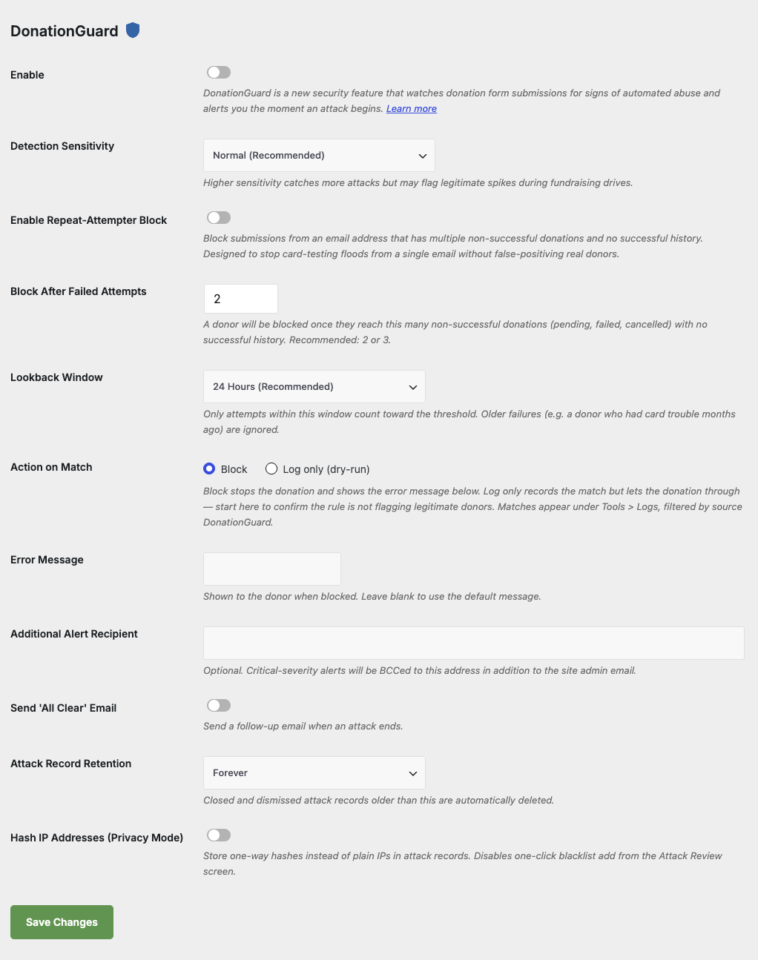
Ajustes Recomendados con un Clic
Dentro de la pestaña DonationGuard verá una tarjeta de Protección Rápida con un botón de Aplicar Ajustes Recomendados. Al hacer clic en él, se habilitan tres módulos de Bloqueo de Spam con valores predeterminados sensatos:
- Honeypot — añade un campo invisible que los donantes reales nunca rellenan
- Time Trap — rechaza envíos que llegan más rápido de lo que un humano podría escribir
- Rate Limit — limita los envíos de un solo visitante a 10 por ventana
Estos módulos requieren una licencia Pro activa. Si su licencia está inactiva, el botón se reemplaza por un enlace de Activar Licencia.
Opciones de configuración
Parámetros de Detección Centrales
| Parámetro | Tipo | Predeterminado | Descripción |
|---|---|---|---|
| Habilitar | casilla de verificación | Desactivado | Interruptor principal de DonationGuard. |
| Sensibilidad de detección | seleccionar | Normal | Baja, Normal o Alta. Una configuración más alta detecta más ataques, pero puede marcar picos legítimos de recaudación de fondos. |
| Destinatario adicional de alertas | correo electrónico | (vacío) | Segundo correo electrónico opcional al que se enviarán las alertas críticas en copia oculta (CCO) además del administrador del sitio. |
| Enviar correo electrónico de 'Todo despejado' | casilla de verificación | Desactivado | Enviar un correo electrónico de seguimiento cuando finaliza un ataque. |
| Retención de registros de ataques | seleccionar | Para siempre | Eliminar automáticamente los registros de ataques cerrados y desestimados con más de 30 días, 90 días, 1 año o nunca. |
| Hashing de direcciones IP (Modo de privacidad) | casilla de verificación | Desactivado | Almacenar hashes unidireccionales en lugar de IPs en texto plano. Deshabilita la adición de IP a la lista negra con un clic desde Revisión de ataques. |
Parámetros de bloqueo de intentos repetidos
El bloqueo de intentos repetidos detiene las inundaciones de prueba de tarjetas que provienen de una única dirección de correo electrónico sin marcar falsamente a donantes reales que simplemente tuvieron problemas con la tarjeta.
| Parámetro | Tipo | Predeterminado | Descripción |
|---|---|---|---|
| Habilitar bloqueo de intentos repetidos | casilla de verificación | Desactivado | Bloquear envíos de un correo electrónico con múltiples donaciones no exitosas y sin historial exitoso. |
| Bloquear después de intentos fallidos | número | 2 | Bloquear una vez que se acumulen estos intentos de donación no exitosos (pendientes, fallidos, cancelados). Recomendado: 2 o 3. |
| Ventana de observación | seleccionar | 24 horas | Solo los intentos dentro de esta ventana cuentan. Opciones: 1 hora, 6 horas, 24 horas, 7 días, 30 días, Para siempre. |
| Acción al coincidir | radio | Bloquear | Bloquear detiene la donación. Solo registrar registra la coincidencia en Herramientas > Registros, pero permite que la donación continúe. |
| Mensaje de error | texto | (predeterminado) | Se muestra al donante cuando se bloquea. Deje en blanco para usar el mensaje incorporado. |
Protección Rápida Preestablecida
| Módulo | Predeterminado | Lo que hace |
|---|---|---|
| Honeypot | Desactivado | Añade un campo de formulario invisible que los bots rellenan pero los humanos no pueden ver. |
| Trampa de tiempo | Desactivado | Rechaza envíos que llegan en menos de los segundos mínimos configurados. |
| Límite de Tasa | Desactivado | Limita el número de envíos que un solo visitante puede realizar por ventana (predeterminado: 10). |
Cómo funciona la detección
DonationGuard ejecuta un ciclo de detección cada vez que una donación entra en estado pendiente (a través de la acción charitable_donation_pending_recorded), limitado a un ciclo cada 60 segundos. Cada ciclo:
- Calcula cinco señales contra una línea base aprendida por hora de su tráfico normal.
- Combina esas desviaciones en una única puntuación ponderada.
- Mapea la puntuación a un nivel: Advertencia o Crítico.
- Abre un nuevo registro de ataque, escala uno existente o cierra un ataque inactivo.
- Envía notificaciones sujetas a un período de enfriamiento de 4 horas y un límite máximo de 6 correos por día.
Las Cinco Señales
| Señal | Lo que vigila |
|---|---|
| Tasa de Pendientes | Volumen de donaciones pendientes en la ventana reciente frente a la línea base para esta hora. |
| Ratio | Ratio de donaciones pendientes frente a exitosas. |
| Abanico de IPs | Direcciones IP distintas que envían en la ventana. Un alto número de IPs es una señal clásica de botnet. |
| Tasa de Rechazos | Porcentaje de rechazos de pasarela en la ventana. Las pruebas de tarjetas producen un estallido de rechazos. |
| Temporización | Patrón de tiempo de envío. Los bots tienden a enviar mucho más rápido que los humanos. |
Hasta que su sitio haya recopilado suficiente historial de donaciones para aprender su propia línea base, DonationGuard recurrirá a un valor predeterminado estático seguro ("modo de calentamiento").
Revisión de Ataques
Cuando DonationGuard detecta un ataque, tienes varias formas de verlo y actuar sobre él.
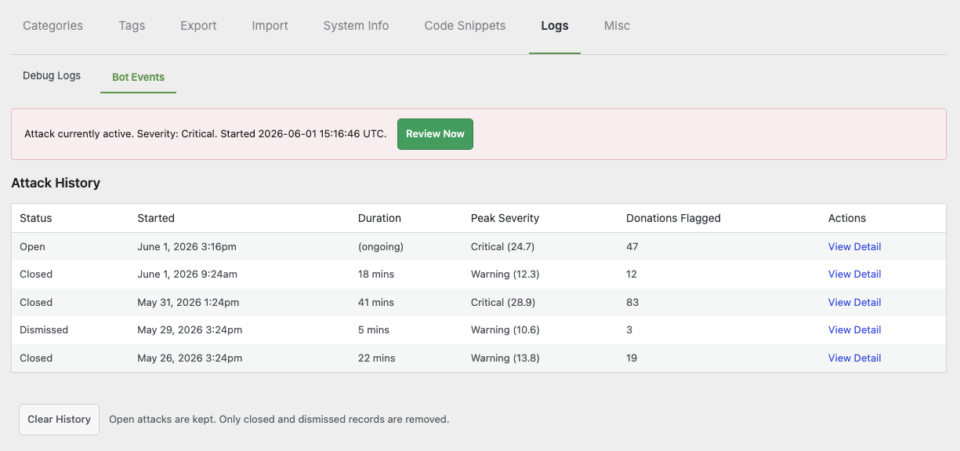
Barra de Administración y Banner
Los ataques abiertos aparecen como una advertencia en la barra de administración de WordPress y un banner en línea en el panel de control de Charitable. Haz clic en cualquiera de ellos para ir a la pantalla de Revisión de Ataques.
Pantalla de Revisión de Ataques
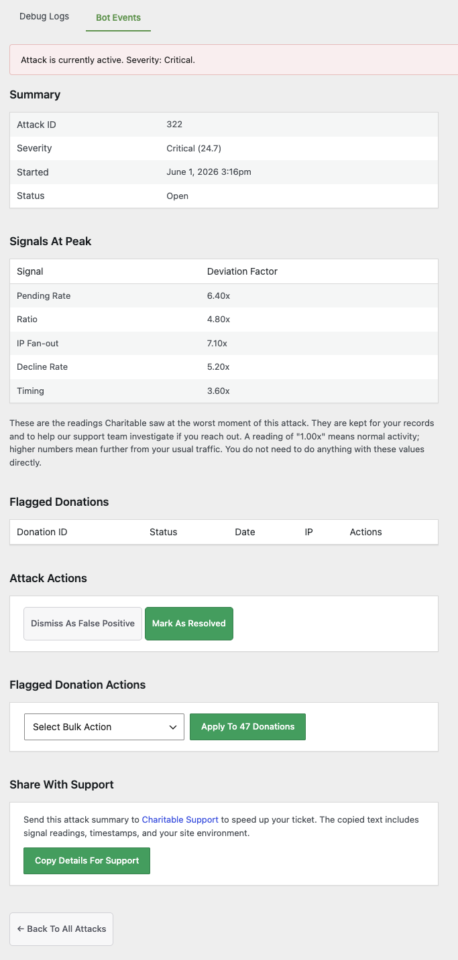
Ubicada en Charitable > Herramientas > Registros > Revisiones de Ataques. La pantalla enumera los ataques abiertos con el nivel de gravedad, el desglose de señales, el número de donaciones y la hora de apertura. Haz clic en un ataque para ver cada donación sospechosa agrupada, con acciones masivas para marcarlas como spam, cancelarlas o descartar falsos positivos.
Alertas por Correo Electrónico
Las alertas críticas se envían al administrador del sitio y a la dirección opcional de Destinatario Adicional de Alertas. Cada correo electrónico incluye la gravedad, las señales principales que lo activaron, el número de donaciones y un enlace directo a la pantalla de Revisión de Ataques. El volumen de correos electrónicos está limitado a uno cada 4 horas y 6 por día, para que un ataque prolongado no sature tu bandeja de entrada.
Personalización
Filtrar la Lista de Destinatarios de Alertas
add_filter( 'charitable_bot_email_recipients', function ( $recipients ) {
    $recipients[] = '[email protected]';
    return $recipients;
} );
Ajustar Pesos de Señales
add_filter( 'charitable_bot_signal_weights', function ( $weights ) {
    $weights['ip_fanout'] = 2.0;
    return $weights;
} );
Desactivar la Función para un Entorno Específico
add_filter( 'charitable_bot_protection_enabled', '__return_false' );Solución de problemas
El botón de Configuración Rápida está desactivado o reemplazado por un enlace Activar Licencia
El preset de Protección Rápida activa módulos de Spam Blocker que requieren una licencia Pro activa. Visita Charitable > Configuración > Licenciasy activa tu licencia, luego regresa a la pestaña DonationGuard.
No se abren registros de ataques a pesar de actividad sospechosa
Confirma que Habilitar está marcado en Configuración > Seguridad > DonationGuard. El detector también requiere que el filtro maestro de interruptor de emergencia charitable_bot_protection_enabled devuelva true. Los primeros 14 días de detección utilizan una línea base estática (calentamiento), que es intencionalmente conservadora.
El Bloqueador de Intentos Repetidos está marcando a donantes legítimos
Cambia Acción en Coincidencia a Solo registrar (simulacro) durante una semana. Las coincidencias aparecerán en Herramientas > Registros filtradas por origen DonationGuard para que puedas revisarlas sin bloquear donaciones reales. Extiende la Ventana de Búsqueda o aumenta Bloquear Después de Intentos Fallidos si ves falsos positivos.
Las alertas por correo electrónico dejaron de llegar durante un ataque activo
DonationGuard aplica un período de enfriamiento de 4 horas entre correos de alerta y un límite máximo de 6 correos por día por sitio. Las notificaciones del banner, la barra de administración y dentro del plugin continúan actualizándose en tiempo real incluso cuando el correo electrónico está limitado.
El equipo de privacidad pregunta sobre el almacenamiento de IP
Activa Hashear Direcciones IP (Modo Privacidad) en la pestaña DonationGuard. Las IPs en los registros de ataques se almacenarán como hashes unidireccionales. La acción de "bloquear esta IP" con un clic en la pantalla de Revisión de Ataques se deshabilita en este modo.
Notas Varias.
Nota: La activación de DonationGuard activará automáticamente el Seguimiento de uso. Si bien no se envía nueva información como resultado de esta acción, y no hay cambios en cómo se mantiene la privacidad, los datos permitirán mejorar DonationGuard en futuras actualizaciones.
¿Qué se protege?
DonationGuard inspecciona cada envío de formulario de donación contra un conjunto dinámico de señales de comportamiento (tiempo, tasa de rechazo, distribución de IP, ratio, tasa pendiente) y calcula una puntuación de severidad. Cuando la puntuación supera un umbral, se abre un Registro de Ataque. A medida que llegan más envíos que coinciden con el mismo patrón, el registro escala de Advertencia a Crítico. Cuando la actividad disminuye, el registro se cierra automáticamente; también puedes Desestimar falsos positivos manualmente.
La función 1.8.16 se lanza con tres capas que funcionan de forma independiente:
| Capa | Lo que hace | ¿Dónde se encuentra? |
|---|---|---|
| Detector DonationGuard | Puntuación pasiva basada en señales. Abre Registros de Ataque, envía alertas por correo electrónico, opcionalmente bloquea el patrón de reintentos repetidos. | Ajustes > Seguridad > DonationGuard |
| Módulos de campos de formulario | Defensas activas por envío: Honeypot (campo señuelo que los bots rellenan) y Time Trap (rechaza envíos de menos de 2 segundos). | Ajustes > Seguridad > Formularios y Campañas |
| Cloudflare Turnstile + asistente de configuración | Una alternativa gratuita y sin fricciones a reCAPTCHA. Un asistente en línea de 3 pasos te ayuda a obtener una clave y pegarla. | Ajustes > Seguridad > Captcha |
Cómo encontrarlo
| ¿Qué? | ¿Dónde? |
|---|---|
| Historial de ataques (el registro continuo de ataques detectados) | Benéfico > Herramientas > Registros > Eventos de Bots |
| Ajustes de DonationGuard (sensibilidad de detección, alertas, regla de reintentos repetidos) | Benéfico > Ajustes > Seguridad > DonationGuard |
| Interruptores Honeypot + Time Trap | Benéfico > Ajustes > Seguridad > Formularios y Campañas |
| Asistente de configuración de Cloudflare Turnstile | Benéfico > Ajustes > Seguridad > Captcha (cuando Turnstile es el proveedor seleccionado) |
Historial de ataques
La subpestaña Eventos de Bots en Herramientas > Registros es donde aterrizan todos los ataques detectados. Cada fila es un Registro de Ataque:
| Columna | Lo que muestra |
|---|---|
| Estado | Abierto (actualmente activo), Cerrado (la actividad disminuyó; DonationGuard lo cerró automáticamente) o Desestimado (lo marcaste como un falso positivo). |
| Iniciado | Cuando aterrizó la primera sumisión que calificó. |
| Duración | Cuánto duró la ráfaga desde la primera hasta la última sumisión coincidente, o (en curso) si aún está abierta. |
| Severidad Máxima | La puntuación más alta que alcanzó el registro durante su ejecución. Crítico o Advertencia, con una puntuación numérica (p. ej., Crítico (0.9)). |
| Donaciones Marcadas | Número de envíos de formularios vinculados a este patrón de ataque. |
| Acciones | Un enlace Ver detalle para el análisis detallado por registro. |
Debajo de la tabla, el botón Borrar historial elimina los registros cerrados y descartados, pero deja los ataques abiertos (para que no puedas ocultar accidentalmente un incidente activo de tu propia vista).
Honeypot y Trampa de tiempo
DonationGuard funciona con dos nuevos módulos de formulario sin fricción que se envían en la versión 1.8.16, ambos en Configuración > Seguridad > Formularios y Campañas:
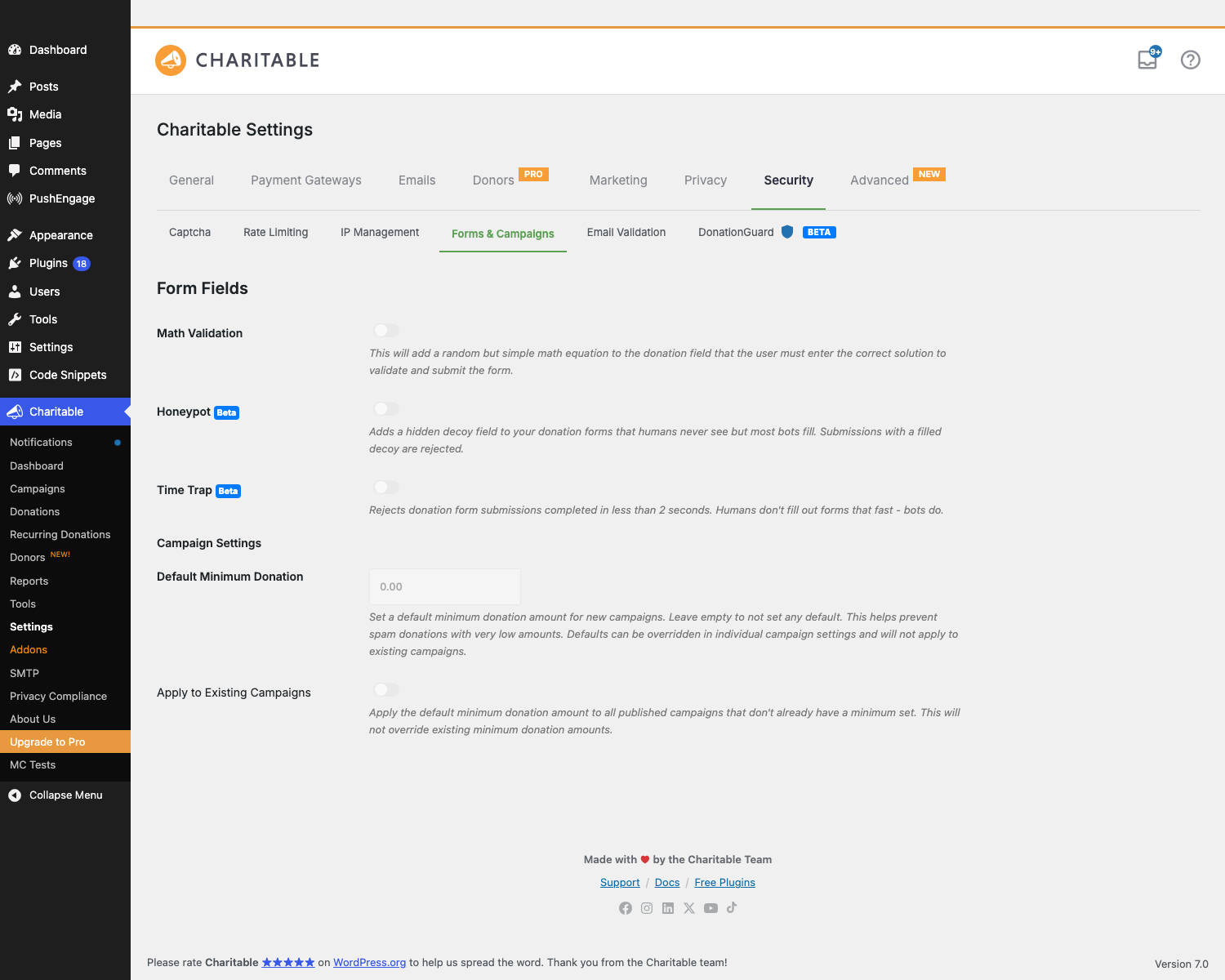
Honeypot
Se inyecta un campo señuelo oculto en cada formulario de donación. Los humanos reales nunca lo ven (es un <input type="hidden">). Los bots ingenuos autocompletan cualquier cosa que parezca una URL o una entrada de sitio web; cuando el campo se rellena, la sumisión se rechaza silenciosamente.
- Configuración: Honeypot — un único interruptor de encendido/apagado.
- Experiencia del donante: cero. Sin captcha, sin problema matemático, sin fricción.
- Lo que detecta: bots de spam de formularios tontos que rellenan todos los campos de un formulario. No detecta bots sofisticados que se dirigen específicamente a Charitable.
- Recomendado: siempre activado. No cuesta nada, detecta una parte significativa de abusos de bajo esfuerzo.
Trampa de tiempo
Rechaza las sumisiones de formularios de donación completadas en menos de 2 segundos. Los donantes no rellenan un formulario de varios campos tan rápido; los bots sí.
- Configuración: Trampa de tiempo — un único interruptor de encendido/apagado.
- Experiencia del donante: cero. Los humanos reales tardan entre 8 y 60 segundos en rellenar el formulario, incluso si son rápidos.
- Lo que detecta: remitentes de scripts que envían directamente al endpoint del formulario sin renderizar la página primero. Buen complemento para Honeypot.
- Recomendado: siempre activado.
Validación matemática (antigua pero todavía aquí)
Un módulo preexistente, conservado para completar en esta pestaña: añade un problema matemático aleatorio (8 - 5 = ?) al formulario de donación que los donantes deben responder correctamente para enviar. Más fricción que Honeypot o Trampa de tiempo; activa esto solo si estás recibiendo bots que superan las capas sin fricción.
Consejos
- Prueba en seco antes de bloquear. Cuando actives por primera vez el Bloqueo de reintentos, configura la Acción al coincidir en Solo registrar (prueba en seco) durante una semana. Observa las coincidencias en Herramientas > Registros. Si todos son atacantes reales, cambia a Bloquear. Si ves donantes legítimos, aumenta primero el umbral o la ventana de búsqueda.
- Compromiso del modo de privacidad. El hash de las direcciones IP hace que los Registros de ataques sean más amigables con el GDPR, pero deshabilita la adición de listas negras con un solo clic. Si de todos modos no añades a listas negras por IP, déjalo activado.
- La protección rápida está a un clic. Si no está seguro por dónde empezar, pulse Aplicar configuración recomendada en el panel de DonationGuard; activa Honeypot, Time Trap y Rate Limiting de una vez.
- Un registro de ataque abierto es más útil que uno cerrado. No desestime como falso positivo en medio de un incidente. Déjelo abierto hasta que termine el pico para poder analizarlo, recopilar patrones de IP/correo electrónico y solo entonces decidir si fue real.
- El correo electrónico de 'Todo despejado' es la señal más tranquilizadora. Ver cómo los incidentes activos se cierran es más tranquilizador que seguir las alertas en curso. Activa esto.
Referencia del desarrollador
Almacenamiento
| ¿Dónde? | ¿Qué? |
|---|---|
Tipo de publicación charitable_bot_atk | Cada registro de ataque es una publicación de este tipo. Los estados son publish (abierto), cb_bot_closed, cb_bot_dismissed. |
Meta de publicación _charitable_bot_attack_severity | Puntuación numérica de gravedad (0.0 — 1.0+) para un ataque en su punto álgido. |
Meta de publicación _charitable_bot_attack_severity_tier | Cadena: warning o critical. |
Meta de publicación _charitable_bot_attack_signals_at_peak | Instantánea JSON de los cinco valores de señal en el momento en que la gravedad alcanzó su punto máximo. |
Meta de publicación _charitable_bot_attack_donation_ids | Matriz JSON de los ID de publicación de donaciones marcados por este ataque. |
Opción charitable_bot_protection_settings | Copia interna de la configuración de DonationGuard que la ruta de acceso del detector lee directamente (sin pasar por la configuración de charitable_settings). |
Acciones
| Acción | Cuando se activa |
|---|---|
charitable_bot_attack_opened | Se abre un nuevo registro de ataque. Recibe $post_id, $tier. |
charitable_bot_attack_escalated | El nivel de un registro existente cambia hacia arriba (advertencia → crítico). Recibe $post_id, $previous_tier, $new_tier. |
charitable_bot_attack_closed | Un registro se cierra automáticamente porque la actividad disminuyó. Recibe $post_id, $reason. |
Extensión de señal
Las cinco señales integradas se encuentran en includes/pro/bot-protection/class-charitable-bot-signal-*.php. Cada una implementa una interfaz común (calcula un factor de desviación para el envío actual). Añada una señal personalizada extendiendo Charitable_Bot_Signal_Abstract y registrándola a través del filtro charitable_bot_signals; su señal se evaluará en cada envío y se incluirá en el puntuador junto con las integradas.
Mensajes de error personalizados
El mensaje de error del Bloqueador de Reintentos es filtrable por donante, útil si desea una redacción diferente para diferentes campañas:
add_filter( 'charitable_bot_repeat_attempter_block_message', function( $message, $email, $campaign_id ) {
    if ( $campaign_id === 123 ) {
        return 'Your donation could not be processed. Please contact our support team.';
    }
    return $message;
}, 10, 3 );
Ejemplos de personalización
Desactivar las alertas de DonationGuard por completo (mantener la detección, suprimir correos electrónicos):
add_filter( 'charitable_bot_attack_should_send_alert', '__return_false' );
Bajar el umbral de gravedad de los registros abiertos (más sensible: abre registros con eventos de puntuación más baja):
add_filter( 'charitable_bot_scorer_open_threshold', function( $threshold ) {
    return 0.5; // Default is around 0.6.
} );
Descartar automáticamente ataques por debajo de una puntuación:
add_action( 'charitable_bot_attack_opened', function( $post_id, $tier ) {
    $score = (float) get_post_meta( $post_id, '_charitable_bot_attack_severity', true );
    if ( $score < 0.65 ) {
        wp_update_post( array( 'ID' => $post_id, 'post_status' => 'cb_bot_dismissed' ) );
    }
}, 10, 2 );
Enviar alertas críticas a un webhook de Slack:
add_action( 'charitable_bot_attack_opened', function( $post_id, $tier ) {
    if ( 'critical' !== $tier ) {
        return;
    }
    $score = get_post_meta( $post_id, '_charitable_bot_attack_severity', true );
    wp_remote_post( SLACK_WEBHOOK_URL, array(
        'body' => json_encode( array(
            'text' => sprintf( 'DonationGuard: CRITICAL attack opened (#%d, score %.2f)', $post_id, $score ),
        ) ),
    ) );
}, 10, 2 );
Relacionado
- Centro de Documentación de Charitable – El índice principal de documentación.