Requisitos: Charitable Pro 1.8.16+
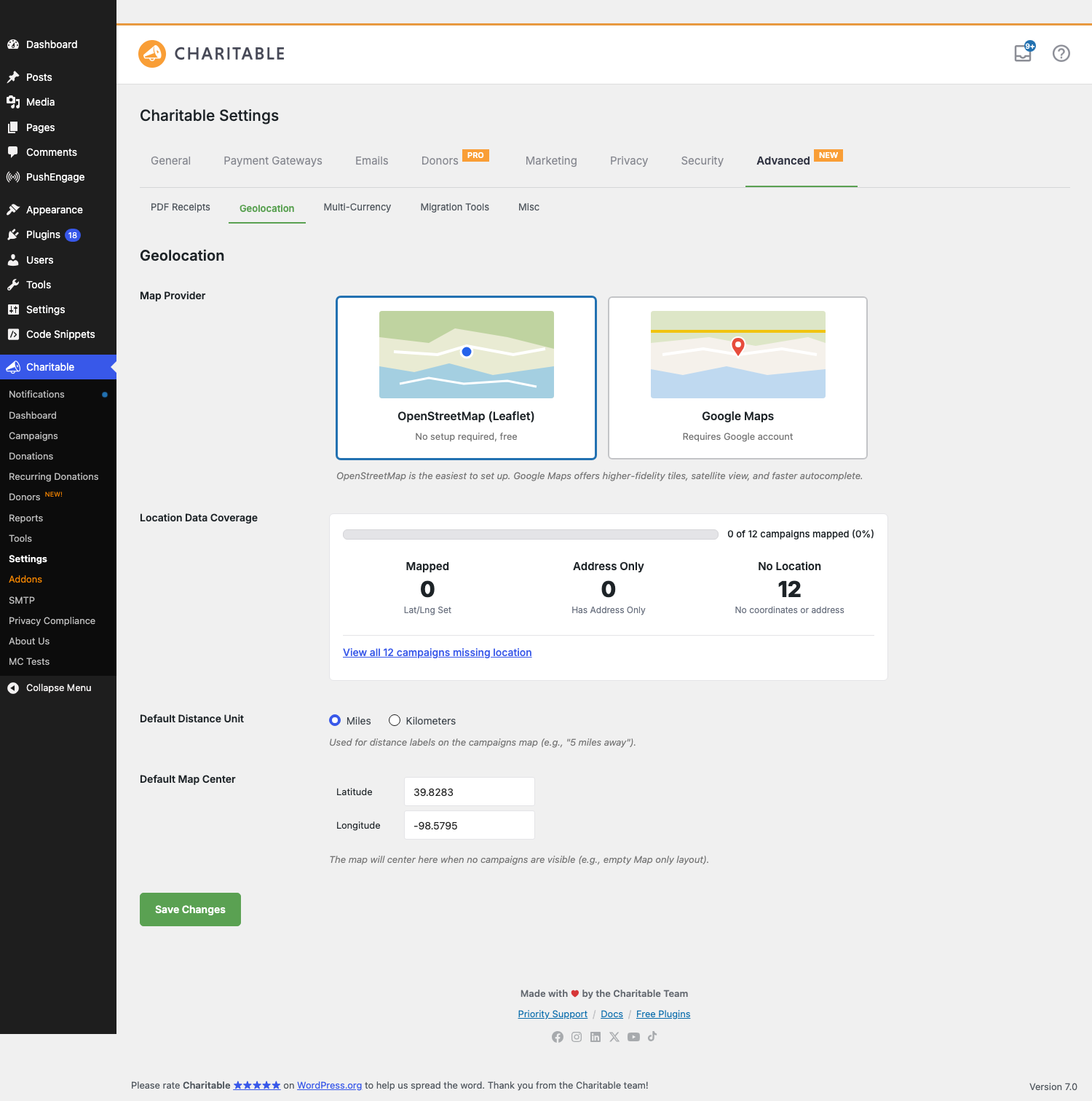
La geolocalización es la capa que convierte la latitud/longitud de las campañas individuales en los mapas, las etiquetas de distancia y la búsqueda "encontrar una campaña cerca de mí" que ves en el front-end. A partir de la versión 1.8.16, admite dos proveedores de mapas: OpenStreetMap (Leaflet) sin clave API, y Google Maps con teselas de mayor fidelidad, y añade una tarjeta de Cobertura de datos de ubicación para que puedas ver de un vistazo cuántas de tus campañas tienen datos geo.
Esta es la página de configuración. Para mostrar un mapa de esas campañas en el front-end, consulta la documentación del bloque Mapa de campañas.
Novedades en la versión 1.8.16
| Cambio | Lo que significa |
|---|---|
| Soporte de OpenStreetMap | Ya no necesitas una clave API de Google. OpenStreetMap (renderizado a través de Leaflet) es el nuevo valor predeterminado para instalaciones nuevas y es gratuito sin necesidad de cuenta. |
| Selector de proveedor de mapas | Un selector visual de dos tarjetas — OpenStreetMap (Leaflet) y Google Maps — reemplaza el flujo de configuración anterior. |
| Tarjeta de Cobertura de datos de ubicación | Bloque de estadísticas de un vistazo: cuántas campañas tienen lat/lng configurado, cuántas tienen solo dirección, cuántas no tienen datos de ubicación. Incluye un enlace de un clic para filtrar la lista de campañas a aquellas que carecen de datos de ubicación. |
| Autocompletado de direcciones con Nominatim | Bajo OpenStreetMap, el autocompletado de direcciones se potencia con el servicio Nominatim. Escribe dos o más caracteres en un campo de ubicación y obtendrás sugerencias, sin necesidad de cuenta de Google. |
| Centro de mapa predeterminado | Establece la latitud/longitud + zoom a la que el mapa retrocede cuando no hay campañas visibles. El valor predeterminado es el centro geográfico de los EE. UU. contiguos (39.8283, -98.5795). |
| Campo de ubicación de Embajadores | Cuando el complemento Embajadores está activo, el formulario público de envío de campañas obtiene un campo de Ubicación opcional con el mismo autocompletado (Nominatim bajo OpenStreetMap, Google Places bajo Google). |
Comportamiento de actualización: Los sitios que ya tenían una clave API de Google Places configurada en el momento de la actualización conservan Google Maps como su proveedor. Las instalaciones nuevas (y los sitios que no tenían ninguna clave configurada) utilizan OpenStreetMap por defecto. Puedes cambiar entre proveedores en cualquier momento sin pérdida de datos: la metadatos de latitud/longitud de las campañas se almacenan de forma independiente del proveedor.
Cómo encontrarlo
Administrador de WordPress > Charitable > Ajustes > Avanzado > Geolocalización
La pestaña Avanzado tiene subpestañas en la parte superior del panel (Recibos PDF, Geolocalización, Multidivisa, Herramientas de migración, Varios). Geolocalización es la segunda.
El panorama general
| Parte | Propósito |
|---|---|
| Proveedor de mapas | El servicio de teselas + autocompletado que utiliza el mapa. OpenStreetMap es gratuito; Google Maps requiere una clave. |
| Cobertura de datos de ubicación | Resumen de solo lectura de cuántas de tus campañas se pueden mapear. |
| Unidad de distancia predeterminada | Si las etiquetas de distancia se muestran como 5 millas de distancia o 8 km de distancia. |
| Centro de mapa predeterminado | La latitud/longitud + zoom a la que se fija el mapa cuando no hay nada que mostrar. |
| Ubicación por campaña | Establecido en cada campaña en el Creador de Campañas (metadatos _campaign_latitude, _campaign_longitude). |
| Campo de ubicación de Embajadores | Captura opcional de la ubicación durante el envío público de la campaña. |
Configuras el proveedor una vez en esta página. El bloque Mapa de Campañas (y el shortcode [campaigns map="1"]) luego renderiza mapas usando el proveedor que hayas seleccionado.
Proveedor de mapas
La elección del titular. Un selector de dos tarjetas:
OpenStreetMap (Leaflet)
No requiere configuración, gratuito. Los mosaicos provienen de los servidores de mosaicos de OpenStreetMap; el widget de mapa es la biblioteca de código abierto Leaflet. Recomendado para la mayoría de los sitios: no hay nada que registrar, ni límites de uso que supervisar, ni claves que rotar. La autocompletación de direcciones en las interfaces de administración y el formulario de Embajadores funciona con Nominatim, el servicio gratuito de geocodificación de OpenStreetMap.
Una nota sobre el uso de Nominatim: OpenStreetMap pide que las integraciones de alto volumen sean corteses (una solicitud por segundo por usuario, resultados cacheados cuando sea posible). La autocompletación de Charitable limita la entrada y almacena en caché las búsquedas, por lo que un sitio de donaciones con tráfico normal está cómodamente por debajo del límite.
Google Maps
Requiere una cuenta de Google y una clave API. Mejor fidelidad de mosaicos, incluye imágenes satelitales y la autocompletación es más rápida y más tolerante con direcciones parciales / mal escritas. Elige esta opción si ya te has estandarizado en los servicios de Google o si tus mapas serán la pieza central de la experiencia.
Al cambiar a Google se revela el campo Clave API de Google Places y un panel de Ayuda de Configuración con enlaces directos a Google Cloud:
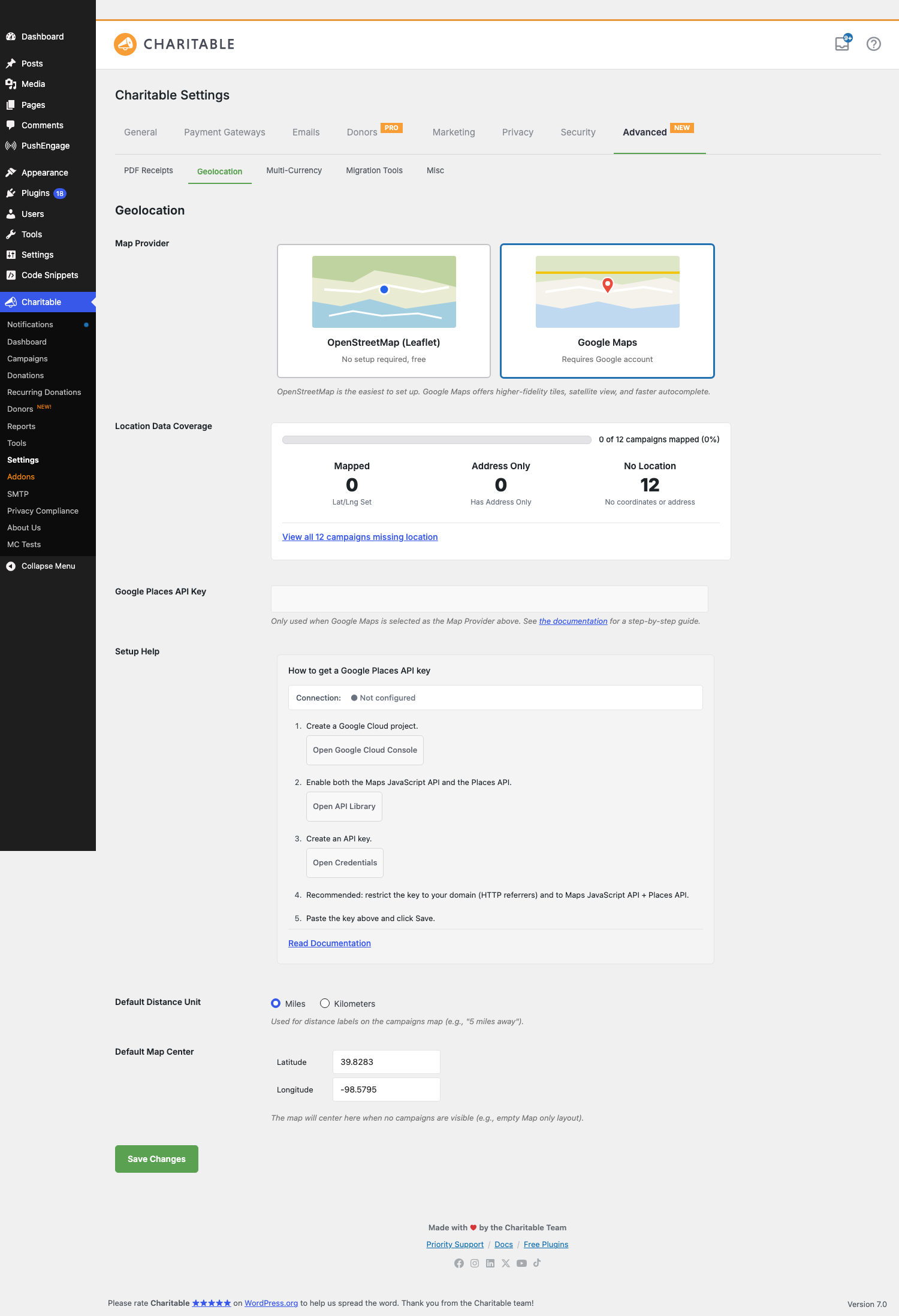
Ayuda de Configuración (5 pasos)
- Crea un proyecto de Google Cloud. El botón abre
console.cloud.google.com/projectcreate. - Habilita la API de JavaScript de Maps y la API de Places. El botón abre la Biblioteca de API.
- Crea una clave API. El botón abre la página de Credenciales.
- Recomendado: restringe la clave a tu dominio (referidores HTTP) y a la API de JavaScript de Maps + API de Places. Esto evita que la clave sea abusada si se filtra.
- Pega la clave arriba y haz clic en Guardar.
Indicador de conexión
Una pequeña píldora de estado junto al título de Ayuda de Configuración refleja el estado actual de la clave API:
| Estado | Lo que significa |
|---|---|
| ● No configurado | El campo de clave está vacío. Las funciones de geolocalización que necesitan Google no funcionarán todavía. |
| ⋯ Comprobando… | La clave se cambió; estamos contactando a Google para verificar. Tarda 1-2 segundos. |
| ● Conectado | La clave es válida, las API relevantes están habilitadas y tu restricción de dominio (si la hay) acepta el nombre de host de tu sitio. |
| ● Clave no válida - comprueba las restricciones | La clave fue rechazada. Causa más común: la restricción de referidor HTTP en la clave no incluye tu sitio, o la API de JavaScript de Maps / API de Places no está habilitada en el proyecto. Corrige la restricción o habilita la API y el indicador cambiará a Conectado en la próxima carga de página. |
El panel de Ayuda de configuración y el campo de clave de API se ocultan cuando se selecciona OpenStreetMap (Leaflet); puedes alternar el proveedor sin recargar la página y aparecen/desaparecen instantáneamente.
Cobertura de datos de ubicación
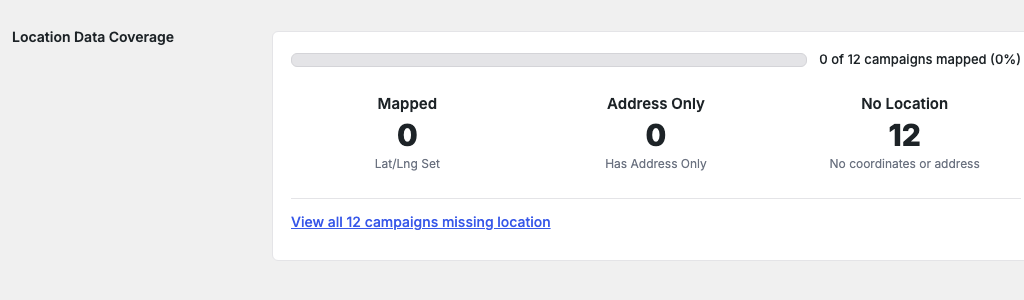
Una tarjeta de estadísticas de solo lectura que resume cuántas de tus campañas publicadas se pueden mapear:
| Estadística | Lo que muestra |
|---|---|
| Mapeado | Campañas con meta _campaign_latitude y _campaign_longitude explícitas. Estas se renderizan en el Mapa de Campañas inmediatamente. |
| Solo Dirección | Campañas con una dirección postal pero sin latitud/longitud resuelta. No se renderizarán en el mapa hasta que la dirección sea geocodificada; normalmente esto ocurre en el siguiente guardado de la campaña, o puedes activarlo manualmente. |
| Sin Ubicación | Campañas sin latitud/longitud ni dirección. Nunca aparecerán en el mapa hasta que añadas datos de ubicación. |
Encima de las estadísticas hay una barra de progreso que muestra el porcentaje de campañas publicadas totales que tienen un mapeo utilizable. Debajo, un enlace de “Ver las N campañas que faltan ubicación” con un solo clic filtra la lista de administración de Campañas para mostrar solo las campañas sin datos de ubicación, para que puedas corregirlas en lote.
La tarjeta se actualiza automáticamente cada vez que se guarda una campaña, por lo que verás el recuento aumentar a medida que completes los datos de ubicación en tus campañas. Las estadísticas se almacenan en caché durante un minuto para mantener la página de configuración ágil en sitios con miles de campañas.
Unidad de distancia predeterminada
Una opción de radio: Millas o Kilómetros. Utilizado por las etiquetas de distancia del bloque Mapa de Campañas (5 millas de distancia vs 8 km de distancia) y cualquier ordenación por distancia en la búsqueda del front-end. Por defecto: Millas.
Esta es una configuración de solo visualización; los cálculos subyacentes de latitud/longitud no cambian. Los sitios con audiencias en países que usan km deberían cambiar esto; de lo contrario, déjalo como está.
Centro de mapa predeterminado
Dos campos numéricos: Latitud y Longitud. El mapa se ajusta aquí cuando no hay nada más que mostrar; por ejemplo, cuando el bloque Mapa de Campañas está configurado para mostrar solo campañas en una categoría que actualmente tiene cero entradas, o antes de que la geolocalización del visitante se haya resuelto.
Por defecto: 39.8283, -98.5795 — el centro geográfico de los Estados Unidos contiguos. Para una organización sin fines de lucro con la mayoría de las campañas en una región o ciudad, configúralo en el centro de esa región para que los renders de mapa vacíos se sientan locales.
Campo de Ubicación de Embajadores (requiere el complemento Ambassadors)
Cuando el complemento Charitable Ambassadors está activo y la Geolocalización está habilitada, el formulario público de Envío de Campaña obtiene un campo de Ubicación opcional. Los nuevos embajadores pueden:
- Escribir una dirección postal. El autocompletado sugiere coincidencias (Nominatim bajo OpenStreetMap, Google Places bajo Google) después de los dos primeros caracteres, con un retardo de ~300 ms.
- Hacer clic en una sugerencia. El campo se rellena con la dirección normalizada completa; los campos ocultos de latitud/longitud se rellenan; el mapa de vista previa junto al campo se recentra en la dirección.
- Omitir el campo por completo; es opcional a menos que lo hayas hecho obligatorio mediante un filtro.
Una vez enviada la campaña, la latitud/longitud guardada en _campaign_latitude / _campaign_longitude hace que la campaña sea inmediatamente localizable en el mapa.
El proveedor de autocompletado sigue la configuración global del Proveedor de Mapas: cambie el sitio de Google a OpenStreetMap y el formulario de Embajadores cambiará silenciosamente los proveedores de autocompletado en la próxima carga de página.
Consejos
- Empiece con OpenStreetMap. Omita el trabajo de la cuenta de Google Cloud a menos que ya tenga una. Para la mayoría de los sitios benéficos, la calidad de las teselas de OSM es suficiente y evitará una factura de uso recurrente si se vuelve viral.
- La tarjeta de cobertura es su lista de TAREAS PENDIENTES. Si 'Solo dirección' es un número alto, esas campañas necesitan que sus direcciones se vuelvan a guardar (o necesita activar una geocodificación masiva); si 'Sin ubicación' es alto, tiene trabajo de entrada de datos que hacer antes de que el mapa muestre mucho.
- Restrinja su clave de Google. Dejar una clave sin restricciones significa que cualquiera que la obtenga del código fuente de su página puede aumentar su factura. Agregue la restricción de referente HTTP en el paso 4 del asistente de configuración; es rápido y cambia significativamente su postura de riesgo.
- El centro de mapa predeterminado no es una trivialidad de latitud/longitud. La mayoría de los visitantes no lo notarán en el día a día, pero si alguna vez envía el mapa incrustado en algún lugar sin campañas, es importante que el mundo se centre en una región sensata en lugar de en medio de Kansas.
- Cambiar de proveedor es seguro. Cambie entre ellos tantas veces como quiera. Los metadatos de latitud/longitud en las campañas son independientes del proveedor; solo cambian los servicios de teselas y autocompletado.
Referencia del desarrollador
Metadatos por campaña
| Clave | Tipo | Propósito |
|---|---|---|
_campaign_latitude |
cadena (decimal) | La latitud guardada para esta campaña. Se establece automáticamente cuando una dirección se geocodifica; se puede establecer manualmente a través de Edición Rápida o mediante programación. |
_campaign_longitude |
cadena (decimal) | La longitud guardada para esta campaña. |
_campaign_address |
cadena | Opcional. La cadena de dirección original que escribió el donante / embajador. Se utiliza para la geocodificación posterior cuando cambia el proveedor. |
Filtros
| Filtro | Predeterminado | Propósito |
|---|---|---|
charitable_geolocation_map_provider |
'leaflet' o 'google' |
El proveedor de mapas activo para una solicitud dada. Filtre para anular por página (por ejemplo, forzar OSM en el flujo de Embajadores incluso si la configuración global es Google). |
charitable_geolocation_default_distance_unit |
'mi' |
La unidad utilizada en las etiquetas de distancia. |
charitable_geolocation_default_center |
[39.8283, -98.5795] |
Centro de mapa predeterminado lat/lng. |
charitable_geolocation_coverage_stats |
(array) | Las estadísticas de cobertura de datos de ubicación. Filtre para inyectar recuentos personalizados (por ejemplo, si almacena datos de ubicación en una clave de metadatos no estándar). |
charitable_geolocation_nominatim_user_agent |
Nombre del sitio + URL | La cadena User-Agent enviada a Nominatim. Requerido por su política de uso; debe identificar su sitio. Anule solo si comprende la política. |
clave_api_google_geolocation_charitable |
La clave guardada | La clave de la API de Google Places devuelta al código del lado del cliente. Filtre para mantener la clave en un administrador de secretos en lugar de en la base de datos. |
Acciones
| Acción | Cuando se activa |
|---|---|
proveedor_geolocation_charitable_cambiado |
El administrador del sitio guardó un nuevo Proveedor de Mapas. Recibe $old_provider, $new_provider. Enganche para borrar cachés o activar la geocodificación. |
campaña_geocodificada_geolocation_charitable |
La dirección de una campaña se resolvió con éxito a lat/lng. Recibe $campaign_id, $lat, $lng. |
invalidar_cache_estadisticas_cobertura_geolocation_charitable |
Gancho interno activado cuando cambian los datos de la campaña, para invalidar la caché de la tarjeta de cobertura de 1 minuto. |
Ayudante de geocodificación masiva
Si muchas campañas están atascadas en el estado Solo dirección (típicamente porque fueron importadas), active un pase de geocodificación masiva a través de WP-CLI:
wp charitable geolocation bulk-geocode --batch-size=20
La salida muestra el progreso por campaña y un resumen de éxitos / fallos al final. El comando masivo respeta los límites de tasa del proveedor y se pausa apropiadamente.
Ejemplos de personalización
Hacer que la Ubicación sea obligatoria en el formulario de envío de campañas de Embajadores:
add_filter( 'charitable_ambassadors_submission_form_fields', function( $fields ) {
    if ( isset( $fields['location'] ) ) {
        $fields['location']['required'] = true;
    }
    return $fields;
}, 20 );
Forzar OpenStreetMap en una página específica (por ejemplo, un mapa público incrustado) incluso si la configuración predeterminada del sitio es Google:
add_filter( 'charitable_geolocation_map_provider', function( $provider ) {
    if ( is_page( 'public-campaign-map' ) ) {
        return 'leaflet';
    }
    return $provider;
} );
Extraer la clave de la API de Google de un administrador de secretos en lugar de la base de datos:
add_filter( 'charitable_geolocation_google_api_key', function( $key_from_db ) {
    if ( defined( 'GOOGLE_PLACES_KEY' ) ) {
        return GOOGLE_PLACES_KEY;
    }
    return $key_from_db;
} );
Personalizar el centro del mapa predeterminado por región:
add_filter( 'charitable_geolocation_default_center', function( $center ) {
    return array( 'lat' => 51.5074, 'lng' => -0.1278 ); // London.
} );
Identifique su sitio a Nominatim con un User-Agent más descriptivo:
add_filter( 'charitable_geolocation_nominatim_user_agent', function( $ua ) {
    return 'YourNonprofit (https://yournonprofit.org) - geocoding for campaign maps';
} );
Relacionado
- Bloque Mapa de Campañas — El bloque de front-end que renderiza sus campañas en un mapa real utilizando esta configuración.
- Centro de Documentación de Charitable — El índice principal de documentación.