Erforderlich: Charitable Pro 1.8.16+
Geolokalisierung ist die Ebene, die Längen- und Breitengrade einzelner Kampagnen in die Karten, Entfernungsbeschriftungen und die „Finde eine Kampagne in meiner Nähe“-Suche umwandelt, die Sie im Frontend sehen. Ab Version 1.8.16 unterstützt es zwei Kartenanbieter – OpenStreetMap (Leaflet) ohne API-Schlüssel und Google Maps mit höherwertigen Kacheln – und fügt eine Karte „Standortdatenabdeckung“ hinzu, damit Sie auf einen Blick sehen können, wie viele Ihrer Kampagnen Geodaten enthalten.
Dies ist die Einstellungsseite. Um eine Karte dieser Kampagnen im Frontend anzuzeigen, lesen Sie die Dokumentation zum Block „Kampagnenkarte“.
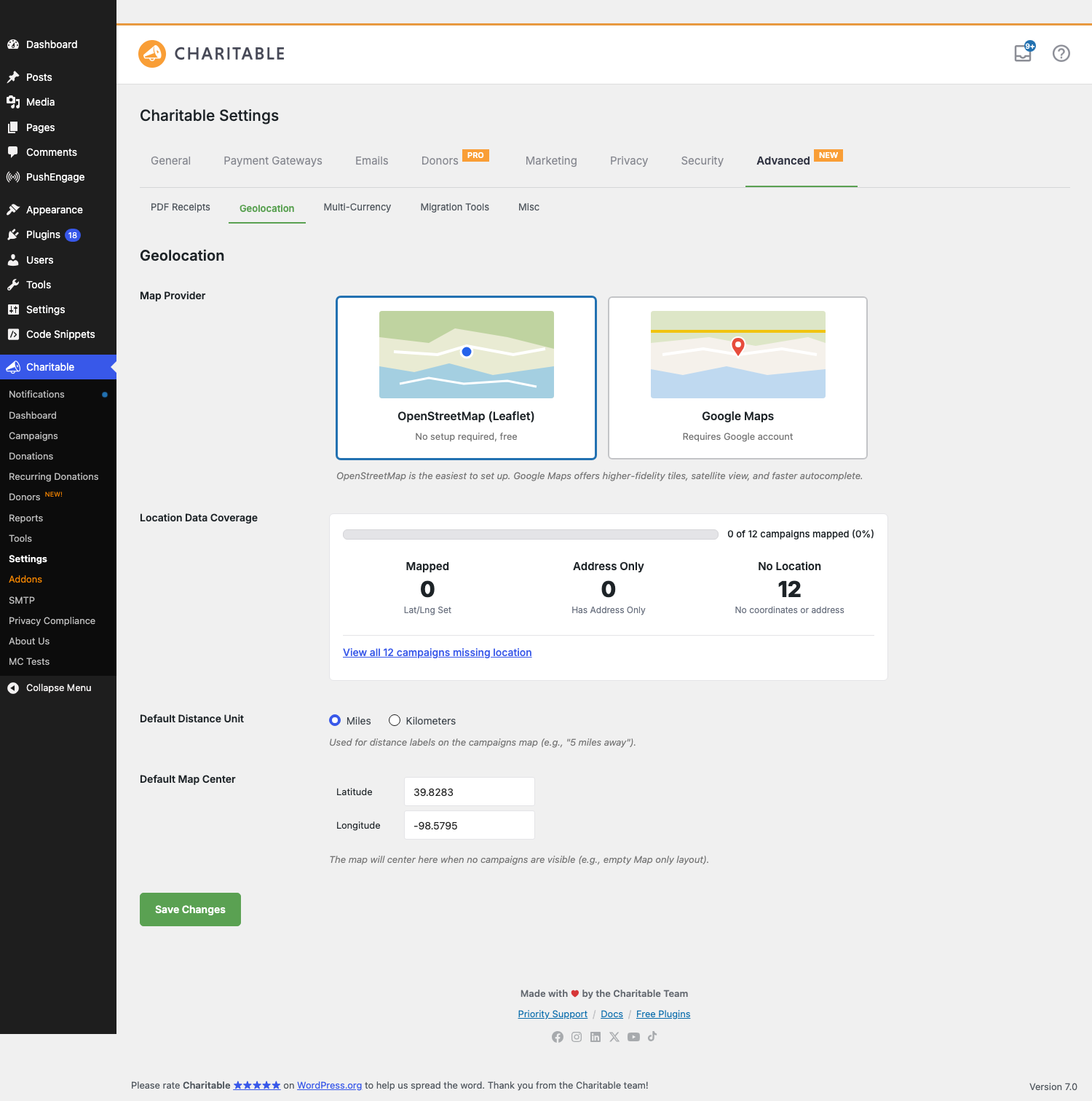
Neues in 1.8.16
| Änderung | Was es bedeutet |
|---|---|
| OpenStreetMap-Unterstützung | Sie benötigen keinen Google API-Schlüssel mehr. OpenStreetMap (gerendert über Leaflet) ist der neue Standard für Neuinstallationen und ist kostenlos ohne Konto. |
| Auswahl des Kartenanbieters | Eine visuelle Auswahl mit zwei Karten – OpenStreetMap (Leaflet) und Google Maps – ersetzt den bisherigen Einrichtungsprozess. |
| Karte „Standortdatenabdeckung“ | Statistikblock auf einen Blick: Wie viele Kampagnen haben Längen-/Breitengrade festgelegt, wie viele haben nur Adressen, wie viele haben keine Standortdaten. Enthält einen Ein-Klick-Link, um die Kampagnenliste auf die Kampagnen zu filtern, denen Standortdaten fehlen. |
| Nominatim-Adressautovervollständigung | Unter OpenStreetMap wird die Adressautovervollständigung vom Nominatim-Dienst bereitgestellt. Geben Sie zwei oder mehr Zeichen in ein Standortfeld ein, und Sie erhalten Vorschläge – kein Google-Konto erforderlich. |
| Standard-Kartenmittelpunkt | Legen Sie den Längen-/Breitengrad + Zoom fest, auf den die Karte zurückfällt, wenn keine Kampagnen sichtbar sind. Standard ist das geografische Zentrum der kontinentalen USA (39,8283, -98,5795). |
| Feld „Standort von Botschaftern“ | Wenn das Addon „Botschafter“ aktiv ist, erhält das öffentliche Kampagnen-Einreichungsformular ein optionales Feld „Standort“ mit derselben Autovervollständigung (Nominatim unter OpenStreetMap, Google Places unter Google). |
Upgrade-Verhalten: Websites, die zum Zeitpunkt des Upgrades bereits einen Google Places API-Schlüssel konfiguriert hatten, behalten Google Maps als Anbieter. Neuinstallationen (und Websites, bei denen kein Schlüssel konfiguriert war) verwenden standardmäßig OpenStreetMap. Sie können jederzeit ohne Datenverlust zwischen den Anbietern wechseln – die Längen-/Breitengrad-Metadaten der Kampagne werden anbieterunabhängig gespeichert.
Finden
WordPress Admin > Charitable > Einstellungen > Erweitert > Geolokalisierung
Die Registerkarte „Erweitert“ hat oben im Panel Unterregisterkarten (PDF-Belege, Geolokalisierung, Multi-Währung, Migrationstools, Sonstiges). Geolokalisierung ist die zweite.
Das Gesamtbild
| Teil | Zweck |
|---|---|
| Kartenanbieter | Welchen Kachel- und Autovervollständigungsdienst die Karte verwendet. OpenStreetMap ist kostenlos; Google Maps erfordert einen Schlüssel. |
| Standortdatenabdeckung | Schreibgeschützte Zusammenfassung, wie viele Ihrer Kampagnen kartierbar sind. |
| Standard-Entfernungseinheit | Ob Entfernungsbeschriftungen als 5 Meilen entfernt oder 8 km entfernt gerendert werden. |
| Standard-Kartenmittelpunkt | Der Längen-/Breitengrad + Zoom, auf den die Karte springt, wenn nichts angezeigt werden kann. |
| Standort pro Kampagne | Wird in jedem Kampagnen-Builder festgelegt (_campaign_latitude, _campaign_longitude Meta). |
| Standortfeld für Botschafter | Optionale Erfassung des Standorts während der öffentlichen Kampagneneinreichung. |
Sie konfigurieren den Anbieter einmal auf dieser Seite. Der Block „Campaigns Map“ (und der Shortcode [campaigns map="1"]) rendert dann Karten mit dem von Ihnen ausgewählten Anbieter.
Kartenanbieter
Die Wahl der Überschrift. Ein Zwei-Karten-Auswahlfeld:
OpenStreetMap (Leaflet)
Keine Einrichtung erforderlich, kostenlos. Kacheln stammen von den Kacheldiensten von OpenStreetMap; das Karten-Widget ist die Open-Source-Bibliothek Leaflet. Empfohlen für die meisten Websites – es gibt nichts zu registrieren, keine Nutzungslimits zu überwachen, keinen Schlüssel zu rotieren. Die Adressautovervollständigung in Admin-Benutzeroberflächen und das Ambassadors-Formular werden von Nominatim, dem kostenlosen Geocodierungsdienst von OpenStreetMap, unterstützt.
Ein Hinweis zur Nominatim-Nutzung: OpenStreetMap bittet darum, dass hochvolumige Integrationen höflich sind (eine Anfrage pro Sekunde pro Benutzer, Ergebnisse nach Möglichkeit zwischengespeichert). Die Autovervollständigung von Charitable drosselt die Eingabe und speichert Lookups zwischen, sodass eine Spenden-Website mit normalem Datenverkehr problemlos unter dem Limit liegt.
Google Maps
Erfordert ein Google-Konto und einen API-Schlüssel. Bessere Kacheltreue, enthält Satellitenbilder, und die Autovervollständigung ist schneller und fehlerverzeihender bei teilweisen / falsch geschriebenen Adressen. Wählen Sie diese Option, wenn Sie bereits Google-Dienste standardisiert haben oder Ihre Karten im Mittelpunkt der Erfahrung stehen sollen.
Beim Wechsel zu Google werden das Feld Google Places API Key und ein Setup Help-Panel mit Deep-Links zu Google Cloud angezeigt:
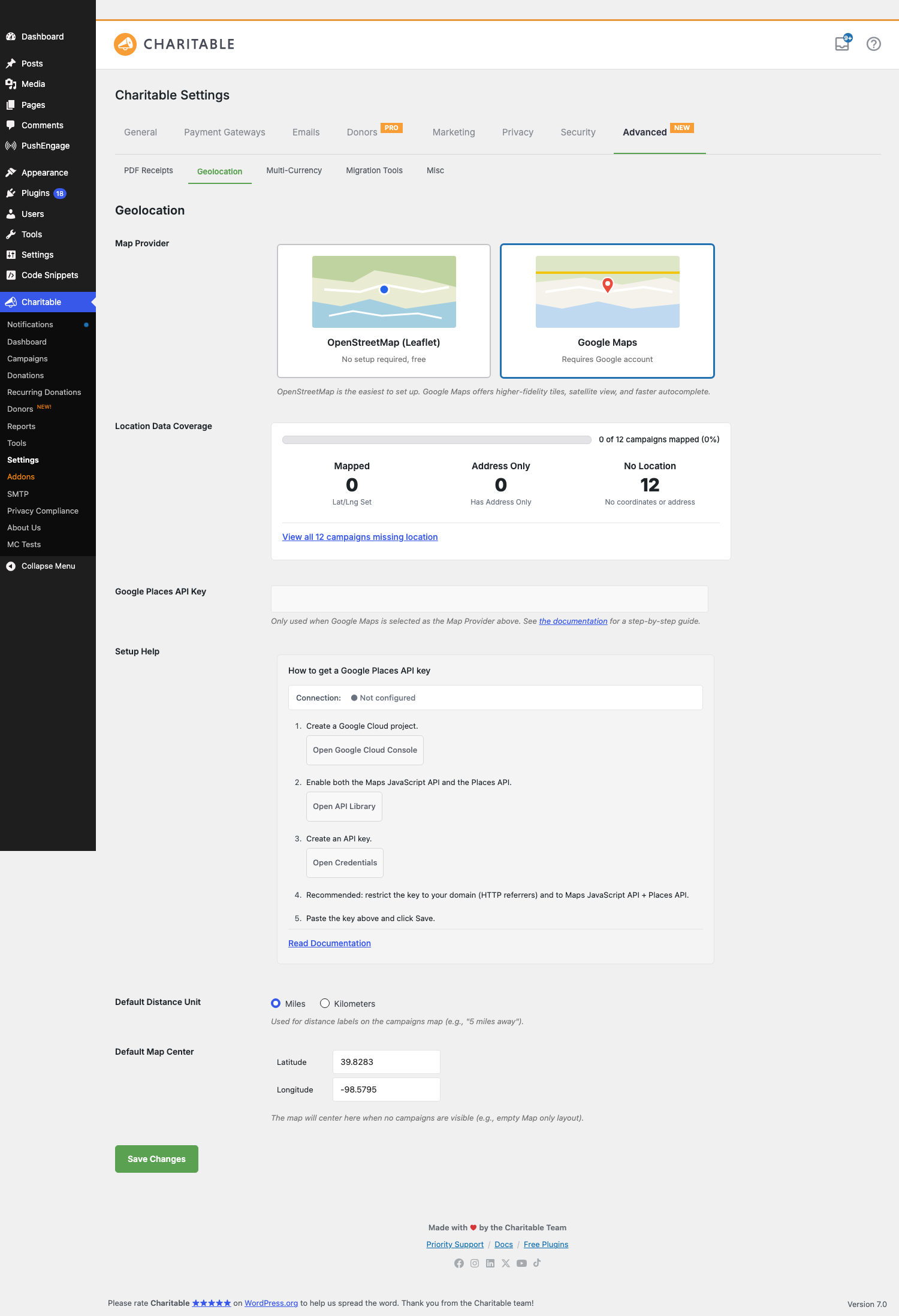
Setup-Hilfe (5 Schritte)
- Erstellen Sie ein Google Cloud-Projekt. Schaltfläche öffnet
console.cloud.google.com/projectcreate. - Aktivieren Sie sowohl die Maps JavaScript API als auch die Places API. Schaltfläche öffnet die API-Bibliothek.
- Erstellen Sie einen API-Schlüssel. Schaltfläche öffnet die Credentials-Seite.
- Empfohlen: Beschränken Sie den Schlüssel auf Ihre Domain (HTTP-Referrer) und auf die Maps JavaScript API + Places API. Dies verhindert, dass der Schlüssel missbraucht wird, falls er durchsickert.
- Fügen Sie den Schlüssel oben ein und klicken Sie auf Speichern.
Verbindungsanzeige
Ein kleiner Status-Pill neben dem Titel „Setup Help“ spiegelt den aktuellen Zustand des API-Schlüssels wider:
| Status | Was es bedeutet |
|---|---|
| ● Nicht konfiguriert | Das Schlüsselfeld ist leer. Geolocation-Funktionen, die Google benötigen, funktionieren noch nicht. |
| ⋯ Prüfe… | Der Schlüssel wurde geändert; wir fragen Google zur Überprüfung. Dauert 1–2 Sekunden. |
| ● Verbunden | Der Schlüssel ist gültig, die relevanten APIs sind aktiviert und Ihre Domain-Beschränkung (falls vorhanden) akzeptiert den Hostnamen Ihrer Website. |
| ● Ungültiger Schlüssel – Beschränkungen prüfen | Der Schlüssel wurde abgelehnt. Häufigste Ursache: Die HTTP-Referrer-Beschränkung des Schlüssels enthält Ihre Website nicht, oder die Maps JavaScript API / Places API ist für das Projekt nicht aktiviert. Korrigieren Sie die Beschränkung oder aktivieren Sie die API, und die Anzeige wechselt beim nächsten Laden der Seite zu „Verbunden“. |
Das „Setup Help“-Panel und das API-Schlüsselfeld werden ausgeblendet, wenn OpenStreetMap (Leaflet) ausgewählt ist – Sie können den Anbieter wechseln, ohne die Seite neu zu laden, und sie erscheinen/verschwinden sofort.
Standortdatenabdeckung
Eine schreibgeschützte Statuskarte, die zusammenfasst, wie viele Ihrer veröffentlichten Kampagnen kartierbar sind:
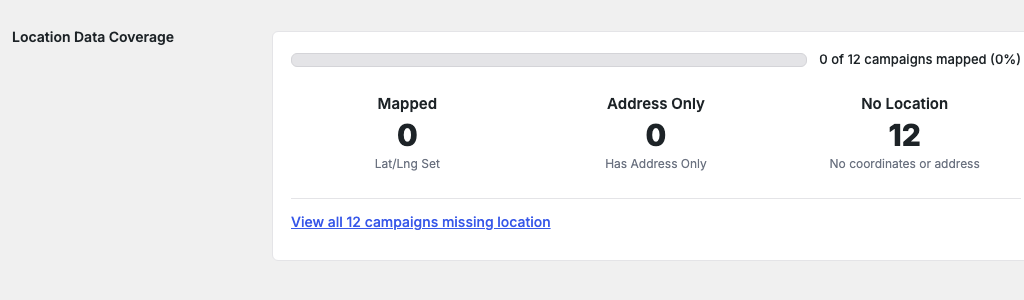
| Statistik | Was es anzeigt |
|---|---|
| Kartiert | Kampagnen mit expliziten _campaign_latitude und _campaign_longitude Metadaten. Diese werden sofort auf der Kampagnenkarte angezeigt. |
| Nur Adresse | Kampagnen mit einer Straßenadresse, aber ohne aufgelöste Längen- und Breitengrade. Sie werden erst auf der Karte angezeigt, wenn die Adresse geokodiert ist – normalerweise geschieht dies beim nächsten Speichern der Kampagne, oder Sie können es manuell auslösen. |
| Kein Standort | Kampagnen ohne Längen-/Breitengrade oder Adressen. Sie werden niemals auf der Karte angezeigt, bis Sie Standortdaten hinzufügen. |
Über den Statistiken befindet sich eine Fortschrittsanzeige, die den Prozentsatz der veröffentlichten Kampagnen anzeigt, die eine nutzbare Kartierung haben. Darunter ein Ein-Klick-Link „Alle N Kampagnen ohne Standort anzeigen“ filtert die Kampagnen Admin-Liste, um nur Kampagnen ohne Standortdaten anzuzeigen, damit Sie diese stapelweise korrigieren können.
Die Karte wird bei jeder Speicherung einer Kampagne automatisch aktualisiert, sodass Sie sehen, wie die Zahl steigt, während Sie Standortdaten für Ihre Kampagnen eingeben. Statistiken werden eine Minute lang zwischengespeichert, um die Einstellungsseite auf Websites mit Tausenden von Kampagnen schnell zu halten.
Standard-Entfernungseinheit
Ein Radiobutton: Meilen oder Kilometer. Wird von den Entfernungsbeschriftungen des Kampagnenkarte-Blocks (5 Meilen entfernt vs 8 km entfernt) und jeder Sortierung nach Entfernung in der Frontend-Suche verwendet. Standard: Meilen.
Dies ist eine reine Anzeigeeinstellung – die zugrunde liegenden Längen-/Breitengradberechnungen ändern sich nicht. Websites mit Zielgruppen in km-verwendenden Ländern sollten dies ändern; andernfalls lassen Sie es unverändert.
Standard-Kartenmittelpunkt
Zwei Zahleneingabefelder: Breitengrad und Längengrad. Die Karte rastet hier ein, wenn nichts anderes angezeigt werden kann – zum Beispiel, wenn der Kampagnenkarte-Block so konfiguriert ist, dass nur Kampagnen einer Kategorie angezeigt werden, die derzeit keine Einträge hat, oder bevor die Geolokalisierung des Besuchers aufgelöst wurde.
Standard: 39,8283, -98,5795 – das geografische Zentrum der zusammenhängenden Vereinigten Staaten. Für eine gemeinnützige Organisation mit den meisten Kampagnen in einer Region oder Stadt legen Sie stattdessen das Zentrum dieser Region fest, damit leere Karten-Renderings lokal wirken.
Botschafter-Standortfeld (erfordert Ambassadors-Addon)
Wenn das Charitable Ambassadors-Addon aktiv und Geolocation aktiviert ist, erhält das öffentliche Formular Kampagneneinreichung ein optionales Standortfeld. Neue Botschafter können:
- Geben Sie eine Straßenadresse ein. Autovervollständigung schlägt Übereinstimmungen vor (Nominatim unter OpenStreetMap, Google Places unter Google) nach den ersten beiden Zeichen, mit einer Verzögerung von ca. 300 ms.
- Klicken Sie auf einen Vorschlag. Das Eingabefeld wird mit der vollständigen normalisierten Adresse gefüllt; versteckte Längen-/Breitengrad-Eingabefelder werden gefüllt; die Vorschaukarte neben dem Feld wird auf die Adresse zentriert.
- Überspringen Sie das Feld vollständig – es ist optional, es sei denn, Sie haben es über einen Filter als erforderlich markiert.
Nachdem die Kampagne eingereicht wurde, machen die in _campaign_latitude / _campaign_longitude gespeicherten Längen- und Breitengrade die Kampagne sofort kartierbar.
Der Autovervollständigungsanbieter folgt der globalen Einstellung „Kartenanbieter“: Wechseln Sie die Website von Google zu OpenStreetMap und der Botschafter-Formular wechselt leise die Autovervollständigungsanbieter bei der nächsten Seitenladung.
Tipps
- Starten Sie mit OpenStreetMap. Überspringen Sie die Google Cloud-Kontoarbeit, es sei denn, Sie haben bereits eines. Für die meisten Wohltätigkeitsseiten ist die OSM-Kachelqualität in Ordnung, und Sie vermeiden eine laufende Nutzungsrechnung, wenn Sie viral gehen.
- Die Abdeckungskarte ist Ihre TODO-Liste. Wenn „Nur Adresse“ eine hohe Zahl ist, müssen die Adressen dieser Kampagnen erneut gespeichert werden (oder Sie müssen eine Massengeocodierung auslösen). Wenn „Kein Standort“ hoch ist, müssen Sie Daten eingeben, bevor die Karte viel anzeigt.
- Beschränken Sie Ihren Google-Schlüssel. Wenn Sie einen Schlüssel uneingeschränkt lassen, kann jeder, der ihn aus Ihrem Seitenquelltext kopiert, Ihre Rechnung in die Höhe treiben. Fügen Sie die HTTP-Referrer-Beschränkung in Schritt 4 des Einrichtungsassistenten hinzu. Das ist schnell und ändert Ihre Risikoposition erheblich.
- Der Standard-Kartenmittelpunkt ist keine Längen-/Breitengrad-Trivia. Die meisten Besucher werden ihn im täglichen Gebrauch nicht bemerken, aber wenn Sie die Karte jemals irgendwo ohne Kampagnen eingebettet versenden, ist es wichtig, dass die Welt in einer sinnvollen Region und nicht mitten in Kansas zentriert wird.
- Der Wechsel des Anbieters ist sicher. Wechseln Sie beliebig hin und her. Meta-Daten für Längen-/Breitengrade bei Kampagnen sind anbieterunabhängig. Nur die Kachel- und Autocomplete-Dienste ändern sich.
Entwicklerreferenz
Metadaten pro Kampagne
| Schlüssel | Typ | Zweck |
|---|---|---|
_campaign_latitude |
Zeichenkette (Dezimal) | Der für diese Kampagne gespeicherte Breitengrad. Wird automatisch festgelegt, wenn eine Adresse geocodiert wird; kann manuell über Schnellerfassung oder programmatisch festgelegt werden. |
_campaign_longitude |
Zeichenkette (Dezimal) | Der für diese Kampagne gespeicherte Längengrad. |
_campaign_address |
Zeichenkette | Optional. Die ursprüngliche Adresszeichenkette, die der Spender/Botschafter eingegeben hat. Wird für die erneute Geocodierung verwendet, wenn sich der Anbieter ändert. |
Filter
| Filter | Standard | Zweck |
|---|---|---|
charitable_geolocation_map_provider |
'leaflet' oder 'google' |
Der aktive Kartenanbieter für eine bestimmte Anfrage. Filtern Sie, um pro Seite zu überschreiben (z. B. OSM im Botschafterfluss erzwingen, auch wenn die globale Einstellung Google ist). |
charitable_geolocation_default_distance_unit |
'mi' |
Die Einheit, die in Entfernungsbeschriftungen verwendet wird. |
charitable_geolocation_default_center |
[39.8283, -98.5795] |
Standard-Kartenmittelpunkt Längen-/Breitengrad. |
charitable_geolocation_coverage_stats |
(Array) | Die Statistiken zur Abdeckung von Standortdaten. Filtern Sie, um benutzerdefinierte Zählungen einzufügen (z. B. wenn Sie Standortdaten in einem nicht standardmäßigen Metaschlüssel speichern). |
charitable_geolocation_nominatim_user_agent |
Seitenname + URL | Die an Nominatim gesendete User-Agent-Zeichenkette. Erforderlich gemäß deren Nutzungsrichtlinien; sollte Ihre Website identifizieren. Überschreiben Sie dies nur, wenn Sie die Richtlinien verstehen. |
charitable_geolocation_google_api_key |
Der gespeicherte Schlüssel | Der Google Places API-Schlüssel, der an den clientseitigen Code zurückgegeben wird. Filtern Sie, um den Schlüssel stattdessen in einem geheimen Manager anstelle der Datenbank zu belassen. |
Aktionen
| Aktion | Wann er ausgelöst wird |
|---|---|
charitable_geolocation_provider_changed |
Der Website-Administrator hat einen neuen Kartenanbieter gespeichert. Empfängt $old_provider, $new_provider. Haken Sie ein, um Caches zu leeren oder eine Neu-Geokodierung auszulösen. |
charitable_geolocation_campaign_geocoded |
Die Adresse einer Kampagne wurde erfolgreich in lat/lng aufgelöst. Empfängt $campaign_id, $lat, $lng. |
charitable_geolocation_invalidate_coverage_stats_cache |
Interner Hook, der ausgelöst wird, wenn sich Kampagnendaten ändern, um den 1-Minuten-Cache der Abdeckungskarten zu löschen. |
Hilfsprogramm für die Stapelgeokodierung
Wenn viele Kampagnen im Status Nur Adresse feststecken (typischerweise, weil sie importiert wurden), lösen Sie einen Stapelgeokodierungslauf über WP-CLI aus:
wp charitable geolocation bulk-geocode --batch-size=20
Die Ausgabe zeigt den Fortschritt pro Kampagne und eine Zusammenfassung der Erfolge/Fehler am Ende. Der Stapelbefehl berücksichtigt die Ratenbegrenzungen des Anbieters und pausiert entsprechend.
Beispiele für Anpassungen
Machen Sie den Standort im Einreichungsformular der Botschafterkampagne erforderlich:
add_filter( 'charitable_ambassadors_submission_form_fields', function( $fields ) {
    if ( isset( $fields['location'] ) ) {
        $fields['location']['required'] = true;
    }
    return $fields;
}, 20 );
Erzwingen Sie OpenStreetMap auf einer bestimmten Seite (z. B. einer öffentlichen Karten-Einbettung), auch wenn die Standardeinstellung der Website Google ist:
add_filter( 'charitable_geolocation_map_provider', function( $provider ) {
    if ( is_page( 'public-campaign-map' ) ) {
        return 'leaflet';
    }
    return $provider;
} );
Rufen Sie den Google API-Schlüssel aus einem geheimen Manager ab, anstatt aus der Datenbank:
add_filter( 'charitable_geolocation_google_api_key', function( $key_from_db ) {
    if ( defined( 'GOOGLE_PLACES_KEY' ) ) {
        return GOOGLE_PLACES_KEY;
    }
    return $key_from_db;
} );
Passen Sie das Standard-Karten-Zentrum je nach Region an:
add_filter( 'charitable_geolocation_default_center', function( $center ) {
    return array( 'lat' => 51.5074, 'lng' => -0.1278 ); // London.
} );
Identifizieren Sie Ihre Website für Nominatim mit einem beschreibenderen User-Agent:
add_filter( 'charitable_geolocation_nominatim_user_agent', function( $ua ) {
    return 'YourNonprofit (https://yournonprofit.org) - geocoding for campaign maps';
} );
Verwandt
- Kampagnen-Karten-Block — Der Front-End-Block, der Ihre Kampagnen mithilfe dieser Einstellungen auf einer tatsächlichen Karte rendert.
- Charitable Dokumentations-Hub — Der Hauptindex der Dokumentation.