
Charitable Lite ist die kostenlose Version von Charitable. Sie bietet Ihnen die Werkzeuge, die Sie benötigen, um Geld auf Ihrer WordPress-Website zu sammeln, darunter Spendenformulare, Zahlungen über Stripe, Square und PayPal sowie Spendenverwaltung.
Für viele gemeinnützige Organisationen, die gerade erst mit Online-Spenden beginnen, ist dies ein guter Ausgangspunkt. Aber wenn Ihre Spendenaktionen wachsen, sind Sie vielleicht neugierig auf die kostenpflichtige Version, das Charitable Pro Plugin.
Das Charitable Pro Plugin fügt die Werkzeuge hinzu, die Ihnen helfen, mehr zu sammeln. Dazu gehören eine Spenderdatenbank, Self-Service-Spenderkonten, wiederkehrende Spenden, Peer-to-Peer-Kampagnen, Veranstaltungstickets und vieles mehr.
Wir haben es auch einfach gemacht, von anderen Fundraising-Tools zu wechseln. Sie können jetzt Ihre Daten von GiveWP, Donorbox und Givebutter importieren, und wenn Sie von GiveWP kommen, kann unser Team den gesamten Umzug sogar für Sie übernehmen.
Benötigen Sie also die kostenpflichtigen Funktionen, oder reicht Charitable Lite für Ihre Organisation aus? Dieser Artikel vergleicht Charitable Lite mit jedem der kostenpflichtigen Pläne, damit Sie entscheiden können, ob ein Upgrade der richtige Schritt für Ihre Spendenaktionen ist.
Charitable Lite vs. Pro im Überblick
Zunächst sind hier die Kernfunktionen, die Sie sowohl mit Lite als auch mit den kostenpflichtigen Plänen erhalten.
Wenn Sie das Plugin installieren, hilft Ihnen ein Einrichtungsassistent, schnell loszulegen. Er führt Sie durch die richtigen Einstellungen und Ihre erste Kampagne, damit Sie sofort mit dem Sammeln von Geldern beginnen können.
Um Ihre Kampagne zu erstellen, können Sie eine vorgefertigte Vorlage auswählen oder von Grund auf neu gestalten.
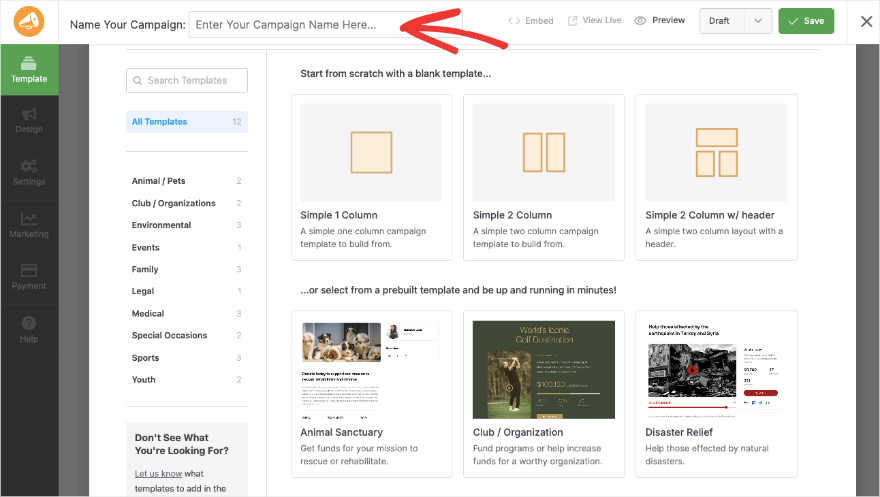
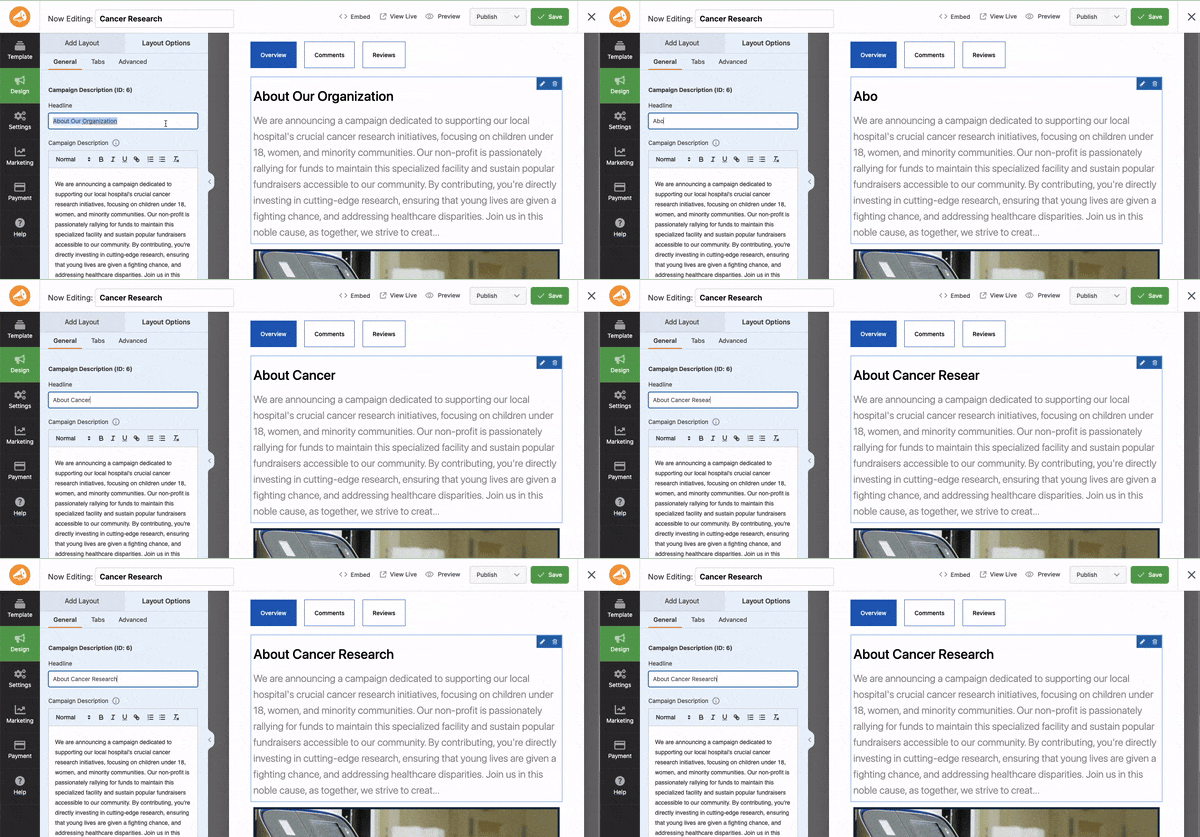
Als Nächstes gibt es einen Drag-and-Drop-Builder, um Ihre Spendenaktion anzupassen. Sie können Felder wie Fortschrittsbalken, Spendenbeträge, soziale Links, Fotos und mehr hinzufügen.
Eine Live-Vorschau zeigt Ihnen, wie Ihre Kampagne im Frontend aussehen wird, während Sie sie gestalten. Klicken Sie einfach auf ein beliebiges Feld, um es zu bearbeiten.
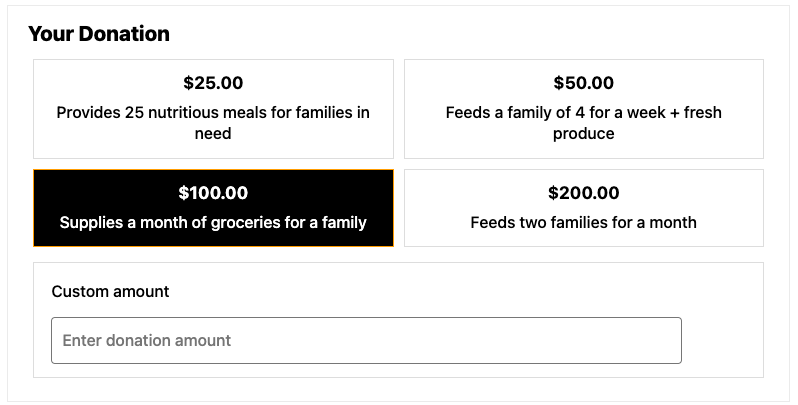
Sie können auch die Spendenbeträge auswählen, die Ihre Spender sehen, und ihnen erlauben, einen eigenen benutzerdefinierten Betrag einzugeben.
Sie können Online-Zahlungen über Stripe, Square und PayPal akzeptieren. Diese sind alle integriert, sodass Sie nur das Gateway aktivieren und Ihr Konto verknüpfen müssen. Sie können auch Offline-Gaben wie Schecks, Bargeld und Banküberweisungen erfassen.
Spenden gehen direkt von Ihrem Zahlungs-Gateway auf Ihr Konto. Charitable behält das Geld niemals ein, und Ihre Spenderdaten bleiben auf Ihrer eigenen Website.
Mit allen Versionen des Plugins erhalten Sie diese Funktionen.
- Unbegrenzte Kampagnen und Spendenformulare
- Spendenaufzeichnungen, die Sie hinzufügen, bearbeiten und löschen können
- Stripe, Square, PayPal und Offline-Spenden
- Kampagnenerstellung mit Vorlagen und dem Drag-and-Drop-Builder
- Spendenberichte
- Spendenquittungen und Benachrichtigungen per E-Mail an den Administrator
- KI-Assistenten-Support über WPVibe
- DSGVO-konforme Tools
- Mobilgerätefreundliches Design
Schauen wir uns nun an, was Charitable Lite bietet und für wen es gedacht ist. Möchten Sie sofort wissen, wie viel die kostenpflichtigen Pläne kosten? Überspringen Sie zum Abschnitt »
Das Charitable Lite Plugin

Charitable Lite bietet Ihnen die Werkzeuge, um Spenden auf Ihrer WordPress-Website anzunehmen. Sie können unbegrenzte Spendenkampagnen mit Zielen, Fristen und Fortschrittsbalken erstellen, die Ihre Spender engagieren.
Für Zahlungen arbeitet Charitable Lite mit Stripe, Square und PayPal sowie mit Offline-Spenden. Das bedeutet, dass Sie sofort mit der sicheren Annahme von einmaligen Spenden beginnen können. Die Spendenformulare sind einfach, mobilfreundlich und DSGVO-konform.
Jede Spende erstellt automatisch einen Spenden-Datensatz, und Sie können Datensätze nach Bedarf hinzufügen, bearbeiten oder löschen. Sie können E-Mail-Benachrichtigungen senden und Ihre Spenden-Daten jederzeit in CSV exportieren.
Charitable Lite funktioniert auch mit KI-Assistenten wie Claude und ChatGPT über WPVibe. Sie können Ihren Assistenten bitten, eine Kampagne zu erstellen oder zu aktualisieren oder eine Offline-Spende zu erfassen, indem Sie sie einfach in natürlicher Sprache beschreiben.
Was ist in Charitable Lite enthalten
Hier ist, was Sie mit Charitable Lite erhalten.
- Unbegrenzte Spendenkampagnen mit Zielen, Fristen und Fortschrittsverfolgung
- Einmalige Spenden über Stripe, Square und PayPal mit sicherer Abwicklung
- Offline-Spenden für Schecks, Bargeld und Überweisungen
- Spendenformulare mit vorgeschlagenen und benutzerdefinierten Beträgen
- Spendenaufzeichnungen, die Sie hinzufügen, bearbeiten und löschen können
- Spendenquittungen, E-Mail-Benachrichtigungen und CSV-Datenexport
- Grundlegende Berichte und Spendenverfolgung
- KI-Assistenten, die Kampagnen für Sie über WPVibe erstellen und aktualisieren können
- Mobilfreundliches Design, das zu Ihrem WordPress-Theme passt
- DSGVO-Konformität und Support im Community-Forum
Einschränkungen von Charitable Lite
Charitable Lite ist eine solide Grundlage, hat aber im Vergleich zu den kostenpflichtigen Plänen Einschränkungen. Sie finden keine wiederkehrenden Spenden, zusätzlichen Zahlungs-Gateways oder eine Spenderdatenbank mit Self-Service-Spenderkonten.
Peer-to-Peer-Fundraising, Event-Tickets, E-Mail-Marketing-Integrationen und die Migrations-Importeure sind ebenfalls nur Teil der kostenpflichtigen Pläne.
Hier sind die Einschränkungen auf einen Blick.
- Keine wiederkehrenden Spenden
- Nur Stripe, Square, PayPal und Offline-Spenden
- Keine Spenderdatenbank, Spenderprofile oder Spender-Dashboard
- Kein Peer-to-Peer-Fundraising oder Event-Tickets
- Kein Donorbox-Importer oder White-Glove-Migration
- Nur Community-Forum-Support
Wer sollte Charitable Lite nutzen?
Charitable Lite ist perfekt für Organisationen, die gerade erst mit Online-Fundraising beginnen. Wenn Sie eine neue gemeinnützige Organisation sind, die zum ersten Mal Online-Spenden ausprobiert, oder eine kleine Wohltätigkeitsorganisation mit einfachen Fundraising-Bedürfnissen, könnte diese kostenlose Version alles sein, was Sie brauchen.
Es ist auch eine großartige Möglichkeit, Charitable auszuprobieren, bevor Sie sich für einen kostenpflichtigen Plan entscheiden.
Wie viel kostet Charitable Lite?
Charitable Lite kann kostenlos heruntergeladen und verwendet werden. Sie können es einfach auf Ihrer Website installieren und loslegen.
Ihr Zahlungs-Gateway, wie z. B. Stripe oder PayPal, berechnet seine eigene Gebühr für die Abwicklung jeder Spende. Diese Gebühr geht direkt an sie und gilt unabhängig davon, welche Version von Charitable Sie verwenden.
Wie bekomme ich Charitable Lite?
Sie können mit Charitable Lite aus dem WordPress.org Plugin-Repository starten. Gehen Sie in Ihrem WordPress-Dashboard zur Seite Plugins » Neues Plugin hinzufügen. Suchen Sie nach Charitable und installieren und aktivieren Sie das Plugin auf Ihrer Website.
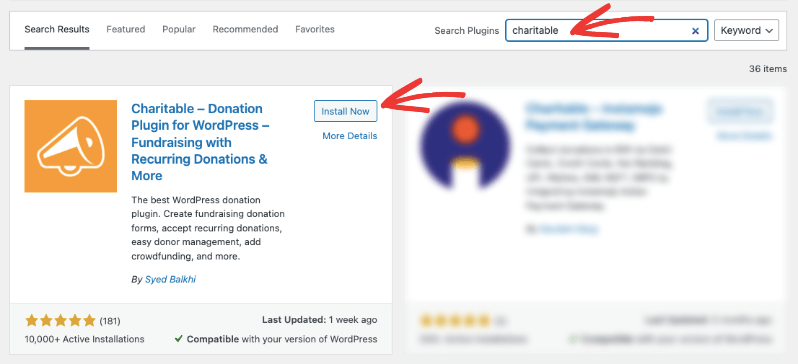
Das war's, Sie sind bereit, Charitable Lite zu verwenden. Keine Lizenz erforderlich.
Nun werfen wir einen Blick darauf, was das Charitable Pro Plugin zu bieten hat.
Das Charitable Pro Plugin (Premium)
Mit dem Charitable Pro Plugin schalten Sie weitere Spendenoptionen und ein vollständiges Spenderverwaltungssystem frei. Es ist darauf ausgelegt, alles zu bewältigen, was eine Fundraising-Website benötigt, von der Annahme von Zahlungen und der Verwaltung von Spendern bis hin zur Ausstellung von Quittungen, dem Verkauf von Event-Tickets und dem Versand von E-Mails.
Zuerst, wenn Sie Kampagnen erstellen, können Sie bestehende duplizieren. Ich liebe diese Funktion, weil sie so viel Zeit spart. Ich richte meine Kampagne einmal mit allen richtigen Einstellungen ein, dupliziere sie dann und ändere den Inhalt nach Bedarf.
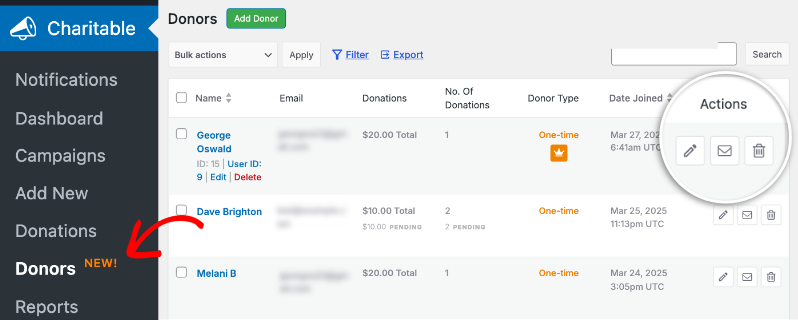
Wenn dann jemand spendet, wird ein Spendenverzeichnis zusammen mit einem neuen Spenderprofil erstellt, das Ihrer Spenderdatenbank hinzugefügt wird.
Darüber hinaus erhalten Sie Funktionen, die Ihnen helfen, mehr zu sammeln, wie z. B. wiederkehrende Spenden und mehr Zahlungs-Gateways. Sie können zum Beispiel sowohl einmalige als auch wiederkehrende Spendenoptionen wie diese anbieten.
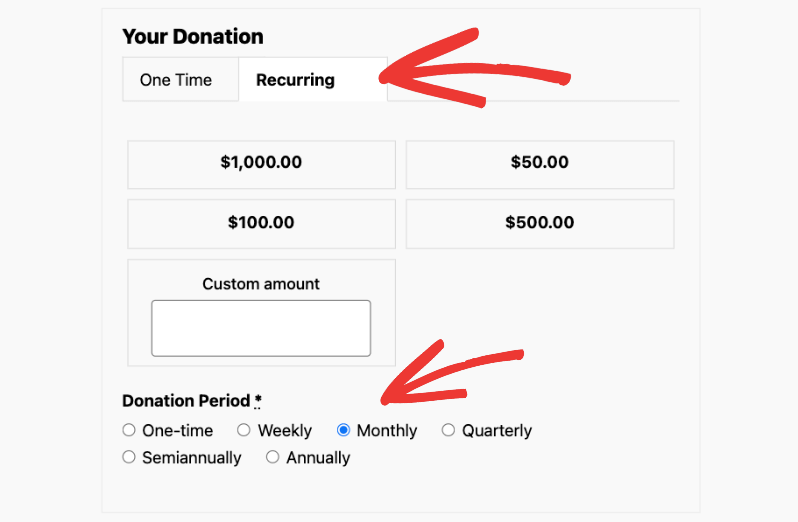
Sie können vorgeschlagene Beträge und Zeiträume für wiederkehrende Spenden hinzufügen. Wenn die Karte eines Spenders abläuft, kann er sie von seinem Dashboard aus aktualisieren, ohne seine wiederkehrende Spende zu stornieren.
Es gibt auch Gebührenübernahme, mit der Spender die Verarbeitungskosten decken können, und Gift Aid für Wohltätigkeitsorganisationen im Vereinigten Königreich.
Das Charitable Pro Plugin bietet Ihnen einen zentralen Ort zur Verwaltung von Spenderbeziehungen mit einer Spenderdatenbank und detaillierten Profilen. Spender erhalten Self-Service-Konten, auf denen sie ihre Spendenhistorie einsehen, ihre wiederkehrenden Spenden ändern und ihre Belege herunterladen können, wann immer sie möchten.
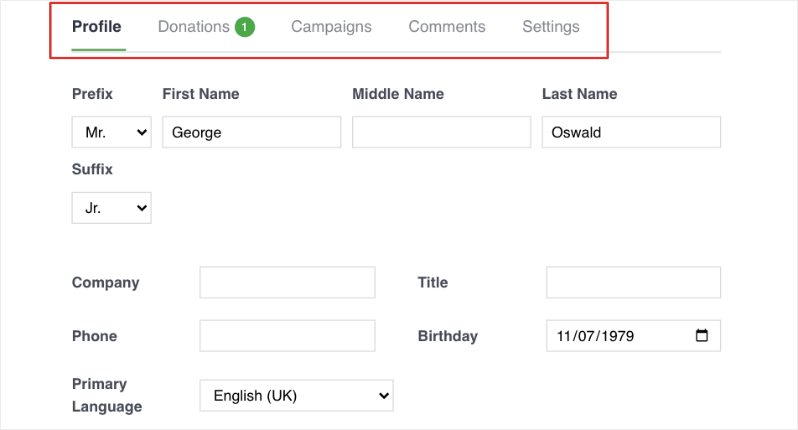
Dies gibt jedem eine professionellere und einfachere Erfahrung.
Es gibt mehr!
Charitable ermöglicht es Ihnen auch, Peer-to-Peer-Spendenkampagnen zu starten und sich mit Ihren E-Mail-Marketing-Tools zu verbinden. Diese Funktionen helfen Ihnen, mehr von Ihrer Community zu erreichen und mehr für Ihre Sache zu sammeln.
Sie erhalten auch bevorzugten Zugang zu unserem Support-Team, wenn Sie es brauchen, damit Ihre Spendenaktionen reibungslos weiterlaufen.
Um das Charitable Pro Plugin zu nutzen, benötigen Sie eine kostenpflichtige Lizenz, die Sie auf der Charitable Preisübersicht erhalten.
Neues im Charitable Pro Plugin
Wir haben kürzlich viel zu den kostenpflichtigen Plänen hinzugefügt, vieles davon basierend auf den Wünschen unserer Kunden. Hier sind einige der neuesten Funktionen.
- Veranstaltungen und Tickets ermöglicht es Ihnen, Veranstaltungstickets innerhalb Ihrer Kampagnen zu verkaufen, mit QR-Check-in an der Tür von jedem Telefon aus.
- Ehrungen ermöglicht es Spendern, zu Ehren oder zum Gedenken an jemanden Besonderen zu spenden.
- Benutzerdefinierte Belege ermöglicht es Ihnen, Ihre eigenen Belegseiten für jede Kampagne zu gestalten.
- Spendenwiederherstellung hilft Ihnen, Spenden zurückzugewinnen, die begonnen, aber nie abgeschlossen wurden.
- Mehrere Währungen ermöglicht es Spendern, in ihrer eigenen Währung zu spenden.
- Conversion-Tracking zeigt Ihnen, welche Anzeigen und Kanäle Spenden einbringen.
- Der Visual Automation Builder ermöglicht es Ihnen, Automatisierungen zu erstellen, indem Sie Schritte per Drag & Drop auf eine Leinwand ziehen, ganz ohne Code.
- Kartenaktualisierungen ermöglichen es wiederkehrenden Spendern, eine abgelaufene Karte zu ersetzen, ohne ihr Abonnement zu verlieren.
- Das aktualisierte Dashboard ermöglicht es Ihnen, zwei beliebige Zeiträume zu vergleichen und Ihre Zusammenfassung als CSV oder PDF zu exportieren.
Was ist im Charitable Pro Plugin enthalten?
Hier ist ein Einblick, was Sie mit dem Charitable Pro Plugin erhalten können.
- Wiederkehrende Spenden mit benutzerdefinierten Spendenintervallen
- 10 weitere Zahlungs-Gateways, plus Gebührenübernahme
- Eine Spenderdatenbank mit Spenderprofilen und Self-Service-Konten
- Peer-to-Peer-Spendenaktionen, Botschafter und Spenderteams
- Veranstaltungen und Tickets
- E-Mail-Marketing-Integrationen, einschließlich Mailchimp, ActiveCampaign und Brevo
- Benutzerdefinierte Spendenformulare mit erweiterten Feldern
- Automatisierte PDF-Belege, Jahresbelege und benutzerdefinierte Belege
- Ehrungen für Geschenke zu Ehren oder zum Gedenken an jemanden
- Gift Aid für britische Wohltätigkeitsorganisationen
- Anonyme Spenden
- Anpassbare E-Mail-Vorlagen
- Erweiterte Berichte und Analysen, einschließlich Google Analytics und Conversion-Tracking
- Spendenrückgewinnung und Multi-Währung
- Automatisierungen mit dem visuellen Automatisierungs-Builder, Zapier und Webhooks
- Weitere KI-Assistenten-Tools, wie Spenderdatensätze und Bearbeitung von Spendenformularen
- Importeure für GiveWP, Donorbox und Givebutter
- Bevorzugter Support und regelmäßige Updates
Hier geht es zur vollständigen Funktionsliste »
Das ist eine lange Liste, aber nicht alles. Sehen wir uns an, für wen das Charitable Pro Plugin am besten geeignet ist.
Wer sollte das Charitable Pro Plugin verwenden?
Das Charitable Pro Plugin ist die richtige Wahl, wenn eine dieser Aussagen auf Sie zutrifft.
- Ihre gemeinnützige Organisation wächst und benötigt mehr als die grundlegenden Spendentools.
- Sie möchten, dass Unterstützer in Ihrem Namen durch Peer-to-Peer-Kampagnen Spenden sammeln.
- Sie benötigen eine Spenderdatenbank und detaillierte Berichte.
- Sie wünschen sich wiederkehrende Spenden und weitere Zahlungs-Gateways.
- Sie verkaufen Tickets für Galas, Läufe oder andere Spendenveranstaltungen.
- Sie möchten Spendern ein professionelles Erlebnis mit Self-Service-Konten bieten.
- Sie sind eine britische Wohltätigkeitsorganisation, die Gift Aid benötigt.
- Sie wechseln von GiveWP, Donorbox oder Givebutter und möchten Ihre Daten mitnehmen.
- Sie benötigen Prioritätsunterstützung und regelmäßige Updates.
Wenn Sie Ihre Organisation in einer dieser Kategorien wiederfinden, könnte ein Upgrade einen großen Unterschied für Ihre Spendenaktionen machen.
Lassen Sie uns nun die Kosten der kostenpflichtigen Pläne betrachten, um zu sehen, ob einer davon in Ihr Budget passt.
Wie viel kostet das Charitable Pro Plugin?
Das Charitable Pro Plugin benötigt eine kostenpflichtige Lizenz. Besuchen Sie die Charitable Preisgestaltungsseite, um die verfügbaren Pläne anzuzeigen.
Es stehen 4 Pläne zur Auswahl.
- Basis
- Plus
- Profi
- Elite
Bei jedem kostenpflichtigen Plan erhebt Charitable keinen Anteil an Ihren Spenden. Sie zahlen die jährliche Lizenz, und die Verarbeitungsgebühr Ihres Zahlungs-Gateways geht direkt an dieses. Jeder Plan beinhaltet außerdem eine 14-tägige Geld-zurück-Garantie.
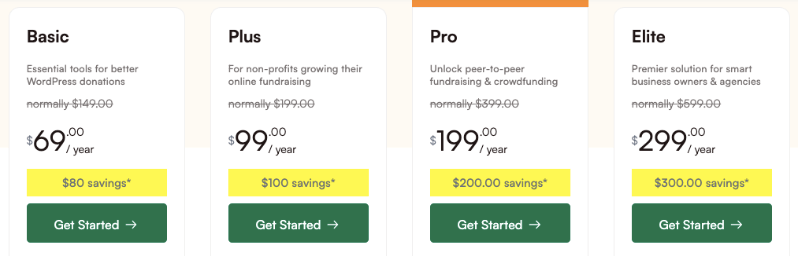
Werfen wir einen detaillierten Blick auf diese Pläne.
Basic (69 $/Jahr)
Der Basic-Plan ist perfekt für kleine gemeinnützige Organisationen, die bereit sind, über die kostenlose Version hinauszugehen, aber noch keine wiederkehrenden Spenden benötigen. Er bietet Ihnen benutzerdefinierte Formulare, PDF-Belege, ein Spender-Dashboard und weitere Zahlungs-Gateways.
Es ist eine gute Wahl für lokale Wohltätigkeitsorganisationen, religiöse Organisationen und Gemeindegruppen mit einfachen Spendenanforderungen.
Sie erhalten diese Funktionen.
- Eine Lizenz für eine Website
- Wesentliche Spendenfunktionen
- Benutzerdefinierte Spendenformulare
- Vollständiges Spendenmanagement
- PDF-Belege und -Berichte
- Spender-Dashboard und Spender-Ranglisten
- Spender-Updates
- Stripe, Square, PayPal, Authorize.net und 7 weitere Zahlungs-Gateways
- Der Donorbox-Importer
- Standard-Support
Plus (99 $/Jahr)
Der Plus-Tarif ist für wachsende gemeinnützige Organisationen konzipiert, die durch wiederkehrende Spenden eine stetige Finanzierung wünschen. Er ist auch der richtige Tarif für Sie, wenn Sie E-Mail-Marketing nutzen oder möchten, dass Spender die Verarbeitungskosten mit Gebührenentlastung übernehmen.
Wenn Sie eine britische Wohltätigkeitsorganisation sind, die Gift Aid benötigt, deckt dieser Tarif auch das ab.
Sie erhalten alle Funktionen des Basic-Tarifs plus diese.
- Erweiterte Fundraising-Tools
- Wiederkehrende Spenden mit Kartenaktualisierungen
- Gebührenermäßigung
- Gift Aid-Unterstützung
- Jährliche und benutzerdefinierte Spendenquittungen
- Tribute
- Anonyme Spenden
- DonorTrust
- E-Mail-Marketing-Integrationen (Mailchimp, ActiveCampaign, Brevo und mehr)
Pro (199 $/Jahr)
Der Pro-Tarif ist für gemeinnützige Organisationen gedacht, die möchten, dass ihre Community ihnen beim Fundraising hilft. Es ist die richtige Wahl, wenn Sie Peer-to-Peer-Kampagnen, Botschafterprogramme, Ticketveranstaltungen oder Crowdfunding-Kampagnen planen.
Es ist auch der Tarif für Organisationen, die ihre Arbeit automatisieren und verfolgen möchten, woher ihre Spenden stammen.
Zusätzlich zu allen Funktionen der anderen Tarife erhalten Sie auch diese.
- Peer-to-Peer-Fundraising
- Crowdfunding
- Botschafter und Spenderteams
- Veranstaltungen und Tickets
- Spendenwiederherstellung
- Mehrere Währungen
- Conversion-Tracking und Google Analytics
- Kampagnen-Updates
- Stripe Connect und Razorpay
- Automatisierungstools (Smart Workflows mit dem Visual Automation Builder, Zapier, Webhooks, Zoho Flow und Uncanny Automator)
- Prioritäts-Support
Elite (299 $/Jahr)
Der Elite-Tarif ist für Agenturen und größere Organisationen gedacht, die mehrere WordPress-Websites verwalten. Wenn Sie Spenden auf mehr als einer Website verwalten oder Kunden-Websites betreuen, bietet dieser Tarif 5 Website-Lizenzen.
Webentwickler, Agenturen und Organisationen mit mehreren Zweigstellen oder Standorten werden die Multisite-Unterstützung und die Kundenverwaltung besonders nützlich finden.
Sie erhalten alles aus Pro sowie diese zusätzlichen Funktionen.
- 5 Website-Lizenzen
- Multisite-Support
- Kundenverwaltung
- Premium-Support
Sind Sie bereit, das Charitable Pro Plugin zu erhalten? Sehen Sie unten, wie das geht.
So erhalten Sie das Charitable Pro Plugin?
Um loszulegen, gehen Sie zur Charitable Preisübersicht. Hier finden Sie die Details zu jedem Tarif, damit Sie den auswählen können, der Ihren Fundraising-Bedürfnissen entspricht. Wenn Sie bereit sind, klicken Sie auf „Loslegen“, um Ihren Tarif zu kaufen.
Nach Ihrem Kauf erhalten Sie sofortigen Zugriff auf Ihr neues Charitable-Konto. Sie werden es für folgende Aufgaben verwenden.
- Herunterladen von Plugins
- Verwalten von Lizenzschlüsseln
- Zugriff auf Belege
- Kundensupport erhalten
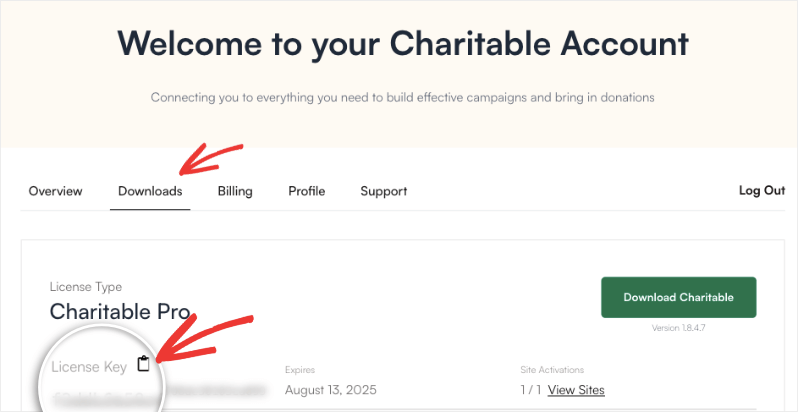
Öffnen Sie den Tab Downloads in Ihrem Konto und klicken Sie auf die Schaltfläche Charitable herunterladen, um die Plugin-Datei herunterzuladen. Dort finden Sie auch Ihren Lizenzschlüssel. Klicken Sie einfach auf das Clipboardsymbol, um ihn zu kopieren, und halten Sie ihn für den letzten Schritt bereit.
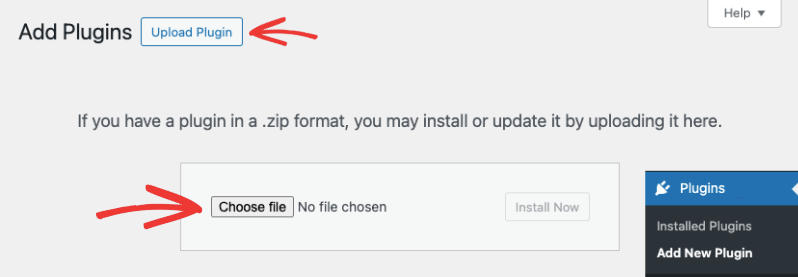
Melden Sie sich jetzt bei Ihrer WordPress-Website an und gehen Sie zu Plugins » Neues Plugin hinzufügen » Plugin hochladen. Wählen Sie die heruntergeladene Datei aus, laden Sie sie dann hoch, installieren und aktivieren Sie sie.
Gehen Sie als Nächstes zu Charitable » Einstellungen, fügen Sie Ihren Lizenzschlüssel ein und klicken Sie auf die Schaltfläche Schlüssel überprüfen.
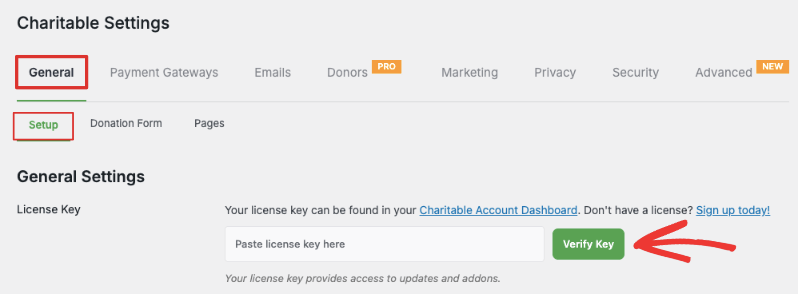
Die kostenpflichtige Version ist jetzt installiert und einsatzbereit. Für detailliertere Anweisungen folgen Sie unserer Anleitung So rüsten Sie auf Charitable Pro um.
Verwenden Sie KI-Assistenten mit Charitable über WPVibe
Charitable funktioniert jetzt mit KI-Assistenten wie Claude und ChatGPT. Sie beschreiben, was Sie möchten, in einfacher Sprache, und Ihr Assistent erledigt die Arbeit für Sie innerhalb von Charitable.
Sie können ihn zum Beispiel bitten, „eine Spendenaktion für das Tierheim mit einem Ziel von 5.000 US-Dollar einzurichten“, und er erstellt einen Entwurf einer Kampagne mit vorgeschlagenen Spendenbeträgen.
Ihr Assistent verbindet sich mit Ihrer Website über WPVibe, ein kostenloses Tool, das sofort mit Charitable funktioniert. Die Einrichtung dauert etwa 10 Minuten und Sie führen sie nur einmal durch.
Dies funktioniert sowohl mit Charitable Lite als auch mit den kostenpflichtigen Plänen. Bei Lite kann Ihr Assistent Kampagnen erstellen und aktualisieren, deren Status ändern und Offline-Spenden erfassen.
Das Plugin Charitable Pro fügt mehr hinzu. Ihr Assistent kann auch Spenderdatensätze und Spendenhistorien abrufen, Spendenformulare bearbeiten und Berichte über Kundenbindung und wiederkehrende Spenden erstellen.
Sie behalten jederzeit die Kontrolle. Ihr Assistent kann Ihre Daten nur lesen, bis Sie den Schreibzugriff aktivieren, und jede von ihm vorgenommene Änderung wird protokolliert. Sie benötigen WordPress 6.9 oder neuer. Sehen Sie sich unsere Charitable KI-Einrichtungsanleitung an, um loszulegen.
Wechsel zu Charitable von GiveWP, Donorbox oder Givebutter
Wenn Sie bereits mit einem anderen Tool Geld sammeln, müssen Sie nicht von vorne anfangen. Charitable bietet einfache Migrationen von beliebten Fundraising-Plattformen, sodass Sie Ihre Spender und Ihre Spendenhistorie mitnehmen können.
Umzug von GiveWP
Wenn GiveWP auf Ihrer Website aktiv ist, verschiebt das Import-Tool von Charitable Ihre Kampagnen, Spenden und Spender mit wenigen Klicks. Unsere Anleitung zur Migration von GiveWP zu Charitable führt Sie durch den Prozess.
Machen Sie es lieber nicht selbst? Wir bieten einen kostenlosen White Glove Migration Service für GiveWP-Benutzer an. Unser Team verschiebt Ihre Spenderdatensätze, Spendenhistorie und wiederkehrenden Spendenpläne für Sie, und Sie behalten das Zahlungsgateway, das Sie bereits verwenden.
Wechseln Sie von GiveWP? Wir verschieben alles für Sie.
Machen Sie sich Sorgen, Daten zu verlieren oder dass es zu viel Zeit in Anspruch nimmt? Unser Team kümmert sich darum. Lehnen Sie sich zurück und entspannen Sie sich.
Mit unserem White-Glove-Migrationsservice verschieben wir Ihre Spender, Spenden und Kampagnen in Charitable. Sie arbeiten weiter an Ihrer Mission, während wir uns um den technischen Teil kümmern.
Qualifizierte GiveWP-Kunden können auch ihr erstes Jahr des Charitable Pro-Plugins kostenlos erhalten. Prüfen Sie, ob Sie berechtigt sind »
Qualifizierte GiveWP-Kunden können auch das erste Jahr des Charitable Pro-Plugins kostenlos erhalten. Sie können auf der White Glove Migration-Seite prüfen, ob Sie berechtigt sind.
Umzug von Donorbox
Der Donorbox Importer liest die CSV-Dateien, die Sie aus Donorbox exportieren. Er übernimmt Ihre Spender, Kampagnen und Spendenhistorie und behält eine Aufzeichnung Ihrer wiederkehrenden Pläne.
Bevor etwas gespeichert wird, können Sie einen Testimport durchführen, der genau anzeigt, wie viele Datensätze gefunden wurden. Der Donorbox Importer ist in jedem kostenpflichtigen Plan enthalten.
Umzug von Givebutter
Charitable verfügt über einen Givebutter-Import-Tab, sodass Sie Ihre Givebutter-Exporte hochladen und Ihre Spenden und Spender importieren können. Unser Leitfaden zum Wechsel von Givebutter zu Charitable zeigt jeden Schritt.
Kommen Sie von woanders? Das CSV-Spender-Import-Tool importiert Spender von jeder Plattform oder Tabelle, die eine CSV-Datei exportieren kann.
Schneller Vergleich von Charitable Lite und Pro
Hier ist eine Tabelle, die Ihnen die Unterschiede zwischen Lite und den kostenpflichtigen Plänen leicht verständlich macht.
| Funktion | Leicht | Kostenpflichtige Pläne |
|---|---|---|
| Kernfunktionen | ||
| Unbegrenzte Kampagnen | ✓ | ✓ |
| Spendenformulare | ✓ | ✓ |
| Vorgeschlagene und benutzerdefinierte Beträge | ✓ | ✓ |
| Spendenaufzeichnungen hinzufügen, bearbeiten und löschen | ✓ | ✓ |
| Einfache Berichte | ✓ | ✓ |
| Zahlungsabwicklung | ||
| Stripe, Square und PayPal | ✓ | ✓ |
| Offline-Spenden | ✓ | ✓ |
| Zusätzliche Zahlungs-Gateways | ✖ | ✓ |
| Wiederkehrende Spenden | ✖ | ✓ |
| Gebührenermäßigung | ✖ | ✓ |
| Spendenquittung (UK) | ✖ | ✓ |
| Mehrere Währungen | ✖ | ✓ |
| Formularfunktionen | ||
| Benutzerdefinierte Felder | ✖ | ✓ |
| Modalformulare | ✖ | ✓ |
| Tribute | ✖ | ✓ |
| Spenderverwaltung | ||
| Spenderdatenbank und -profile | ✖ | ✓ |
| Spender-Dashboard | ✖ | ✓ |
| PDF-, Jahres- und benutzerdefinierte Spendenquittungen | ✖ | ✓ |
| Spendenwiederherstellung | ✖ | ✓ |
| Fortgeschrittene Funktionen | ||
| Peer-to-Peer-Fundraising | ✖ | ✓ |
| Crowdfunding | ✖ | ✓ |
| Veranstaltungen und Tickets | ✖ | ✓ |
| E-Mail-Marketing-Integration | ✖ | ✓ |
| Visueller Automatisierungs-Builder | ✖ | ✓ |
| KI und Migration | ||
| KI-Assistenten über WPVibe (Kampagnen und Offline-Spenden) | ✓ | ✓ |
| KI-Assistenten für Spenderdatensätze, Formulare und Berichte | ✖ | ✓ |
| Spender-Importeur | ✖ | ✓ |
| White Glove-Migration von GiveWP | ✖ | ✓ |
| Support | ||
| Forum-Support | ✓ | ✓ |
| Prioritäts-Support | ✖ | ✓ |
Ihre Entscheidung: Charitable Lite oder Pro?
Die Wahl zwischen Charitable Lite und den kostenpflichtigen Plänen hängt von den Bedürfnissen Ihrer Organisation und Ihrem Wachstumstempo ab.
Bleiben Sie bei Charitable Lite, wenn Sie diese Kriterien erfüllen.
- Sie beginnen gerade erst mit der Online-Spendenwerbung.
- Ihre Spendenbedürfnisse sind einfach.
- Sie benötigen nur Stripe, Square, PayPal und Offline-Zahlungen.
- Sie sind mit einfachen Spendenaufzeichnungen zufrieden.
- Sie haben ein begrenztes Budget für Fundraising-Tools.
Upgrade auf das Charitable Pro-Plugin, wenn Sie diese Kriterien erfüllen.
- Sie möchten wiederkehrende Spenden einrichten.
- Ihre Organisation wächst.
- Sie benötigen Peer-to-Peer-Fundraising.
- Sie möchten Tickets für Ihre Veranstaltungen verkaufen.
- Eine Spenderdatenbank hat Priorität.
- Sie benötigen mehr Zahlungs-Gateway-Optionen.
- E-Mail-Marketing-Integration ist Ihnen wichtig.
- Sie benötigen Unterstützung für UK Gift Aid.
- Sie wechseln von GiveWP, Donorbox oder Givebutter.
- Prioritätsunterstützung ist Ihnen wichtig.
Berücksichtigen Sie Ihre Wachstumspläne
Denken Sie darüber nach, wo Ihre Organisation nächstes Jahr stehen wird. Wenn Sie planen, Ihre Spendenaktionen auszubauen, schaffen Sie mit einem kostenpflichtigen Plan jetzt eine stärkere Grundlage. Denken Sie daran, Sie können immer mit dem Basic-Plan beginnen und ein Upgrade durchführen, wenn sich Ihre Anforderungen ändern.
Ein kostenpflichtiger Plan kann seine Kosten schnell durch mehr Spenden, Spender, die weiterhin spenden, und weniger Zeitaufwand für die Verwaltung decken. Und mit der 14-tägigen Geld-zurück-Garantie können Sie es ohne Risiko ausprobieren.
Bereit, mit dem Charitable Pro Plugin zu beginnen?







Hinterlassen Sie eine Antwort