Requiere:
- Pro Benéfico 1.8.15+
- Actualizaciones de Campaña de Charitable 1.0.8+
Actualizaciones de Campaña te permite publicar posts de progreso para cualquier campaña, mostrarlos en la página de la campaña (o en cualquier página) y enviar correos electrónicos a los donantes que aceptaron. Tres tipos de actualización (general, hito, urgente), un marcador "destacado" por campaña y un enlace de cancelación de suscripción por campaña en cada correo electrónico para que la higiene de la lista se cuide sola.
Cuándo usarlo
- Quieres que los donantes vean que la campaña avanza después de que donan, no solo en los agradecimientos de fin de campaña.
- Estás ejecutando una campaña de varias semanas o meses y necesitas una forma de mostrar hitos y solicitudes urgentes (regalo de contrapartida que expira, objetivo de ampliación de emergencia).
- Quieres una audiencia suscrita por campaña en lugar de una lista general del sitio que incluya a todos.
Cómo encontrarlo
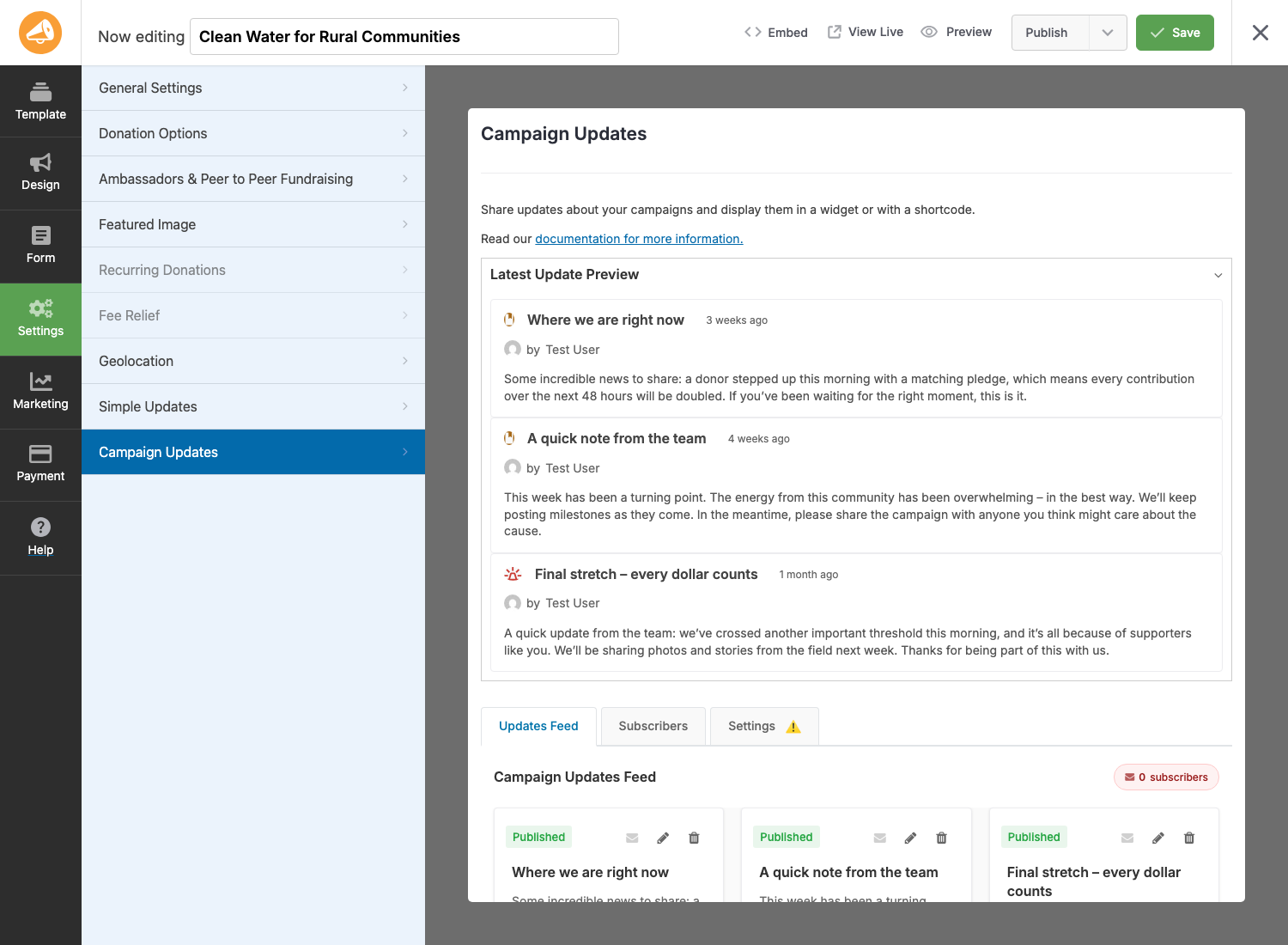
Toda la función se encuentra dentro del Constructor de Campañas. Abre cualquier campaña y mira en la barra lateral izquierda:
Administrador de WordPress > Campañas > [tu campaña] > Constructor de Campañas > Actualizaciones de Campaña
El panel tiene tres subpestañas en la parte inferior:
- Feed de Actualizaciones — el predeterminado. Vista previa de la última actualización más el feed completo de tarjetas de actualización (añadir, editar, eliminar, enviar).
- Suscriptores — donantes que aceptaron recibir actualizaciones por correo electrónico para esta campaña, más el historial de envíos de correos electrónicos.
- Configuración — la activación/desactivación por campaña, el límite de contenido y el comportamiento del correo electrónico.
El panorama general
Hay tres partes móviles que trabajan juntas:
| Parte | ¿Dónde se encuentra? | Lo que hace |
|---|---|---|
| El feed de actualizaciones | Constructor de Campañas > Actualizaciones de Campaña > Feed de Actualizaciones | La lista de actualizaciones para una campaña. Añadir, editar, eliminar, enviar. |
| La aceptación del donante | Formulario de donación, cuando el consentimiento del contacto está habilitado | Una casilla de verificación "Quiero recibir actualizaciones" junto a la casilla de consentimiento en el momento de la donación. |
| La visualización | Página de campaña (a través del campo Constructor de Campañas o bloque Gutenberg) | La lista pública que los donantes y visitantes ven en la página de la campaña. |
Una campaña necesita las tres activadas para ofrecer la experiencia completa: publicas una actualización, los donantes que aceptaron reciben un correo electrónico y los visitantes que llegan a la página de la campaña ven la actualización mostrada allí.
Configuración paso a paso
La primera vez que configuras esto para una campaña:
- Actívala para la campaña. Abre Constructor de Campañas > Actualizaciones de Campaña > Configuración. Cambia Habilitar Actualizaciones de Campaña a Activado. Este es el interruptor principal para todo lo demás en esta campaña.
- Verifica que la ruta de aceptación exista. Ve a Charitable > Configuración > Privacidad y confirma que el Consentimiento del contacto está activado. La casilla de aceptación de Actualizaciones de Campaña se apoya en esto; sin ella, la casilla no puede renderizarse en el formulario de donación. (La pestaña Configuración te advertirá si falta alguno de estos prerrequisitos).
- Añade el campo Actualizaciones de Campaña al diseño de la campaña. Abre Constructor de Campañas > Diseño > Añadir Campos y arrastra Actualizaciones de Campaña donde quieras que se muestren las actualizaciones en la página de la campaña. Para campañas basadas en Gutenberg o páginas que no sean de campaña, usa en su lugar el bloque Actualizaciones de Campaña.
- Confirme que el correo electrónico está habilitado. Vaya a Benéfico > Ajustes > Correos electrónicos y asegúrese de que Actualización de campaña esté habilitado. La pestaña Ajustes también lo indicará si falta.
- Publique su primera actualización. De vuelta en Constructor de campañas > Actualizaciones de campaña > Feed de actualizaciones, haga clic en Añadir primera actualización. Consulte Creación de actualizaciones para ver el tutorial completo del modal.
Después del paso 5, su formulario de donación mostrará la casilla de verificación de suscripción, su página de campaña mostrará la actualización y (dependiendo de su modo de envío) el correo electrónico puede enviarse automáticamente o esperar a que usted lo envíe.
Pestaña de Ajustes
Cada campaña tiene sus propios ajustes en Constructor de campañas > Actualizaciones de campaña > Ajustes:
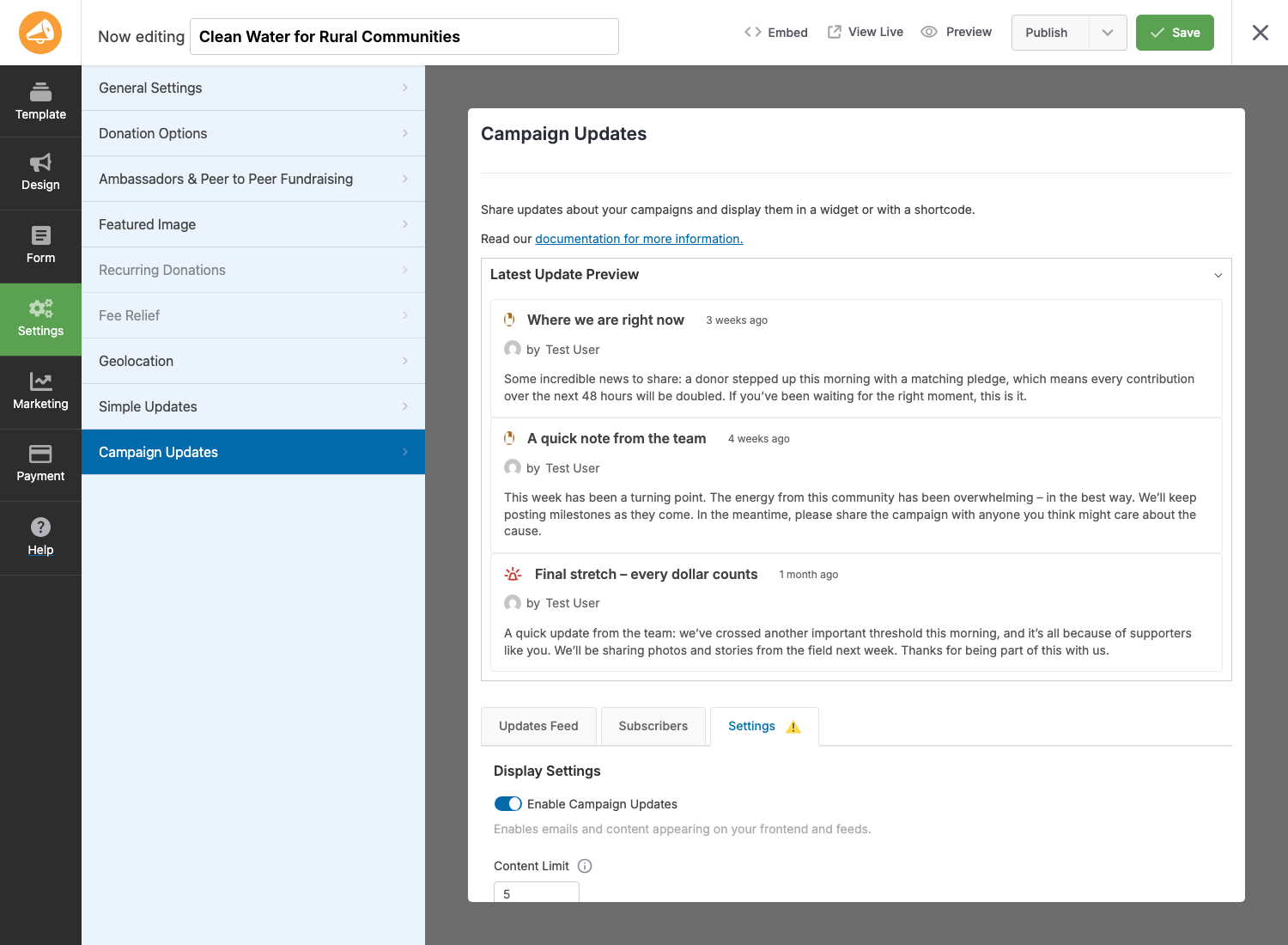
Configuración de pantalla
| Configuración | Lo que hace |
|---|---|
| Habilitar actualizaciones de campaña | Interruptor principal para esta campaña. Desactivado significa: sin casilla de suscripción, sin envío de correos electrónicos, sin actualizaciones mostradas en el frontend. |
| Límite de contenido | Número máximo de actualizaciones que el campo/bloque debe mostrar por defecto. Cada instancia del campo Actualizaciones de campaña puede anular esto. Establézcalo en 0 para no tener límite. |
Notificaciones por Correo Electrónico
| Configuración | Lo que hace |
|---|---|
| Habilitar correos electrónicos de actualización | Permite el envío de correos electrónicos de actualización para esta campaña. También requiere que el correo electrónico de Actualización de campaña esté habilitado en la configuración global de correos electrónicos de Charitable. |
| Envío automático de correos electrónicos | Tres modos: Solo manual (usted hace clic en "enviar" por actualización), Automático para actualizaciones destacadas (publicar una actualización destacada se envía automáticamente), Automático para todas las actualizaciones (cada actualización publicada se envía automáticamente). |
| Longitud del contenido del correo electrónico | Número de caracteres del cuerpo de la actualización a incluir en el correo electrónico. 0 significa contenido completo. Útil para mantener los correos electrónicos escaneables. |
La pestaña Ajustes muestra banners de advertencia amarillos si detecta alguno de los siguientes:
- El correo electrónico de Actualización de campaña está deshabilitado en la configuración de correos electrónicos de Charitable.
- El consentimiento de contacto está desactivado en los ajustes de Privacidad.
- El formulario de la campaña no tiene campo de privacidad/consentimiento (por lo que los nuevos donantes no pueden suscribirse).
Solucione lo que señalan las advertencias antes de empezar a publicar actualizaciones, o los nuevos donantes no podrán suscribirse.
Consejos
- Una actualización destacada a la vez. Marcar una segunda actualización como destacada desmarca automáticamente la anterior. Úselo para "esto es lo único que necesita saber ahora mismo".
- Los borradores no envían correos. Guardar como borrador es seguro: los borradores son invisibles para los donantes y nunca activan envíos, incluso en modos de envío automático. Use borradores para redactar actualizaciones antes de que se publiquen.
- Pruebe antes de enviar. El modal de envío tiene un enlace "Enviar correo electrónico de prueba" que se envía al usuario actualmente conectado. Envíese siempre una prueba a usted mismo antes de enviarla a la lista real.
- La exclusión voluntaria del donante es por campaña. Que un donante se dé de baja de su campaña de gala no lo da de baja de su campaña de rescate de animales. El enlace de cancelación de suscripción tiene el ámbito de la campaña.
- La re-suscripción es automática en nuevas donaciones. Si un donante se da de baja y luego realiza una nueva donación a la misma campaña con la opción de suscripción marcada, vuelve a estar en la lista. No se necesita limpieza manual.
Referencia del desarrollador
Filtros
Estos son los filtros de alto tr uevo m uevo00e1s propensos a aparecer en el trabajo de personalizaci uevo00f3n. Consulte Hooks y Filtros para ver el inventario completo.
| Filtro | Predeterminado | Propósito |
|---|---|---|
actualizaciones_campaña_caridad_predeterminado_marcado |
false |
Si la casilla de opt-in del formulario de donaci uevo00f3n est uevo00e1 preseleccionada. |
Etiqueta de consentimiento para actualizaciones de campañas benéficas |
"Quiero recibir actualizaciones sobre el progreso de esta campa
uevo00f1a." |
La etiqueta de la casilla de opt-in. |
actualizaciones_campaña_caridad_requerir_consentimiento_contacto |
verdadero |
Si la casilla de opt-in est uevo00e1 deshabilitada hasta que se marque el consentimiento de contacto. |
Tipos de actualización de campañas benéficas |
(array) | La lista de tipos de actualizaci uevo00f3n ewo2014 general, hito, urgente ewo2014 y sus etiquetas, iconos y colores. |
Límite de contenido de las actualizaciones de campañas benéficas |
(int) | L uevo00edmite de contenido predeterminado por campa uevo00f1a. |
campaña_caridad_puede_usuario_gestionar_actualizaciones |
verdadero |
Si el usuario actual puede agregar/editar/eliminar actualizaciones para una campa uevo00f1a. |
Acciones
| Acción | Cu uevo00e1ndo se ejecuta |
|---|---|
Actualizaciones de campañas benéficas guardadas |
Despu uevo00e9s de que los metadatos de una actualizaci uevo00f3n se guardan desde el administrador (post_id, post). |
Constructor de actualizaciones de campañas benéficas cargado |
Cuando el panel de Actualizaciones de Campa uevo00f1a del Creador de Campa uevo00f1as termina de cargarse. |
Actualizaciones de campañas benéficas activadas |
En la activaci uevo00f3n del plugin. |
Actualizaciones de campañas benéficas instaladas |
Despu uevo00e9s de la instalaci uevo00f3n del plugin (se pasa la cadena de versi uevo00f3n). |
Funciones auxiliares y tipo de publicaci uevo00f3n
| Símbolo | Propósito |
|---|---|
obtener_tipos_actualización_campaña_caridad() |
Devuelve la matriz de tipos de actualizaci
uevo00f3n registrados. Aplique el filtro charitable_campaign_update_types para agregar/modificar tipos. |
Tipo de publicaci
uevo00f3n: campaign_update |
Cada actualización es una publicación campaign_update con los metadatos _campaign_id, _update_type, _featured y (para urgentes) _urgency_level. |
Puerta de capacidad
El acceso de edición se otorga por defecto a cualquiera que pueda editar la campaña. Anula el filtro charitable_can_user_manage_campaign_updates para restringir (por ejemplo, solo al autor de la campaña):
add_filter( 'charitable_can_user_manage_campaign_updates', function( $can, $campaign_id ) {
    if ( ! $can ) {
        return $can;
    }
    $campaign = get_post( $campaign_id );
    return $campaign && (int) $campaign->post_author === get_current_user_id();
}, 10, 2 );
Ejemplos de personalización
Preselecciona la casilla de verificación de consentimiento para donantes primerizos:
add_filter( 'charitable_campaign_updates_default_checked', '__return_true' );
Cambia la etiqueta de consentimiento a algo específico de la campaña:
add_filter( 'charitable_campaign_updates_consent_label', function( $label ) {
    return 'Email me updates about this campaign. We send roughly one per month.';
} );
Añade un cuarto tipo de actualización ("inspiración") para compartir historias de donantes:
add_filter( 'charitable_campaign_update_types', function( $types ) {
    $types['inspiration'] = array(
        'label'       => __( 'Inspiration', 'your-textdomain' ),
        'description' => __( 'Stories and quotes from donors and beneficiaries.', 'your-textdomain' ),
        'icon'        => 'fa-heart',
        'color'       => '#9333ea',
    );
    return $types;
} );
Anula el límite global de contenido por campaña a 10:
add_filter( 'charitable_campaign_updates_content_limit', function( $limit, $campaign_id ) {
    return 10;
}, 10, 2 );
Relacionado
- Creación de actualizaciones – El modal de añadir/editar, tipos de actualización, fijación destacada, borrador vs. publicación.
- Notificaciones por correo electrónico – Consentimiento del donante, envío manual y automático, cancelación y reactivación de la suscripción.
- Campo del Creador de Campañas – El campo de arrastrar y soltar para mostrar actualizaciones dentro del diseño del Creador de Campañas.
- Bloque de Actualizaciones de Campaña – El bloque de Gutenberg, shortcode y función PHP para mostrar actualizaciones en cualquier lugar del sitio.
- Hooks y filtros – Referencia completa para desarrolladores.